How to update title of plugin
-
I am working on a plugin where I need to update the title of the plugin based on the selected document.
How this can be done.
tTbData tbData;

tbData.uMask = DWS_DF_CONT_BOTTOM | DWS_ADDINFO;
tbData.pszName = TEXT("pszName");
tbData.pszAddInfo = TEXT("pszAddInfo");
tbData.dlgID = 0;
tbData.iPrevCont = -1;

SendMessage(_hParent, NPPM_DMMREGASDCKDLG, 0, (LPARAM)&tbData);
A referenced bug: https://github.com/notepad-plus-plus/notepad-plus-plus/issues/2389
I know that
NPPM_DMMUPDATEDISPINFOaccepts the handle instead oftTbData. Hence, this bug might have been marked invalid.Is there any way to update the title?
-
AFAIK
NPPM_DMMUPDATEDISPINFOis only for updating thetbData.pszAddInfofield, i.e., the text in the title bar of the dialog, e.g.:1. before sending
NPPM_DMMUPDATEDISPINFO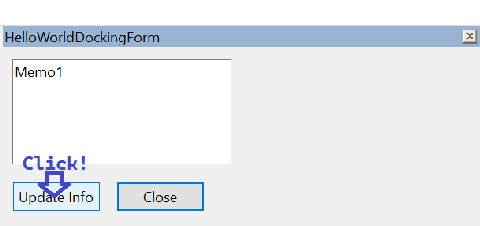
2. after sending
NPPM_DMMUPDATEDISPINFO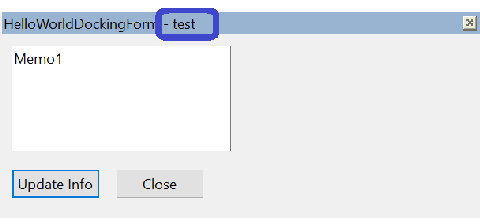
That may not be what you want. If you’re talking about the
Pluginsmenu on the main application’s tool bar, tryNPPM_GETMENUHANDLEinstead: https://npp-user-manual.org/docs/plugin-communication/#2049nppm_getmenuhandle -
@rdipardo this is what I wanted. Thanks!
I wanted to change the title of plugin based on the filename.
e.g.Json Viewer Panel - new 1toJson Viewer Panel - new 2when user switches fromnew 1tonew 2Adding
tbData.pszAddInfoworks. However, I does not have control over delimiter. E.g. changing-to:or something else. But I am ok with-to as well. -
@SinghRajenM said in How to update title of plugin:
Adding
tbData.pszAddInfoworks. However, I does not have control over delimiter.Gotcha. As you said above, the
LPARAMmust be a handle to the docking dialog. An example involving an instance ofStaticDialogshows_hselfbeing passed.The
-separator is indeed fixed. It is only drawn whenpszAddInfois notNULL, but I don’t know of any public method for customizing it. -
The - separator is indeed fixed.
Yes, it is fixed as we can see it here. Also, it seems we need to ensure
tbData.pszAddInforemains valid. If you want to change anything there, update the text on the original pointer.I feel, instead passing
_hselftoLPARAM, it should passtTbDatatoNPPM_DMMUPDATEDISPINFO.Anyway,
-is very minor stuff here. I am good with it. Thanks for the help on this.
Cheers!


Hello! It looks like you're interested in this conversation, but you don't have an account yet.
Getting fed up of having to scroll through the same posts each visit? When you register for an account, you'll always come back to exactly where you were before, and choose to be notified of new replies (either via email, or push notification). You'll also be able to save bookmarks and upvote posts to show your appreciation to other community members.
With your input, this post could be even better 💗
Register Login