Does NPP have selective line editing?
-
I’m trying to replace my text editor (Kedit). This old text editor (legacy mainframe editor was the Xedit) has selective editing. After several updates I’m wondering if NPP now has selective line editing.
Something like this… issuing the ‘all [target]’ enables selective editing of the target lines eg.
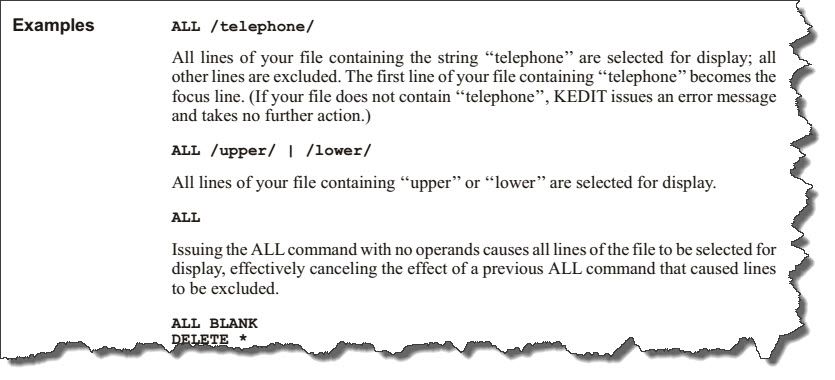
-
Short answer: No.
If Notepad++ had a robust hide-lines/show-lines capability (it has a rudimentary one, complete with bugs), then something like you describe could be implemented as a script (because Notepad++ has a very robust scripting plugin), but…alas…
If you want to experiment, the best Notepad++ has to offer is on the View menu; see Hide Lines.
-
@Alan-Kilborn said in Does NPP have selective line editing?:
Short answer: No.
If Notepad++ had a robust hide-lines/show-lines capability (it has a rudimentary one, complete with bugs), then something like you describe could be implemented as a script (because Notepad++ has a very robust scripting plugin), but…alas…
If you want to experiment, the best Notepad++ has to offer is on the View menu; see Hide Lines.
I’ll experiment. I’m hoping I can selectively view and edit comments made in the code using npp. Thank you.
-
@Alan-Kilborn said in Does NPP have selective line editing?:
Short answer: No.
If Notepad++ had a robust hide-lines/show-lines capability (it has a rudimentary one, complete with bugs), then something like you describe could be implemented as a script (because Notepad++ has a very robust scripting plugin), but…alas…
If you want to experiment, the best Notepad++ has to offer is on the View menu; see Hide Lines.
Can npp hide all the lines in a file, and then unhide and display only the lines found in search?
-
@bofhlusr said in Does NPP have selective line editing?:
Can npp hide all the lines in a file, and then unhide and display only the lines found in search?
Short answer: No (again).
There have been ideas proposed before about a Find All in Current Document search having a checkbox parameter to show only the lines with search hits (and thus hiding all others), but – I think I said this before – the hide/show lines feature in Notepad++ is not robust, so I’d think that anything based on the idea of hiding/showing lines conditionally is going to be flawed.


Hello! It looks like you're interested in this conversation, but you don't have an account yet.
Getting fed up of having to scroll through the same posts each visit? When you register for an account, you'll always come back to exactly where you were before, and choose to be notified of new replies (either via email, or push notification). You'll also be able to save bookmarks and upvote posts to show your appreciation to other community members.
With your input, this post could be even better 💗
Register Login