Does anyone else hate "Enable Copy/Cut Line without selection"?
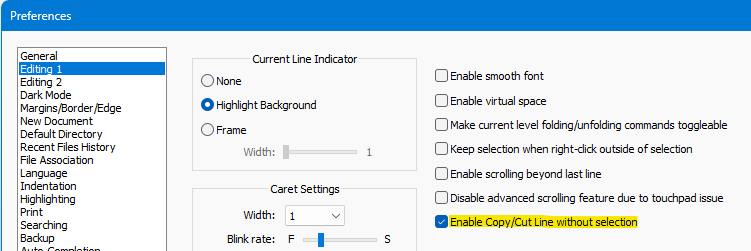
-
This topics looks more like a complaint topic to put into Boycott Notepad++.
And Alan, you are a skilled programmer from what I saw until now. Why don’t you create a PR instead of complaining? ;-)
-
@MarkusBodensee said:
looks more like a complaint topic to put into Boycott Notepad++
Hardly.
Why don’t you create a PR instead
No way am I going to try to un-mess the whole debacle, as mentioned by @Coises .
I’m more likely to write the script I mentioned to work around the problem. -
@Alan-Kilborn said:
Hardly.
Sorry… but using the word “hate” in your post is a clear indication that it would be right over there.
-
@datatraveller1 said in Does anyone else hate "Enable Copy/Cut Line without selection"?:
Often I want to hit Ctrl+C but press Ctrl+V which is even worse
Oddly, I don’t seem to be plagued by that variant.
Actually, I don’t think that is worse because you can usually Ctrl+z undo it.
There is no undo for destroying the clipboard content (by trying to do Ctrl+v and mistakenly doing Ctrl+c). -
@Alan-Kilborn Yes, but the issue with my variant is that I think I have copied something but actually cut it, and sometimes even don’t notice that it was cut and not copied so the cut content is lost e.g. from a database field. However, my issue is not a Notepad++ issue, it is a general MS Windows fat fingering problem.
But thinking again of your variant - I am also plagued by your variant, so you are not the only one :-)
-
@Alan-Kilborn said in Does anyone else hate "Enable Copy/Cut Line without selection"?:
un-mess the whole debacle
Would it be less obnoxious if Edit | Copy and Cut were never disabled on the menu; that is, even when Enable Copy/Cut Line without selection is unchecked and nothing is selected, they would still be enabled: they just wouldn’t do anything?
If I understand the code correctly, that would be an easy “fix” that wouldn’t be likely to cause unexpected side-effects.
Edit to add: The next least complicated way I can think of to fix this would be to create a “proxy” command that doesn’t appear on the menu, to which Ctrl+C/Ctrl+Insert can attached as a keyboard accelerator. Unlike the command that appears on the menu, the proxy command would never be disabled, allowing WM_COPY to be passed on to whatever control has focus. The same should be done for Ctrl+X/Shift+Delete, assuming I am correct that this also affects some docking dialogs (which I still haven’t verified).
-
@Alan-Kilborn said in Does anyone else hate "Enable Copy/Cut Line without selection"?:
There is no undo for destroying the clipboard content (by trying to do Ctrl+v and mistakenly doing Ctrl+c).
I would have thought that Edit > Clipboard History would allow an undo for Ctrl+C – or that an external Clipboard-history tool would have that (and I thought you recently mentioned that you used one of those external clipboard tools when it came up in another discussion).
(Yes, E>CH isn’t a solution if you didn’t already have that panel open… but I would think the external clipboard tools were always running)
-
@PeterJones said:
and I thought you recently mentioned that you used one of those external clipboard tools when it came up in another discussion
I do, but it is a pain to have to go there to get data, when I just had it. :-)
-
@Coises said :
Would it be less obnoxious if Edit | Copy and Cut were never disabled on the menu; that is, even when Enable Copy/Cut Line without selection is unchecked and nothing is selected, they would still be enabled: they just wouldn’t do anything? If I understand the code correctly, that would be an easy “fix” that wouldn’t be likely to cause unexpected side-effects.
I don’t like it that much but…If it fixes the larger problem it’s an acceptable trade-off.
The next least complicated way I can think of to fix this would be to create a “proxy” command that doesn’t appear on the menu, to which Ctrl+C/Ctrl+Insert can attached as a keyboard accelerator. Unlike the command that appears on the menu, the proxy command would never be disabled, allowing WM_COPY to be passed on to whatever control has focus. The same should be done for Ctrl+X/Shift+Delete, assuming I am correct that this also affects some docking dialogs (which I still haven’t verified).
I do like this better as a N++ user, because I don’t see it. But it probably complicates the code too much to be accepted.
Anyway @Coises, if you want to get involved and try to fix this, you’d have my thanks.
-
It appears a fix for Ctrl+c being broken in Search results has just been PUBLISHED, so hopefully future discussion on this is moot.
-
I had forgotten that some else has the same fat fingers that I do, and thus shared my pain; it’s a bit of a rant, but some good reading: https://github.com/notepad-plus-plus/notepad-plus-plus/issues/15480




Hello! It looks like you're interested in this conversation, but you don't have an account yet.
Getting fed up of having to scroll through the same posts each visit? When you register for an account, you'll always come back to exactly where you were before, and choose to be notified of new replies (either via email, or push notification). You'll also be able to save bookmarks and upvote posts to show your appreciation to other community members.
With your input, this post could be even better 💗
Register Login