Notepad++ release 8.7.1
-
@donho said in Notepad++ release 8.7.1:
I could be in one of Asian countries so the release date could be correct…
OK, I’m in Europe. Fixed :)Not fixed yet:
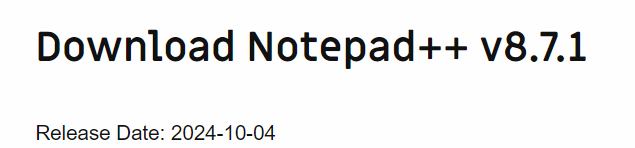
This month is November (11), not October (10). I think that was @schnurlos’s quibble, not the 5th vs 4th.
-
@PeterJones said in Notepad++ release 8.7.1:
@donho said in Notepad++ release 8.7.1:
I could be in one of Asian countries so the release date could be correct…
OK, I’m in Europe. Fixed :)Not fixed yet:
This month is November (11), not October (10). I think that was @schnurlos’s quibble, not the 5th vs 4th.
Oups, thank you @PeterJones for the further explanation.
Thank you @schnurlos for remind me this important error.
It’s fixed now for sure. -
Regards;
It seems that the new release is having problems with the option of ‘Run’. Instead of running on the requested browser, it creates a new instance of NotePad++ with a blank note.
Thanks
-
@Luis-Marrero said in Notepad++ release 8.7.1:
the new release is having problems with the option of ‘Run’. Instead of running on the requested browser, it creates a new instance of NotePad++ with a blank note.
As Notepad++ has not had browser running on the Run menu for years, I don’t think this will be considered any kind of problem. Use View menu > View Current File in > …
-
Regards;
It is any way to revert to the previous release?
Thanks
-
It is any way to revert to the previous release?
Download the older installer and run it.
But that’s not your best next step.
I’d actually recommend downloading the older version as a portable zip, and comparing the behavior using the exact same steps in each version.
If you’d like help debugging the problem you’re having with v8.7.1, feel free to post a question in Help Wanted, making sure to have complete details about how to replicate the problem you are having.
-
@Luis-Marrero said in Notepad++ release 8.7.1:
Regards;
It seems that the new release is having problems with the option of ‘Run’. Instead of running on the requested browser, it creates a new instance of NotePad++ with a blank note.
Thanks
@Luis-Marrero
Could you elaborate your problem please? -
Auto-update has been triggered for this release.
-
This release has introduced a new bug that didn’t exist in v8.7.0 and prior:
I open/edit files on network drives (rclone SFTP mount), and now I’m frequently getting popup messages that the underlying file has been modified with the question if I want to reload it. I choose no, and then it says the file has gone missing with the question if I want to keep it open in my editor. I choose yes, and then save it. This process keeps on repeating. It’s so annoying. I suspect that it was introduced by one of the network bug fixes listed in the release notes for 8.7.1
-
@Craig-Manley said in Notepad++ release 8.7.1:
I open/edit files on network drives (rclone SFTP mount), and now I’m frequently getting popup messages that the underlying file has been modified with the question if I want to reload it. I choose no, and then it says the file has gone missing with the question if I want to keep it open in my editor. I choose yes, and then save it. This process keeps on repeating. It’s so annoying. I suspect that it was introduced by one of the network bug fixes listed in the release notes for 8.7.1
It seems the side effect (so a regression) of network files hanging fix. Sorry about that.
Could you report to GitHub issue with more information please?
https://github.com/notepad-plus-plus/notepad-plus-plusI’ll try to reproduce the regression and fix it.
-
@donho said in Notepad++ release 8.7.1:
Could you report to GitHub issue with more information please?
Since the OP did not append here the created issue:
https://github.com/notepad-plus-plus/notepad-plus-plus/issues/15819 -
@donho Hi, I found an issue.
When shifting, left or right, more text rows contemporary in column mode by pressing the TAB key, the column indicator in the status bar is updated uncorrectly:On the first series of right shift, the column indicator switches to column 1, then it stay still; On the following left shifts, the column indicator is updated accordingly the current column; On the following right shifts, the column indicator is first updated wrongly (first backwards to 1, then upwards but incorrectly),Steps To Reproduce:
Open a C++ source file (.cpp);
Left click at the beginning of an instruction;
Ctrl-Alt-Shft left click at the following row, same column;
Press TAB to shift right, note that the column indicator goes to 1, then stays still;
Press (BACKSPACE) to shift left, note that the column indicator is updated correctly;
Press TAB to shift right, note that the column indicator first goes backwards, then upwards but shows the wrong column.Current Behavior:
Wrong behaviour of the column indicator in the status bar. -
@Luigi-C said in Notepad++ release 8.7.1:
When shifting, left or right, more text rows contemporary in column mode by pressing the TAB key…
English-speaking forum readers may like to know that “contemporary” is used here as in Italian contemporaneamente: literally, “at the same time”
-
D donho unpinned this topic on






Hello! It looks like you're interested in this conversation, but you don't have an account yet.
Getting fed up of having to scroll through the same posts each visit? When you register for an account, you'll always come back to exactly where you were before, and choose to be notified of new replies (either via email, or push notification). You'll also be able to save bookmarks and upvote posts to show your appreciation to other community members.
With your input, this post could be even better 💗
Register Login