How to prevent re-alignment of lines
-
When editing, I find that NPP’s re-alignment of lines is very irritating. I’ve not found a way to turn it off, but hopefully there is a way, and someone can tell me how to do so. Here is an example:
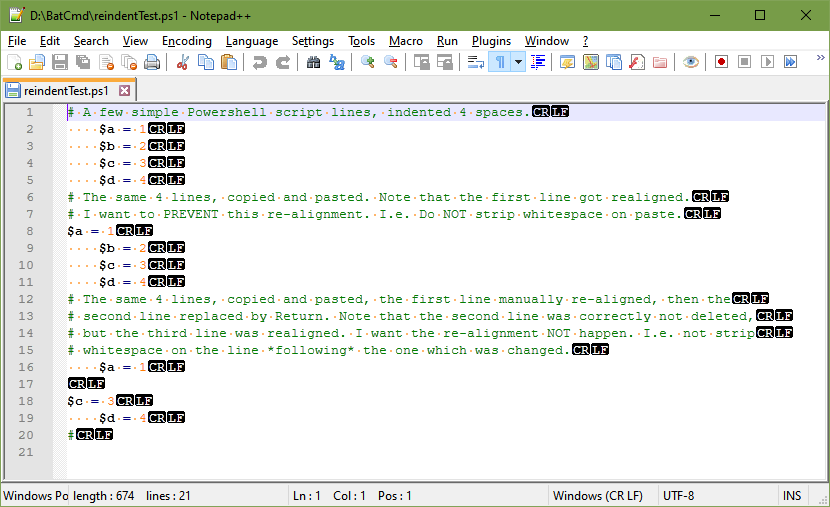
(Note that this doesn’t just affect Powershell’s .ps1 files, but as far as I can tell, it affects all languages.)
-
Here’s my result:
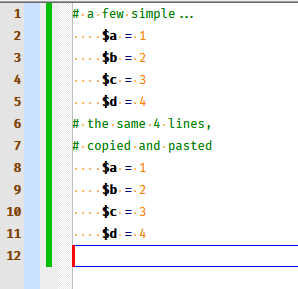
Note that my line 8 doesn’t look like yours, but you didn’t explain exactly how you achieved your result, so…
about all I can say is that Notepad++ does NOT strip whitespace or anything else upon pasting.My head hurts when I read your comments on your lines 12-15 (i.e., I can’t follow it), so I can’t talk at all on what might be happening there for you.
-
@Alan-Kilborn said in How to prevent re-alignment of lines:
Here’s my result:
Note that my line 8 doesn’t look like yours, but you didn’t explain exactly how you achieved your result, so…
about all I can say is that Notepad++ does NOT strip whitespace or anything else upon pasting.My head hurts when I read your comments on your lines 12-15 (i.e., I can’t follow it), so I can’t talk at all on what might be happening there for you.
Thank you for replying. Your result does suggest there is a setting somewhere which affects this. It is just a matter of finding it.
I’m not sure how to make what I did for the second any clearer. Just do each thing one step at a time:
- Do a copy and paste.
- Manually fix loss of indentation of the first pasted line.
- Replace the second line with just Return (an empty line.) Maybe that isn’t clear enough: a) select the line, b) press Return. 2nd line is now empty, but still there. 3rd line has lost its indentation.
-
Selection before copying:
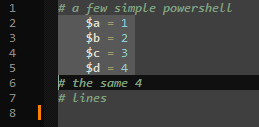
After pasting:
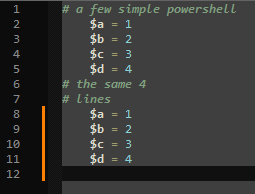
After selecting $b=2 line:
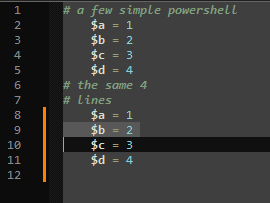
After pressing Enter:
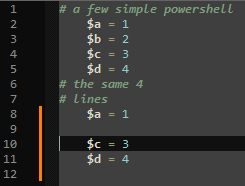
-
@Alan-Kilborn Yes, fine, it doesn’t happen for you. It also appears you have no idea what controls it. Hopefully someone else does.
-
@Graham-Norris said :
Hopefully someone else does.
Yes. But yours is such an oddball problem, I have doubts.
Are you using any unusual plugin?
Can you post your Debug Info here?
See Notepad++'s?menu for how to obtain that.


Hello! It looks like you're interested in this conversation, but you don't have an account yet.
Getting fed up of having to scroll through the same posts each visit? When you register for an account, you'll always come back to exactly where you were before, and choose to be notified of new replies (either via email, or push notification). You'll also be able to save bookmarks and upvote posts to show your appreciation to other community members.
With your input, this post could be even better 💗
Register Login