Broken emoji
-
I have text full of broken emoji like
💀displayed in strange symbols. is the anyway to fix it? (inside or outside Notepad++)
Notepad++ dose not break the emojis. Emojis were broken in the first place. I want to fix them and I don’t know How.
I read this but it didn’t help to fix my problem. -
When you open with Notepad++, does the lower-right (between “Windows (CR LF)” and “INS”) say “UTF-8” or “ANSI” or something else?
Because if it says ANSI or something other that UTF-8, then you might be able to trick Notepad++ into re-reading the bytes as UTF by using the Encoding > UTF-8 (not Convert to UTF-8).
Other than that, you weren’t very clear whether your text was a pure text file, or whether it was HTML like in the SO link you provided. And whether when you look at it in Notepad++ it’s wrong, or if it’s only wrong if you look using your browser but it’s right in Notepad++.
Click the </> button in your reply, and paste in some example text from your file into the code-block that the forum button created (make sure none of what you paste is confidential/proprietary) – and maybe also include a screenshot of what it looks like in your Notepad++ (and also in your browser, if it really is HTML like the one from SO).
-
💀could represent the bytes with hex valuesF0 9F 92 80– and those, in turn, are the UTF-8 bytes ofU+01F480 💀Unfortunately, there is no easy with a “regular expression”-mode search-and-replace to generically convert those from the individual bytes to the actual character.
However, you still might be able to use Notepad++ to help:
Copy that sequence of four weird characters, then File > New, Encoding > ANSI, paste (it will still look like those four bytes), save to a temporary file, Encoding > UTF-8, it will convert it; you should then be able to copy that character back into your original UTF-8 file. Before you save your final file, I would recommend putting in the BOM character so that future editors (and/or browsers) will be able to see that you want UTF-8: Encoding > Convert to UTF-8-BOM then save. (The lower right will now say
UTF-8-BOMto indicate that Notepad++ knows the UTF-8 file has the BOM sequence at the beginning)If all special characters in your file are the mis-encoded emoji, like you showed, then you might be able to get away with:
- Open File
- Confirm it says UTF-8 in the corner, but has the bad characters like the ones you showed
- Copy
- Create new file, set Encoding > ANSI
- Paste
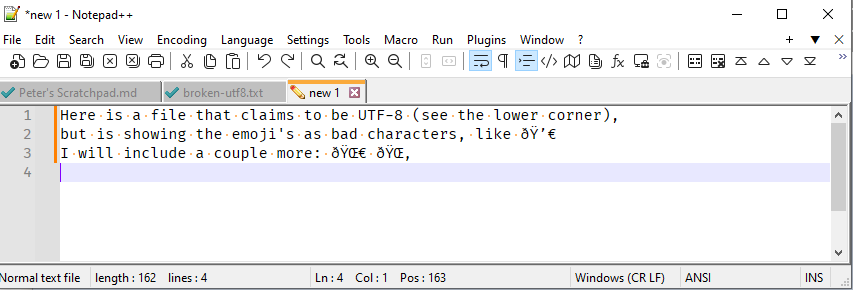
- Re-interpret using Encoding > UTF-8
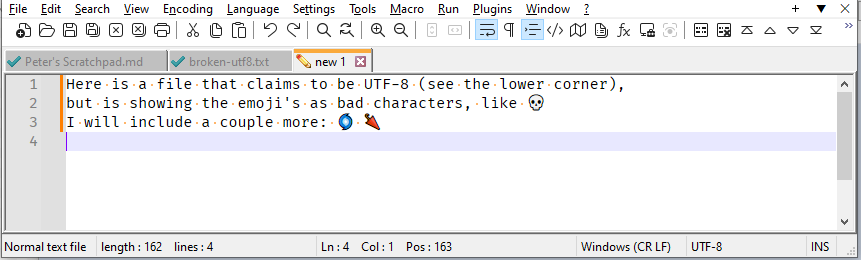
- Then you can copy from there and paste back in your original. Save.
- Highly recommended: Encoding > Convert to UTF-8-BOM, Save.
You can test this procedure by starting with the following as your “bad UTF-8 source”:
Here is a file that claims to be UTF-8 (see the lower corner), but is showing the emoji's as bad characters, like 💀 I will include a couple more: 🌀 🌂 -
Hello, @hosein-GSD, @Peterjones and All,
I think that the clever @peterjones’s method can be recorded as a N++ macro !
So, first, insert this new macro in your active
shortcut.xmlfile, right before the</macros>ending tag<Macro name="Test_Emoji" Ctrl="no" Alt="yes" Shift="no" Key="0"> <Action type="2" message="0" wParam="41001" lParam="0" sParam="IDM_FILE_NEW" /> <Action type="2" message="0" wParam="45009" lParam="0" sParam="IDM_FORMAT_CONV2_ANSI" /> <Action type="0" message="2179" wParam="0" lParam="0" sParam="SCINTILLAMESSAGE.SCI_PASTE" /> <Action type="2" message="0" wParam="45008" lParam="0" sParam="IDM_FORMAT_AS_UTF_8" /> <Action type="2" message="0" wParam="45011" lParam="0" sParam="IDM_FORMAT_CONV2_UTF_8" /> <Action type="2" message="0" wParam="41006" lParam="0" sParam="IDM_FILE_SAVE" /> </Macro>-
Exit Notepad++
-
Restart N++
-
Open your original file in Notepad++
-
Select all your text (
Ctrl + A) -
Copy its contents in the clipboard (
Ctrl + C) -
Run the
Macro > Test_Emojimacro -
Save the new created file with its default name or else
=> You should see all your Emoji characters correctly displayed !
To test my method, simply copy the two lines below, in the clipboard and use the
Macro > Test_EmojimacroI have a file which is showing all emoji's as bad characters, like 💀 Here are some other examples of bad syntaxes : 🌀 and 🌂
Of course, you can easily change the macro’s name and/or affect a shortcut to this new macro
Best Regards,
guy038
-
-
@PeterJones
thank you so much for your detailed answer 🙏Actually the problem was with the output files of this chrome extension.
I wrote a comment for that and today I used it again and noticed that it’s problems is solved.(before that, I treied to solve many problems using regex manually which was useful for things like & but not for things like like 💀. )
@guy038 said in Broken emoji:
I think that the clever @peterjones’s method can be recorded as a N++ macro !
absolutely!



Hello! It looks like you're interested in this conversation, but you don't have an account yet.
Getting fed up of having to scroll through the same posts each visit? When you register for an account, you'll always come back to exactly where you were before, and choose to be notified of new replies (either via email, or push notification). You'll also be able to save bookmarks and upvote posts to show your appreciation to other community members.
With your input, this post could be even better 💗
Register Login