An issue with background color
-
As I am a complete novice user, this question may appear to be childish. Sorry !
By editing two files ( root\themes\Obsidian.xml’ and ‘root\langs.xml’), I was able to customize the syntax highlighting for C language files and include user-defined keywords. I have most of my customizations set the background color to black, and now I want to change to black the background color of the entire document (except for the keywords that I have set differently) too.
But ‘Settings > Style Configurator > Global override > Force background color for all style’ is not right for me because it resets to black everything, eliminating the background color of keywords where it is required to be a different color.I would appreciate it if you could suggest a solution or workaround. Thanks ! Kind Regards
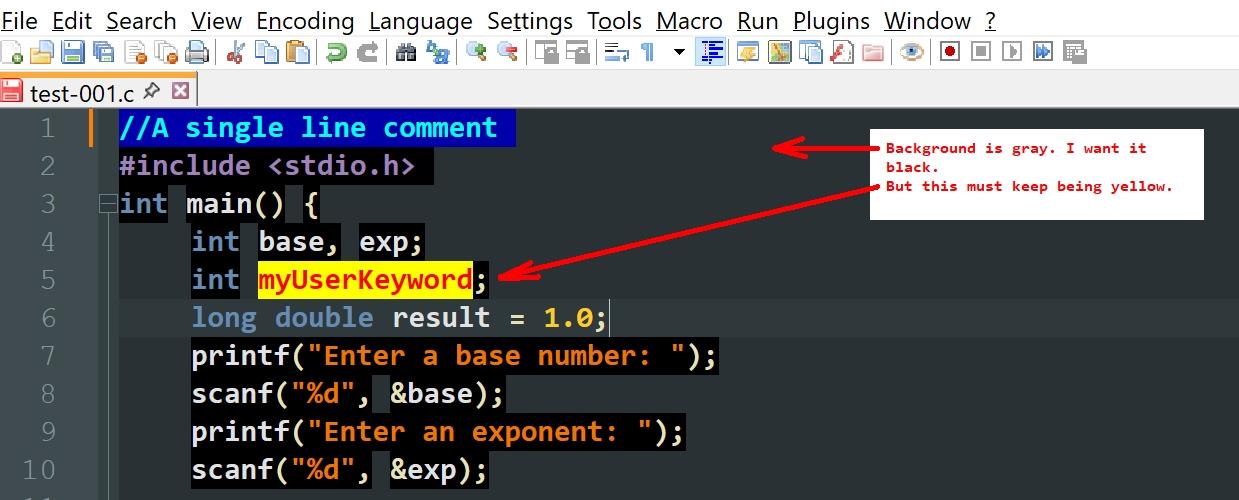
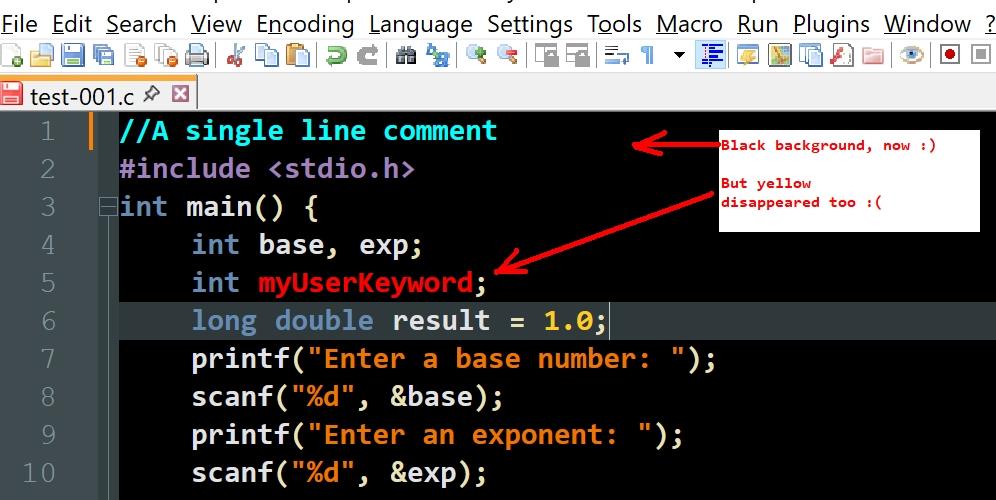
-
@sdfh6srtytydgf-65cghj67ed56u8 ,
Settings > Style Configurator > Language:
Global Style> Style:Default> Background sets the default bg color used by any style that doesn’t override the bg.


Hello! It looks like you're interested in this conversation, but you don't have an account yet.
Getting fed up of having to scroll through the same posts each visit? When you register for an account, you'll always come back to exactly where you were before, and choose to be notified of new replies (either via email, or push notification). You'll also be able to save bookmarks and upvote posts to show your appreciation to other community members.
With your input, this post could be even better 💗
Register Login