Python Script plugin: script to tell the cursor to highlight the result and everything before it up to ">"
-
Thanks,
I have tried but there is an error
File “<console>”, line 1
z = editor.findText(FINDOPTION.REGEXP, 0, editor.getLength(), r’ (?s)>.*585543’) if Z is not None: editor.setSel(*z)
^
SyntaxError: invalid syntax -
I tried but there is an error:
File “<console>”, line 1
z = editor.findText(FINDOPTION.REGEXP, 0, editor.getLength(), r’ (?s)>.*585543’) if Z is not None: editor.setSel(*z)
^
SyntaxError: invalid syntax -
@jean-luc-borla said,
SyntaxError: invalid syntax
You put both commands on the same line. Python (and thus the PythonScript plugin) doesn’t work that way.
z = editor.findText(FINDOPTION.REGEXP, 0, editor.getLength(), r'(?s)>.*585543')
if z is not None: editor.setSel(*z)
This works. Well, mostly. The regex is too greedy.
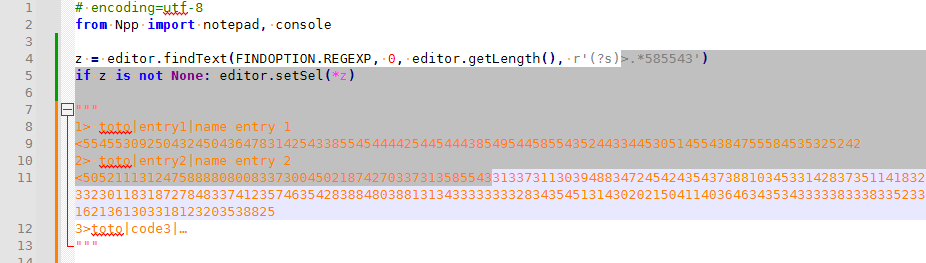
Change it to be less greedy:
z = editor.findText(FINDOPTION.REGEXP, 0, editor.getLength(), r'(?s)>.*?585543')
if z is not None: editor.setSel(*z)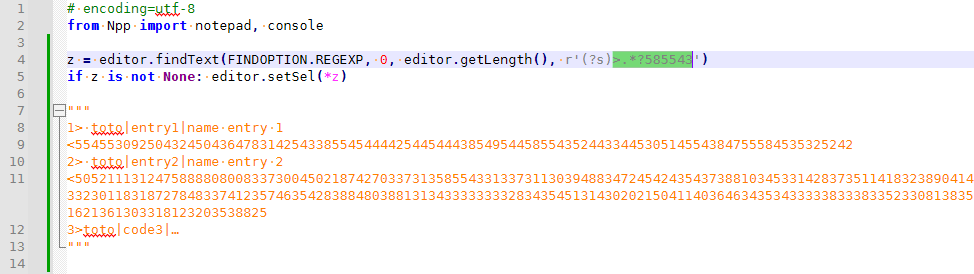
-
My response was going to be: “We can’t teach basic Python here”
-
Hello!
This thread has been very helpful and got me out of a rut I was in, so thank you very much!How would you determine how many “matches” are in z? I like to output it to console as shown below…
console.write('Searching for matches...\n')
z = editor.findText(FINDOPTION.REGEXP, 0, editor.getLength(), my_search_variable)
if z is not None:
    editor.gotoLine(editor.lineFromPosition(z[0])+20)
    editor.setSel(*z)
    console.write('Search Completed - found XXX matches which are highlighted\n')
else:
    console.write('Search Completed.  No matches found.\n')
-–
moderator added code markdown around text; please don’t forget to use the
</>button to mark example text as “code” so that characters don’t get changed by the forum -
@4SHAKEN said :
z = editor.findText(FINDOPTION.REGEXP, 0, editor.getLength(), my_search_variable)How would you determine how many “matches” are in z?
Um…well, one, at most. The documentation for
editor.findText()in PythonScript is lacking, unfortunately; here’s what I’ve discovered about it over time:Here’s how to interpret the return value from
z = editor.findText(...):Result Meaning zisNoneno match was found zis a 2-tuple wherez[0] == -2regular expression in my_search_variableis either invalid or the regex engine had a failure in conducting the searchzis a 2-tuple wherez[0] != -2one match, at the position range indicated by the tuple, i.e., at positions z[0]throughz[1]in the document
Bonus (because it came to mind based on what you’re asking about, and what I’ve said above):
If you need to validate the regex in
my_search_variable, here’s a (Python3) function that will do that for you:def regex_is_valid(test_regex): return (tup2 := editor.findText(FINDOPTION.REGEXP, 0, 0, test_regex)) is None or tup2[0] != -2
It really seems like you need to use
editor.research()rather thaneditor.findText(), if you want to find multiple matches with a single call to a searching function, e.g.:matches = [] editor.research(search_variable, lambda m: matches.append(m.span(0))) num_matches = len(matches) -
@Alan-Kilborn thanks for the suggestion on editor.research! I’m now able to get num of matches. I haven’t found a replacement for editor.setSel (using match) so I’m having to do the search twice. I’m sure its a rookie mistake on my part.
console.write('Searching for matches...\n')
matches = []
editor.research(my_search_variable, lambda m: matches.append(m.span(0)))
num_matches = len(matches)
z = editor.findText(FINDOPTION.REGEXP, 0, editor.getLength(), mrn_acc_search)
if matches:
    editor.gotoLine(editor.lineFromPosition(matches[0][0])+20)
    editor.setSel(*z)
    console.write('Search Completed - found ' + str(num_matches) + ' which are highlighted.\n')
if not matches:
    console.write('Search Completed.  No matches found.\n')
-–
moderator added code markdown around text; please don’t forget to use the
</>button to mark example text as “code” so that characters don’t get changed by the forum -
@4SHAKEN said:
I haven’t found a replacement for editor.setSel (using match)
Note, the following is untested, but it or something very similar, should work, if I’m understanding what you want:
editor.setSel(*matches[0]) -
@Alan-Kilborn Confirmed it works, thanks so much! My updated code is below in case it helps others.
console.write('Searching for matches...\n')
matches = []
editor.research(my_search_variable, lambda m: matches.append(m.span(0)))
num_matches = len(matches)
if matches:
    editor.gotoLine(editor.lineFromPosition(matches[0][0])+20)
    editor.setSel(*matches[0])
    console.write('Search completed at ' + datetime.now().strftime('%Y-%m-%d %H:%M:%S') + '. ' + str(num_matches) + ' matches found.\n')
if not matches:
    console.write('Search completed at ' + datetime.now().strftime('%Y-%m-%d %H:%M:%S') + '.  No matches found.\n')
-–
moderator added code markdown around text; please don’t forget to use the
</>button to mark example text as “code” so that characters don’t get changed by the forum -
@4SHAKEN
In the future you should wrap your code snippets in ``` blocks.if foo: blah = -3 return bar() # notice syntax highlighting, indentation preserved else: return zut()





Hello! It looks like you're interested in this conversation, but you don't have an account yet.
Getting fed up of having to scroll through the same posts each visit? When you register for an account, you'll always come back to exactly where you were before, and choose to be notified of new replies (either via email, or push notification). You'll also be able to save bookmarks and upvote posts to show your appreciation to other community members.
With your input, this post could be even better 💗
Register Login