Multi selection and multi edit
-
I released a Notepad++ bundle where the multi selection is already installed, so you can simply test it:
https://github.com/bitagoras/PyPadPlusPlus/releases
It’s actually a portable version that includes a Python environment. But you don’t need this for mult selection.Below you can see how this looks like. The only non-standard edit command I used here is
<Strg> + <D>.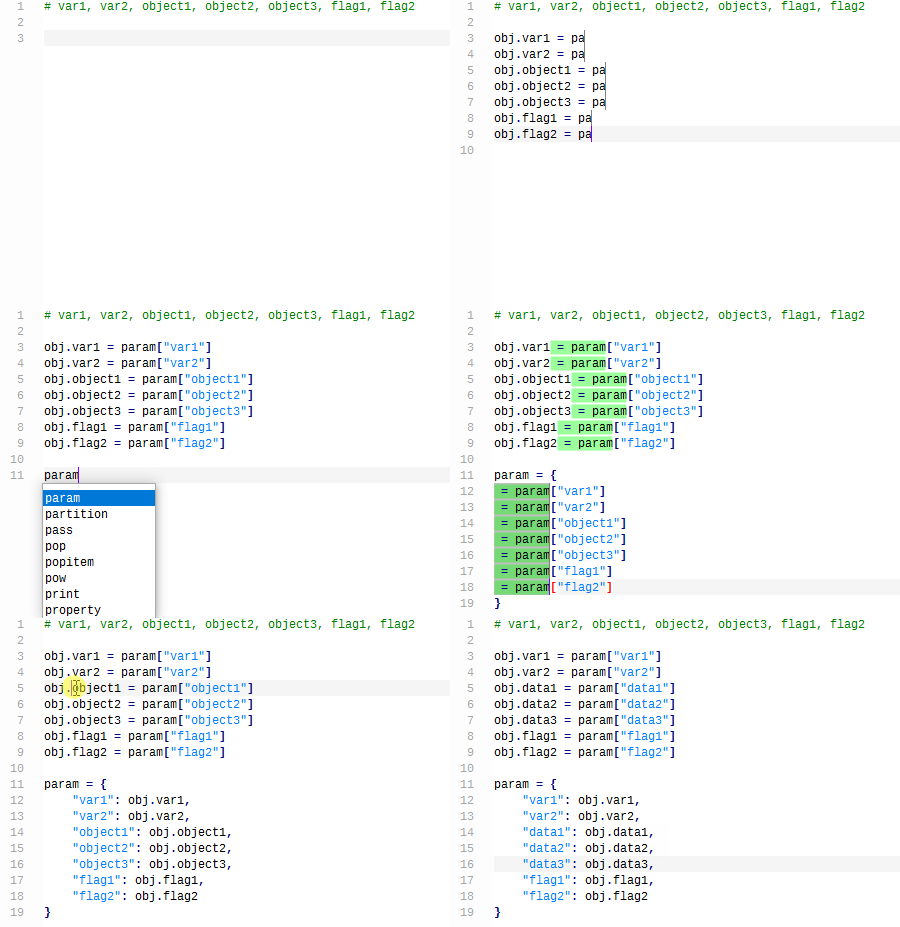
-
@bitagoras said in Multi selection and multi edit:
The only non-standard edit command I used here is <Strg> + <D>.
<Strg> + <D>??
What does that mean? -
@Alan-Kilborn
Sorry, I use a German keyboard. I wanted to write<Ctrl> + <D>;-) -
FYI: This feature is implemented in Notepad++ core and it’ll be available in the next release.
You may want to check the PR to see if it meets your need:
https://github.com/notepad-plus-plus/notepad-plus-plus/pull/14313



Hello! It looks like you're interested in this conversation, but you don't have an account yet.
Getting fed up of having to scroll through the same posts each visit? When you register for an account, you'll always come back to exactly where you were before, and choose to be notified of new replies (either via email, or push notification). You'll also be able to save bookmarks and upvote posts to show your appreciation to other community members.
With your input, this post could be even better 💗
Register Login