Community
    • Login

    Multi selection and multi edit

    Scheduled Pinned Locked Moved Help wanted · · · – – – · · ·
    multiline
    64 Posts 18 Posters 256.1k Views 8 Watching
    Loading More Posts
    • Oldest to Newest
    • Newest to Oldest
    • Most Votes
    Reply
    • Reply as topic
    Log in to reply
    This topic has been deleted. Only users with topic management privileges can see it.
    • Alan KilbornA Offline
      Alan Kilborn @Don Bhai
      last edited by

      @Don-Bhai

      I’d help with a PythonScript, but maybe you want an NppExec script?
      Can’t tell from the above…

      Don BhaiD 1 Reply Last reply Reply Quote 0
      • guy038G Offline
        guy038
        last edited by guy038

        Hello, @don-bhai, @alan-kilborn and All,

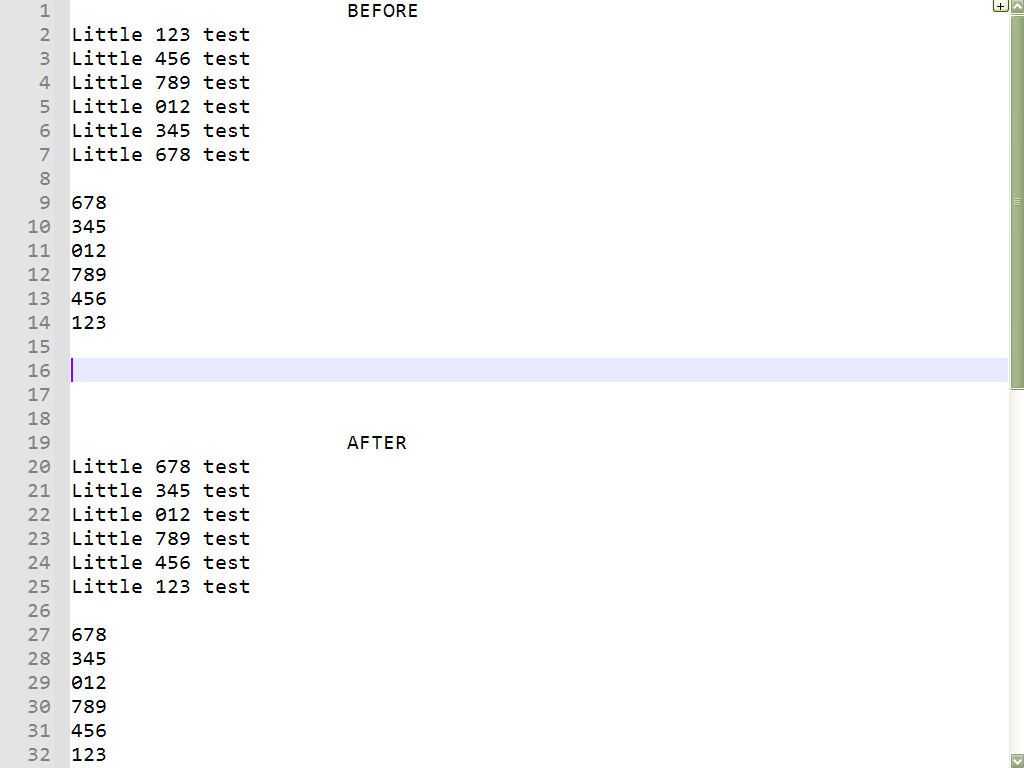
        I may misunderstand what you want but are you looking for this kind of manipulations, below, which seems to work nicely ?

        I assume that the BetterMultiSelection plugin is installed, with its last 1.4 version ( IMPORTANT )

        I personally tested with N++ portable v7.9.2 (32 bits )


        So :

        • Paste the text, below, beginning with a blank line, in a new tab
        
        Little 123 test
        Little 456 test
        Little 789 test
        Little 012 test
        Little 345 test
        Little 678 test
        
        678
        345
        012
        789
        456
        123
        
        • Move the caret at beginning of line 9

        • Hold down the Alt and Shift keys and hit 5 times on the Down arrow key

        • Hit the Shift + End shortcut, once

        • Hit the Ctrl + C shortcut

        • Hit, 7 times, on the Up arrow key

        • Hit, 4 times, on the Right arrow key

        • Hold down the Shift key and hit 3 times on the Right arrow key

        • Hit the Ctrl + V shortcut

        • Hit the Esc key to cancel the multi-selection !

        As you can see, in the picture, below, each number, from line 27 to 32, have been pasted, accordingly, in lines 20 to 25 ;-))

        79fd1f93-28db-4867-829f-939b208e87ba-image.png

        Best Regards

        guy038

        Alan KilbornA Don BhaiD 2 Replies Last reply Reply Quote 2
        • Alan KilbornA Offline
          Alan Kilborn @guy038
          last edited by Alan Kilborn

          @guy038

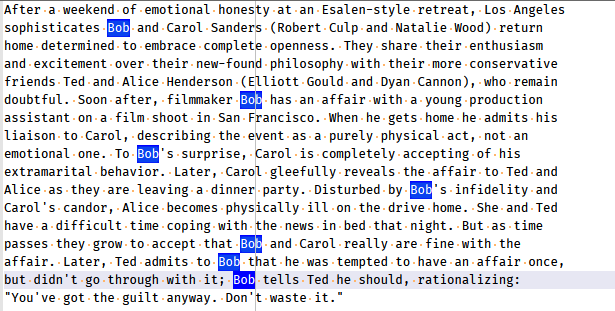
          I presume OP has this, where the inverted text is the product of “multi-select”:
          349843b9-20c3-4b6a-882d-13d61776696b-image.png

          and then has this in the clipboard:

          Peter
          Guy
          Claudia
          Scott
          Alan
          Terry
          Michael
          

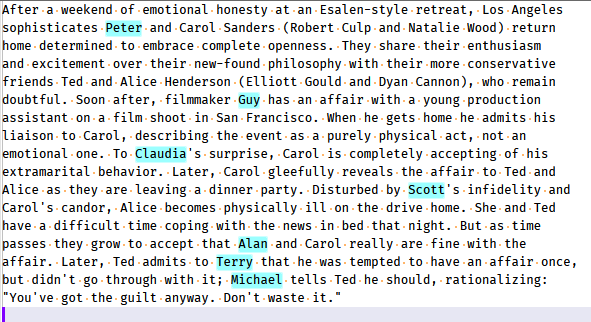
          And wants to end up with this text after replacement:
          879ea221-1581-4cf5-89bf-b6d763b5f794-image.png

          Note that I styled the text in the cyan color myself, just so the replacements could be easier to see.

          Of course I could be totally wrong about what the OP has and wants. :-)

          Alan KilbornA 1 Reply Last reply Reply Quote 2
          • Alan KilbornA Offline
            Alan Kilborn @Alan Kilborn
            last edited by

            Oops, it appears I’ve turned Guy into a philandering filmmaker, Scott into an infidel, and Michael into an encourager of adultery. Sorry, all! :-)

            1 Reply Last reply Reply Quote 2
            • Don BhaiD Offline
              Don Bhai @Alan Kilborn
              last edited by

              @Alan-Kilborn
              i can install paython plugin if this is not available in NPPEXec script

              1 Reply Last reply Reply Quote 0
              • astrosofistaA Offline
                astrosofista @Don Bhai
                last edited by

                @Don-Bhai said in Multi selection and multi edit:

                but her in notepad++ every word replaced by the 6 words that in clipboard that makes me crazy

                As I understand you comment, I think you missed an important condition to get what you want - in order to distribute replacements over a multiselection, you must copy the replacement strings as a rectangular selection, not a normal one.

                Hope this helps.

                Don BhaiD 1 Reply Last reply Reply Quote 2
                • Don BhaiD Offline
                  Don Bhai @guy038
                  last edited by

                  @guy038 you are amazing, thank you very much
                  i was selecting the 6 word by ctrl+A
                  thats why it replace every word by the 6 words i have selected and copied in clipboard
                  thanks @Alan-Kilborn , @guy038 , @astrosofista , and to every one tried to help

                  1 Reply Last reply Reply Quote 2
                  • Don BhaiD Offline
                    Don Bhai @astrosofista
                    last edited by

                    @astrosofista you are right, i selected them as normal one that’s my fault

                    1 Reply Last reply Reply Quote 2
                    • bitagorasB Offline
                      bitagoras @bitagoras
                      last edited by

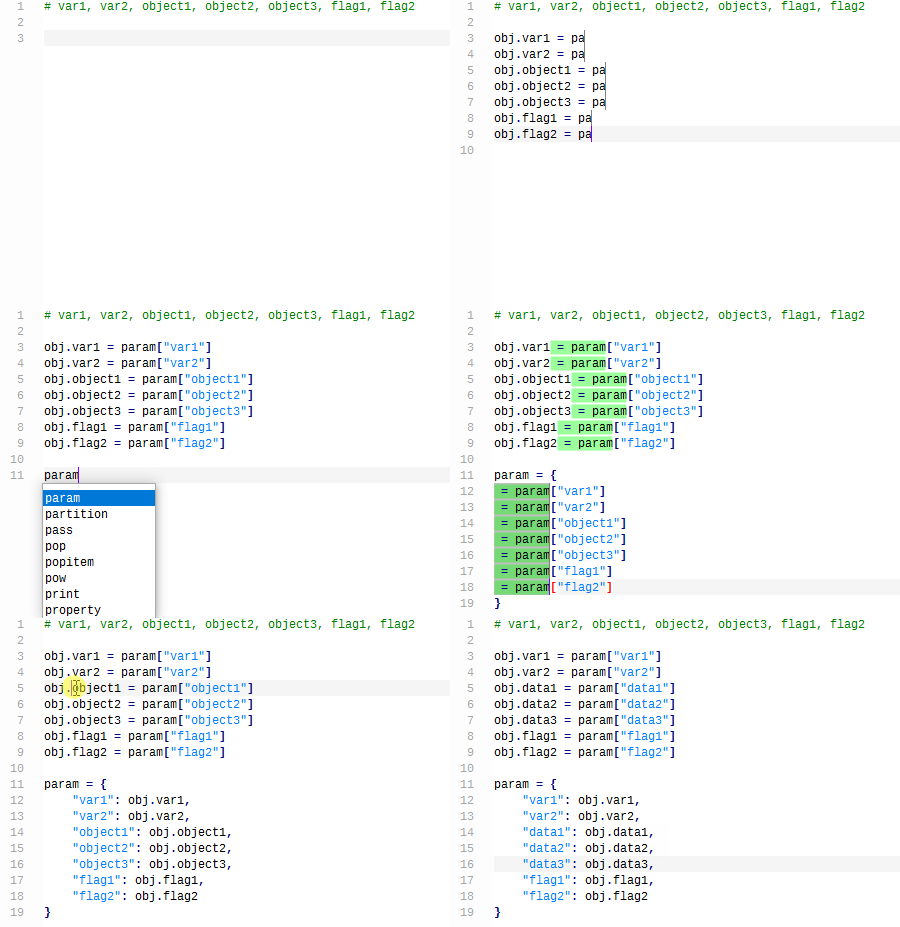
                      I released a Notepad++ bundle where the multi selection is already installed, so you can simply test it:
                      https://github.com/bitagoras/PyPadPlusPlus/releases
                      It’s actually a portable version that includes a Python environment. But you don’t need this for mult selection.

                      Below you can see how this looks like. The only non-standard edit command I used here is <Strg> + <D>.
                      alt text

                      Alan KilbornA 1 Reply Last reply Reply Quote 0
                      • Alan KilbornA Offline
                        Alan Kilborn @bitagoras
                        last edited by

                        @bitagoras said in Multi selection and multi edit:

                        The only non-standard edit command I used here is <Strg> + <D>.

                        <Strg> + <D> ??
                        What does that mean?

                        bitagorasB 1 Reply Last reply Reply Quote 0
                        • bitagorasB Offline
                          bitagoras @Alan Kilborn
                          last edited by bitagoras

                          @Alan-Kilborn
                          Sorry, I use a German keyboard. I wanted to write <Ctrl> + <D> ;-)

                          1 Reply Last reply Reply Quote 1
                          • donhoD Offline
                            donho @Chandler Newby
                            last edited by

                            FYI: This feature is implemented in Notepad++ core and it’ll be available in the next release.
                            You may want to check the PR to see if it meets your need:
                            https://github.com/notepad-plus-plus/notepad-plus-plus/pull/14313

                            1 Reply Last reply Reply Quote 4

                            Hello! It looks like you're interested in this conversation, but you don't have an account yet.

                            Getting fed up of having to scroll through the same posts each visit? When you register for an account, you'll always come back to exactly where you were before, and choose to be notified of new replies (either via email, or push notification). You'll also be able to save bookmarks and upvote posts to show your appreciation to other community members.

                            With your input, this post could be even better 💗

                            Register Login
                            • First post
                              Last post
                            The Community of users of the Notepad++ text editor.
                            Powered by NodeBB | Contributors