Support for Plugins Admin & NppPluginList
-
@datherton15 said in Support for Plugins Admin & NppPluginList - Round 2:
Apologies if this is in the wrong spot…
It is the wrong spot. This Topic is specifically about the Plugins Admin tool inside Notepad++, not for general questions about any plugin.
It would be better to ask it as a New Topic in the Plugin Development or Help Wanted sections.
Thanks for any assistance in passing this forward to the appropriate devs…
The Plugins > XML Tools > About contains a link to the repository for XML Tools development. From that site, you can go to the “Issues” page, and can create an issue directly with the XML Tools developer.
-
 B Bas de Reuver referenced this topic on
-
B Bas de Reuver referenced this topic on
-
@peterjones
Thanks and appreciate the directions.
Dave -
Hello,
I am a new developer for several days. I make my own plug based on the ‘Npp Converter’.
But I am confused about the separation lines in the menu.
Could anyone tell me how can I remove them? It seems a simple question but I still can’t figure out how to customiz it.Thanks!
The separation lines in the red box:
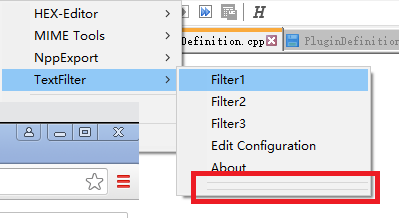
this is the code:
void commandMenuInit() { //setCommand(1, TEXT("HEX -> ASCII"), hex2Ascii, NULL, false); //setCommand(2, TEXT("---"), NULL, NULL, false); //setCommand(CONVERSIONPANEL_INDEX, TEXT("Conversion Panel"), conversionPanel, NULL, false); //setCommand(4, TEXT("---"), NULL, NULL, false); //setCommand(5, TEXT("Edit Configuration File"), editConf, NULL, false); //setCommand(6, TEXT("About"), about, NULL, false); setCommand(0, TEXT("Filter1"), filterRun1, NULL, false); setCommand(1, TEXT("Filter2"), filterRun2, NULL, false); setCommand(2, TEXT("Filter3"), filterRun3, NULL, false); setCommand(3, TEXT("Edit Configuration"), conversionPanel, NULL, false); setCommand(4, TEXT("About"), about, NULL, false); } -
Please avoid posting the same question multiple times.
-
@ekopalypse Got it. I won’t any more.
-
D donho unpinned this topic on
-
Question: How do I update my local NppPluginList? I find a NppPluginList in C:\Program Files\Notepad++\plugins\Config\nppPluginList.dll
version is 1.7.8and the releases on github only offer the source code, but no compiled NppPluginList…
Answer: I just downloaded the 8.7.8 installer of Notepad++ and the NppPluginList got updated too. Confusing was the “no update available…” The text and the … is very small, but contains important information about the update releases, so you’ll end up ccleaner or plugins tell you npp isn’t up to date, while it self tells you it is…
(I’m not sure if this is the right thread to ask)
-
@mh-tp said in Support for Plugins Admin & NppPluginList:
Answer: I just downloaded the 8.7.8 installer of Notepad++ and the NppPluginList got updated too.
Or download the most-recent portable copy, where you can get the DLL without having to upgrade the rest, if you don’t want to.
Confusing was the “no update available…”
See our “most recent version” FAQ and the User Manual page on Upgrading Notepad++
The text and the … is very small, but contains important information about the update releases, so you’ll end up ccleaner or plugins tell you npp isn’t up to date, while it self tells you it is…
I don’t see how the size of the text has anything to do with what cleaner tells you (but after years of CCleaner getting worse and worse, I gave up ever listening to what it told me, and uninstalled it ages ago)
-
This post is deleted! -
This post is deleted! -
Hi, at my employer, security measures are becoming always more strict, which I imagine is commonplace now with the NIS2 directive being more widely implemented (https://digital-strategy.ec.europa.eu/en/policies/nis2-directive).
Therefore having plugins only being installable in the app installation directory is a nuisance. Installing the NPP app itself via Company Portal/InTune is provided for by my employer, but modifying the C:\Program Files\Notepad++\plugins is understandably blocked without admin access.
Would it not be possible to allow (as a config choice) to install them in %APPDATA%\Notepad++ instead, or even do a virtual “merge” of plugins installed “locally” in AppData and in the application’s install directory?
Same for user language definition files (and other “personalisation” of the app)
-
@Ivo-Krab said in Support for Plugins Admin & NppPluginList:
but modifying the C:\Program Files\Notepad++\plugins is understandably blocked without admin access.
Would it not be possible to allow (as a config choice) to install them in %APPDATA%\Notepad++ instead
The problem is that plugins in Notepad++ can do anything Notepad++ itself could do. They are C++ programs operating in the same security context as Notepad++ itself. From a security standpoint, allowing plugins in a directory that can be modified without admin access would be equivalent to allowing access to Program Files without admin access.
As I recall, that was allowed at one time, and this is why it was removed. Security-sensitive organizations determined that they could not install Notepad++ at all unless they could stop users from installing their own plugins. The developer decided it was better to remove the capacity entirely than to try to implement a switch of some kind.
The work-around, if you can run programs that are not installed in Program Files, is to use a portable copy of Notepad++. If you are not allowed to do that, then logically you would be forbidden to run Notepad++ plugins in a directory you control, since it would grant you exactly the same access.





Hello! It looks like you're interested in this conversation, but you don't have an account yet.
Getting fed up of having to scroll through the same posts each visit? When you register for an account, you'll always come back to exactly where you were before, and choose to be notified of new replies (either via email, or push notification). You'll also be able to save bookmarks and upvote posts to show your appreciation to other community members.
With your input, this post could be even better 💗
Register Login