Find & Replace Enhancement Suggestion
-
In all Find & Replace operations: anywhere there is a “Find what:” or a “Replace with:” fill-in:
Put in a little [GET] button next to both the Find what: and Replace with: lines, which, when pressed would clear out the current expression and substitute with what is currently highlighted in a file.
This is to avoid having to close dialog, re-select text and re-open the dialog, or to avoid typing new expression in, or copy from file then paste the expression into box. Makes it a little faster changing expressions.
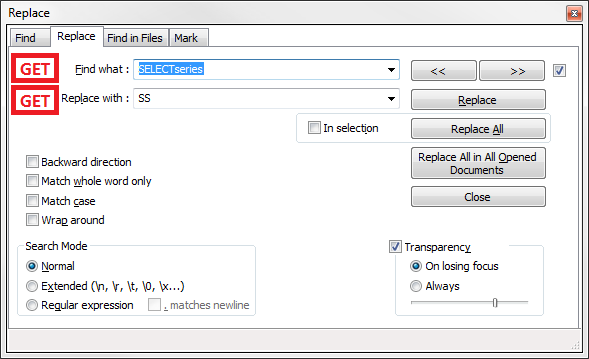
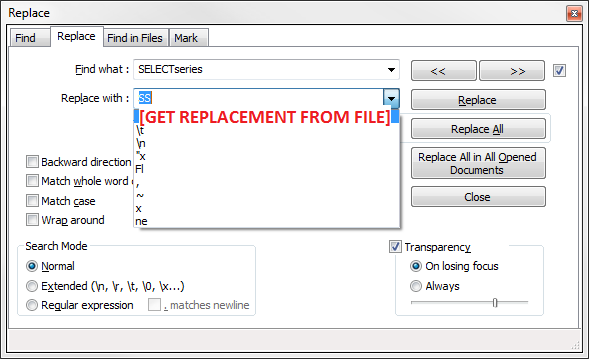
Alternatively, instead of adding a GET button, each existing drop-down could have the first (or last) selection to do the same thing. I prefer a button to reduce confusion, with maybe a tool-tip explanation.
For what it’s worth,
Pat -
There is a resistance to adding new controls to the UI. Or at least their seems to be. I can understand it; they take screen real-estate, and anything that is added with text on it has to be made translatable into dozens of languages. Oh, and maybe “Get” doesn’t translate to something short-and-sweet in Italian, for example, so the button has to be a certain size (bigger!). So it all gets burdensome quickly.
It might be cool to have a double-click on the Find-what label do your “get” functionality, but UI purists will bash me for endorsing such a hidden and easter-eggish thing. But, with that there would be no screen real estate consumed, and no variable-sized text to translate into many languages.
But maybe I’m missing something about your scenario. If you have some selected text in your document, if you press ctrl+f then that selected text is transferred to the Find-what box in the Find window, automagically. There is no “close dialog, re-select text and re-open the dialog” steps needed. Or perhaps I misunderstand. If so, please enlighten me.
There was a similar request recently for a button to swap the text of the Find-what and Replace-with boxes. I think it just had a symbol in it (nothing to translate) and the button itself was quite small. This request gained no traction.


Hello! It looks like you're interested in this conversation, but you don't have an account yet.
Getting fed up of having to scroll through the same posts each visit? When you register for an account, you'll always come back to exactly where you were before, and choose to be notified of new replies (either via email, or push notification). You'll also be able to save bookmarks and upvote posts to show your appreciation to other community members.
With your input, this post could be even better 💗
Register Login