Not able to save a file as .txt.
-
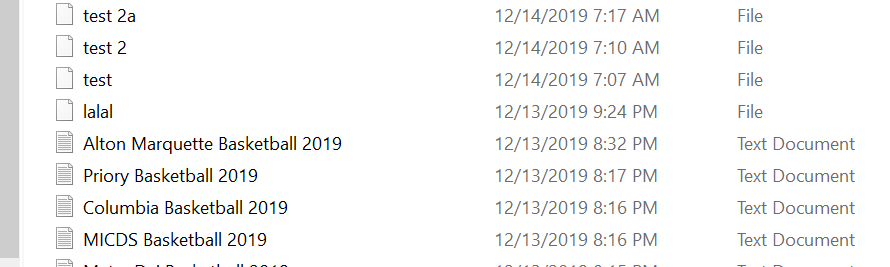
For no reason, suddenly my files are not being saved as .txt They show simply as a “file”. Nothing was changed when I was creating very simple text files. When I try to force it to save as a .txt, it still does not save. Help!
-
@GordonRadford Also, I"ve tried reinstalling Notepad with various releases and nothing seems to help.
-
Hmmm…what are you typing when you first give a file a name?
For example, are you actually typing
lalal.txtinto the box, or are you just typinglalaland expecting it to add.txtautomatically (perhaps based upon the filter specification dropdown)?There is a Preference setting for old style versus new style dialog boxes, perhaps you have the “wrong” one selected? Try changing it and experimenting… I would strongly recommend new style even though you have to manually add the dot and the txt extension when you first save.
Finally, I’d also advise turning on Windows’ ability to show you the extension in the leftmost column of your screenshot. Why rely on having to look to another column to determine what your file type is? (IMO, hiding file extensions is a crazy concept)
-
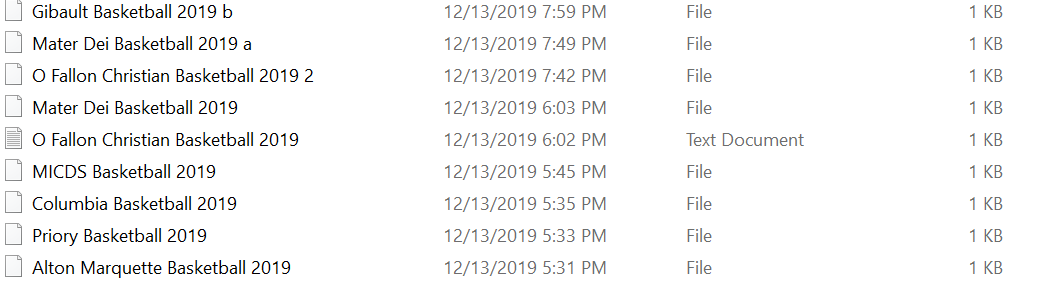
As to saving, I am simply typing whatever name I need…Such as Jonestown Basketball 2019 I"ve been doing this for years and have never had this issue. What was strange, this just started happening last night. I had created eight files, and seven were saved just as “file”, and one was saved as .txt (which is how it has always saved the files). I didn’t change any settings when I was making these files.
Where is the new style preference setting? I looked at the dropdown for preferences but could not locate it.
What is strange, you can see how one saved correctly, and the others just a files…This was last evening…
Thanks for your suggestions. -
Where is the new style preference setting? I looked at the dropdown for preferences but could not locate it.
For someone that wants it to work the way you say, you didn’t look very hard through the Preferences. :-)
See:
Settings > Preferences > Default Directory > Use new style save dialogI didn’t change any settings when I was making these files.
I don’t have a comment for this. Software is software… :-)
Also of some relevance: https://github.com/notepad-plus-plus/notepad-plus-plus/issues/3341
-
Well, the “box” was checked for new style. Upon unselecting, it is now defaulting to save as .txt
Thank you for the suggestion.
-
Hello, @gordonradford, @alan-kilborn and All,
Alan, you said :
I’d also advise turning on Windows’ ability to show you the extension
Personally, it is, always, one the my first actions, right after installing any Windows operating system ;-))
You also said :
Why rely on having to look to another column to determine what your file type is?
Well, I would say that this column isn’t completely useless as it allows you to sort your files according to their file type !
Finally, you added :
IMO, hiding file extensions is a crazy concept
Oh, yes, you’re a thousand times right !
BR
guy038



Hello! It looks like you're interested in this conversation, but you don't have an account yet.
Getting fed up of having to scroll through the same posts each visit? When you register for an account, you'll always come back to exactly where you were before, and choose to be notified of new replies (either via email, or push notification). You'll also be able to save bookmarks and upvote posts to show your appreciation to other community members.
With your input, this post could be even better 💗
Register Login