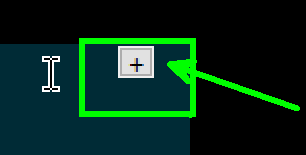
How to remove this + Icon in Post it view
-
Hi,
I started once again with notepad++ to have a distraction free writing tool with dark background.
Post-it view (F12) is awesome.Only this + Icon in the top right is quite distracting, especially when I move the window in post-it view, this icon stays at the same place overlaying everything…
Unfortunately I couldn’t find any way to remove or hide it.What could I try to get rid of it?
-
I’m afraid but as far as I know, you can’t get rid of it.


Hello! It looks like you're interested in this conversation, but you don't have an account yet.
Getting fed up of having to scroll through the same posts each visit? When you register for an account, you'll always come back to exactly where you were before, and choose to be notified of new replies (either via email, or push notification). You'll also be able to save bookmarks and upvote posts to show your appreciation to other community members.
With your input, this post could be even better 💗
Register Login