Community
    • Login

    "Function List" current function highlighting is too light?

    Scheduled Pinned Locked Moved Help wanted · · · – – – · · ·
    23 Posts 5 Posters 5.4k Views 2 Watching
    Loading More Posts
    • Oldest to Newest
    • Newest to Oldest
    • Most Votes
    Reply
    • Reply as topic
    Log in to reply
    This topic has been deleted. Only users with topic management privileges can see it.
    • andrecool-68A Offline
      andrecool-68 @PeterJones
      last edited by

      @PeterJones
      Try to call this window with this command:
      rundll32.exe shell32.dll,Control_RunDLL desk.cpl,Advanced,@Advanced

      1 Reply Last reply Reply Quote 0
      • guy038G Offline
        guy038
        last edited by guy038

        Hi, @alan-kilborn, @andrecool-68, @peterjones and All,

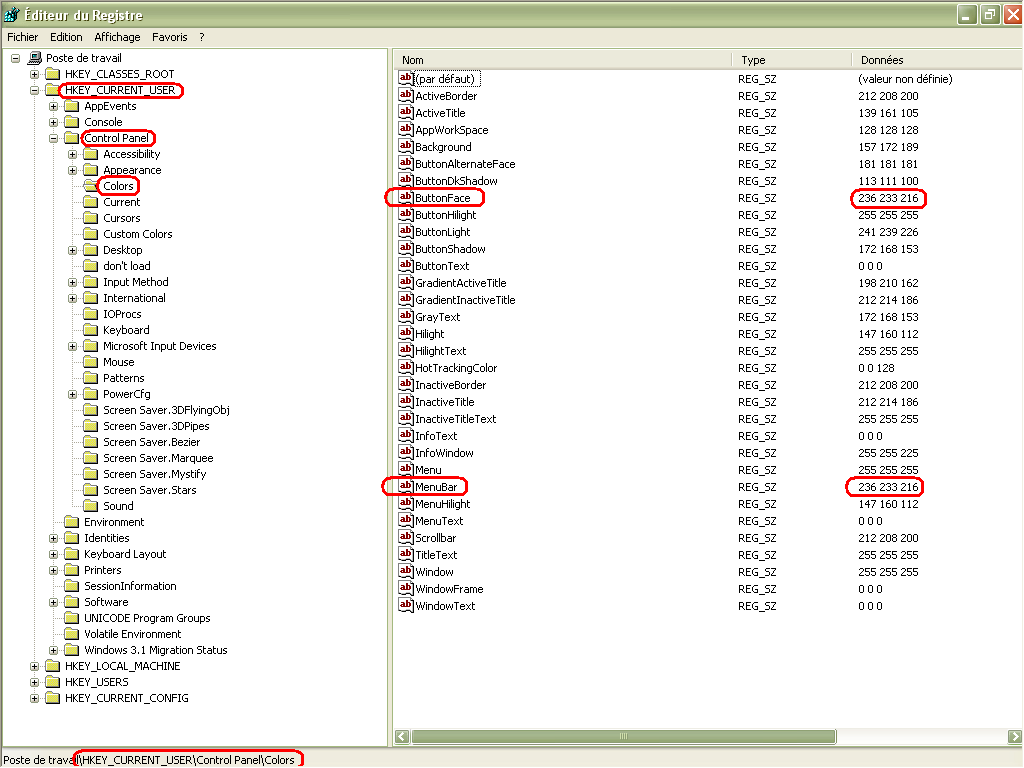
        Peter, you’re right ! The color of current function, in the Function List panel, seems to be controlled from the colors of the ButtonFace key !

        Here is my \HKEY_CURRENT_USER\Control Panel\Colors, on my Win XP laptop :
        40b29281-0365-47d4-9da1-0e622a4cbdfb-image.png

        As you can see, Peter, only two keys ( ButtonFace and MenuBar ) have colors 236, 233, 216, in my Win XP configuration

        We can see that the different keys are always the same, between win XP and Win 10! ! But, strangely, no reference to a 3D Objects key, seems to be visible in registry ?

        Best Regards,

        guy038

        1 Reply Last reply Reply Quote 2
        • PeterJonesP Offline
          PeterJones
          last edited by

          @andrecool-68 ,

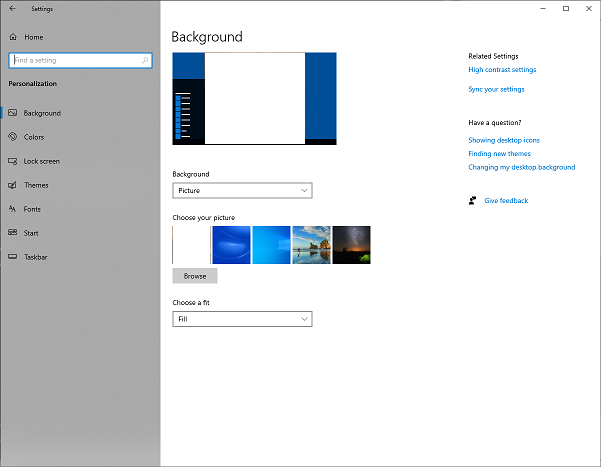
          Nope, that just launches dd05274f-e79a-4798-a7f0-ff29c8abed38-image.png , which doesn’t allow setting the individual colors.

          @guy038 ,

          Nice to know that same key works on both WinXP and Win10 for controlling it. My guess is that the “button” is the default “3d object” in old windows nomenclature, and they just stuck with that naming convention, even as things changed through the decades.

          Alan KilbornA 1 Reply Last reply Reply Quote 1
          • Alan KilbornA Offline
            Alan Kilborn @PeterJones
            last edited by

            @PeterJones said in "Function List" current function highlighting is too light?:

            Nice to know that same key works on both WinXP and Win10 for controlling it.

            I guess having WinXP still around does indeed have some usefulness! :-)

            EkopalypseE 1 Reply Last reply Reply Quote 0
            • EkopalypseE Offline
              Ekopalypse @Alan Kilborn
              last edited by

              @Alan-Kilborn

              or by using a dark theme :-D

              17f14ddc-82b3-403a-8bf5-b0fcc82795b5-image.png

              Alan KilbornA 1 Reply Last reply Reply Quote 2
              • Alan KilbornA Offline
                Alan Kilborn @Ekopalypse
                last edited by

                @Ekopalypse

                by using a dark theme

                Well now, THERE’s some contrast!

                But I’m confused, is that your display when you’ve just clicked on something in the Function List, or is that merely the function you are in as you are navigating the editor window? (Neither appears to be the case from the data shown?)

                EkopalypseE 1 Reply Last reply Reply Quote 1
                • EkopalypseE Offline
                  Ekopalypse @Alan Kilborn
                  last edited by

                  @Alan-Kilborn

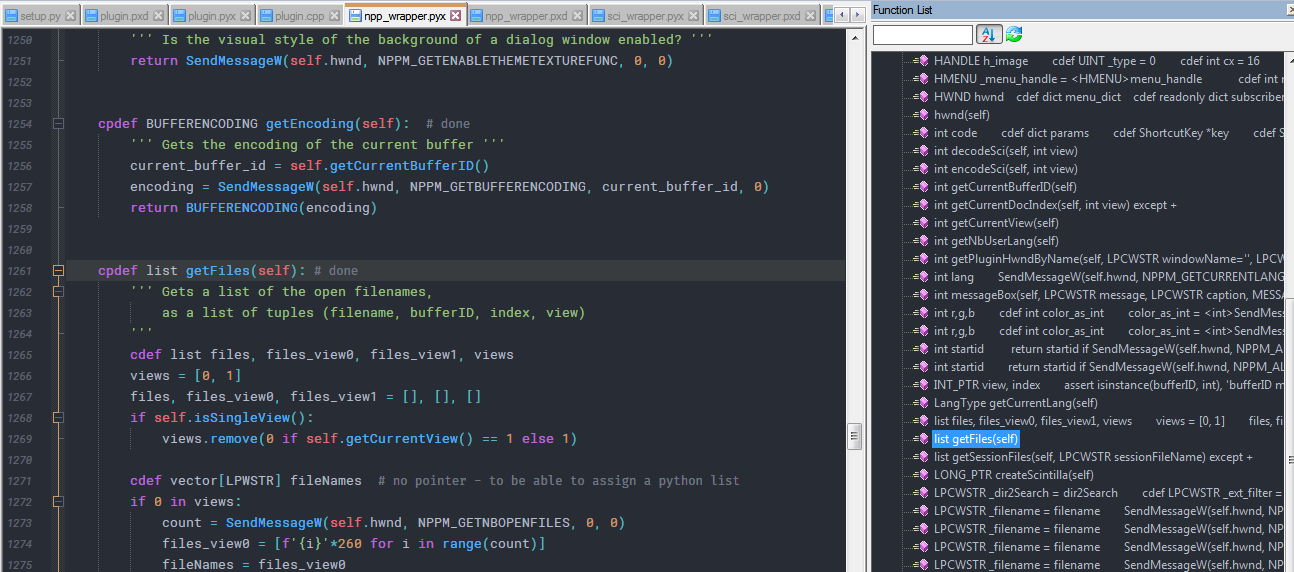
                  In this screenshot the focus was at the editor and I was moving the caret.
                  This is how it looks like when the function list has the focus and an item is selected
                  1054405b-f3c6-4c52-aacd-ad73c80fe60d-image.png

                  1 Reply Last reply Reply Quote 2
                  • Alan KilbornA Offline
                    Alan Kilborn
                    last edited by Alan Kilborn

                    I finally got some time to look deeper into the responses here. Thanks to everyone for their input.

                    Peter said:

                    I’ll stick with normals. Whether @Alan-Kilborn wants to go that route is up to him.

                    I took Peter’s “advice” and changed my ButtonFace to (224, 224, 224). This indeed makes the “inactive-but-inside” function in the list have better noticeability, without having any other negatives elsewhere in the Notepad++ (or Windows) UI.

                    I’m keeping that setting! :-)

                    PeterJonesP 1 Reply Last reply Reply Quote 2
                    • PeterJonesP Offline
                      PeterJones @Alan Kilborn
                      last edited by

                      This post is deleted!
                      1 Reply Last reply Reply Quote 0
                      • Alan KilbornA Offline
                        Alan Kilborn
                        last edited by

                        More on the topic of this thread is found HERE.

                        1 Reply Last reply Reply Quote 2

                        Hello! It looks like you're interested in this conversation, but you don't have an account yet.

                        Getting fed up of having to scroll through the same posts each visit? When you register for an account, you'll always come back to exactly where you were before, and choose to be notified of new replies (either via email, or push notification). You'll also be able to save bookmarks and upvote posts to show your appreciation to other community members.

                        With your input, this post could be even better 💗

                        Register Login
                        • First post
                          Last post
                        The Community of users of the Notepad++ text editor.
                        Powered by NodeBB | Contributors