Regex searching for NUL characters
-
@guy038 or anyone else with input:
In the FAQ it is implied that current Notepad++ has a problem doing regular expression searching for embedded NUL characters via this statement, which might at first read be confusing because it is talking about the benefits of using a non-standard N++ version:
“Both, search and replace strings can contain embedded NUL characters and/or Escape sequences for NUL characters ( \x{0000} )”
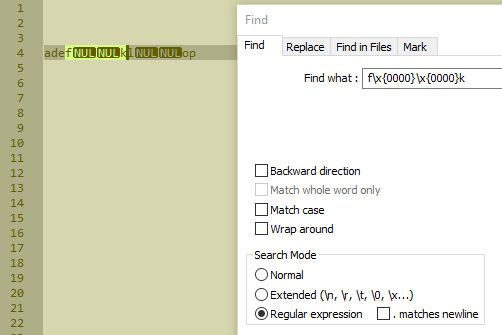
But…I did NOT find searching for embedded NULs to be a problem with Notepad++ 7.8.6; am I missing something?
-
Hello, @alan-kilborn and
All,When I wrote, in that FAQ that :
- Both, search and replace strings can contain embedded NUL characters and/or Escape sequences for NUL characters (
\x{0000})
I was referring, specifically, to the
Francois-R Boyerregex engine version !But, indeed, our present
Boostregex engine do handle theNULcharacters, but ONLY in the search regex ! EmbeddedNULchars in replacement, breaks the replacement process :-((
BTW, for the record, in the
Find what:zone, any of the regex syntaxes, below, can be used to match a single Control character NUL, of Unicode point-point0000:-
In
Regular expressionsearch mode :-
\0,\00,\000,\0000in octal -
\x0,\x00,\x{00},\x{000},\x{0000}in hexadecimal
-
-
In
Extendedsearch mode :-
\0( special syntax ) -
\d000,\o000,\b00000000,\x00in decimal, octal, binary and hexadecimal
-
Beware also that, in
Extendedsearch mode, you cannot search any string with contains characters after a first\0character. For instance, search of\0orabc\0do work properly but the search of\0abcor even\0\0fails !Best Regards,
guy038
- Both, search and replace strings can contain embedded NUL characters and/or Escape sequences for NUL characters (
-
@guy038 said in Regex searching for NUL characters:
our present Boost regex engine do handle the NUL characters, but ONLY in the search regex !
Ah, okay; thanks for the confirmation on what I was seeing in practice!
Is it clear that the FAQ entry is implying that the even a search does not currently work when that is truly not the case?Beware also that, in Extended search mode, you cannot search any string with contains characters after a first \0 character. For instance, search of \0 or abc\0 do work properly but the search of \0abc or even \0\0 fails !
Indeed, it appears to be a known issue to others besides yourself; see HERE.
Perhaps to someone with a C/C++ background, this behavior, although not good, is totally understandable!? :-)
I’m just thankful I don’t try to edit files with NULs very often.
-
So after a bit more real work with NULs…
I noticed that the Find result window, after a Find All in Current Document, on a line with NULs, shows only the part of the line BEFORE the first NUL.
A bit of time later, I noticed THIS. :-(
I do agree that NUL isn’t a typical use case for a text file, but…
-
Hi, @alan-kilborn and All,
Here is a solution, as a work-around, to manage the presence of the
NULcharacter(s) in a file :-
Choose an other character, not used, yet, in your file. Let’s take the
\x{007F}control character Delete -
So, you first run the regex S/R, below, with the
Wrap aroundoption and theRegular expressionsearch mode-
SEARCH
\0 -
REPLACE
\x7F
-
-
Then you perform all your text manipulations, in Notepad++
-
Finally, save your file and exit N++
-
As we cannot insert any
NULcharacter, with an N++ replacement, we’ll simply use the well known utilitysed.exe-
You can download its last Windows
v4.8 - 64 bitsversion, from https://github.com/mbuilov/sed-windows -
Or other versions, from https://github.com/mbuilov/sed-windows/tree/master/archive
-
-
Then, in a
DOSconsole window, type in and execute this simple command :sed.exe -i s/\x7f/\x00/Your_File
Best Regards,
guy038
-


Hello! It looks like you're interested in this conversation, but you don't have an account yet.
Getting fed up of having to scroll through the same posts each visit? When you register for an account, you'll always come back to exactly where you were before, and choose to be notified of new replies (either via email, or push notification). You'll also be able to save bookmarks and upvote posts to show your appreciation to other community members.
With your input, this post could be even better 💗
Register Login