Find and Insert rather Replace
-
This is my original code. What I am trying to do is insert another set of codes from this:
{
	id: 100
},
{
	info: 1000
},
{
	info: 1000
}
In order to make the codes like this
{
	id: 100
	info: {
		cute: true
	}
},
{
	id: 1000
	info: {
		cute: true
	}
},
{
	id: 10000
	info: {
		cute: true
	}
}
I used this which works fine when searching
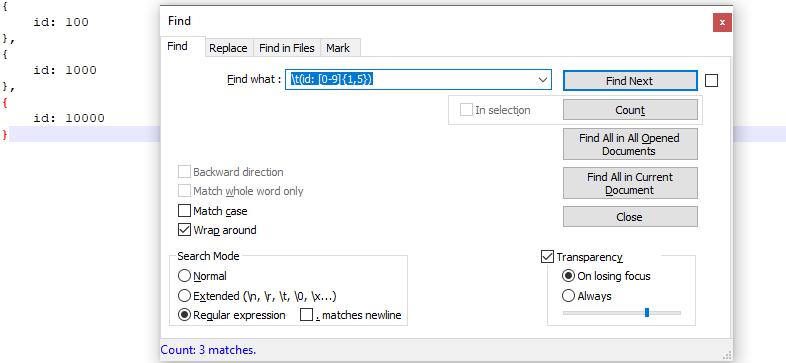
But I want to replace/insert the codes I want to it, it fails and this is the end result
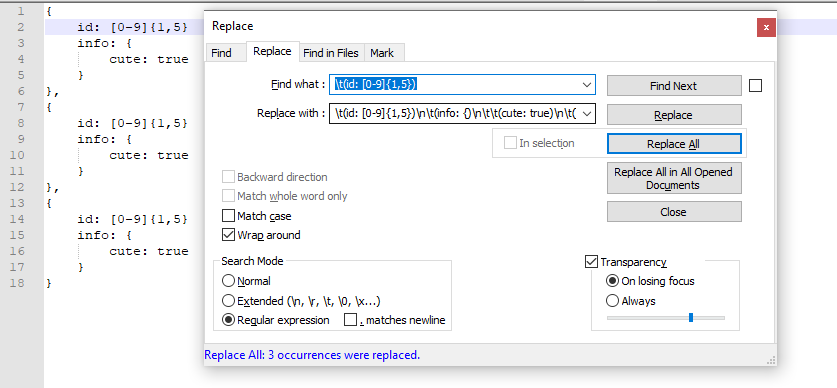
my regex might be wrong and garbage but it seems to work, the only proble mis that it replaces the regex from the search process. Is there way to avoid this?
-
You can use
${0}in your replace string to insert the contents of what was matched by the find string.
I think that is what you are asking for. -
Another technique is to use
\Kat the end of your find string.
In that usage you then do not use${0}in the replace.
Your replacement string will be inserted at the end of the text your find string matches.
I mention this usage because that seems to be what you are needing.However, if you ever have a situation where you want your find string text to be in the middle of a replacement, then the
${0}usage is the solution.


Hello! It looks like you're interested in this conversation, but you don't have an account yet.
Getting fed up of having to scroll through the same posts each visit? When you register for an account, you'll always come back to exactly where you were before, and choose to be notified of new replies (either via email, or push notification). You'll also be able to save bookmarks and upvote posts to show your appreciation to other community members.
With your input, this post could be even better 💗
Register Login