Emojis Not Showing On Windows 7
-
Hi,
I’m on Windows 7, 64Bit and have installed the most recent version of Notepad++ (7.8.7) and I do have the “An update for the Segoe UI symbol font in Windows 7 and in Windows Server 2008 R2 is available” (KB2729094) installed.
I open a new file, set to UTF-8 (also tried UTF-8-BOM as well and anything else as options), and paste my emojis (🐴🐎🐫🐑🐘🐍🐦🐤🐔🐧🐛🐙) and they show up as blank boxes (with a ‘?’ inside). What makes this strange is that other Unicode characters do work fine (☀☁☂☃☄☇☈ЀЁЂЃЄЅІЇЈЉ★☆✠✡✢✣✤ these work). Additionally, emojis work fine in Microsoft Visual Studio, Visual Studio Code, and LibreOffice Writer, so I don’t think this is an OS issue. (I just installed Vim to test another editor and they did not work in Vim so I’m not 100% certain)
Also, on my Windows 10 laptop, Emoji’s show up fine in Notepad++ with the exact same version, exact same font. I tried many fonts and emojis all work fine on Windows 10 but none work on Windows 7. Let’s use “Courier New” during this discussion though.
I would appreciate any help and I can provide screenshots or you can even call my cell phone if you want, this is important to me that I get this issue solved.
-
Maybe this related to this issue?
-
Works fine for me:
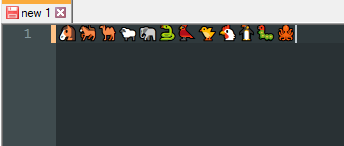
I"m using a build that includes this commit.
If you have NppExec of a different scripting plugin installed, you can turn this feature on. NppExec does it like this:
SCI_SENDMSG SCI_SETTECHNOLOGY SC_TECHNOLOGY_DIRECTWRITECheers.
-
@Michael-Vincent said in Emojis Not Showing On Windows 7:
@Green-NorrisWorks fine for me:
Whoops, should have read the fine print, I’m on WIndows 10, not WIndows 7. But maybe try my advice and see if that works? If not, it may be a Windows 7 font rendering issue?
Sorry.
Cheers.
-
@Michael-Vincent said in Emojis Not Showing On Windows 7:
But maybe try my advice and see if that works?
It works!
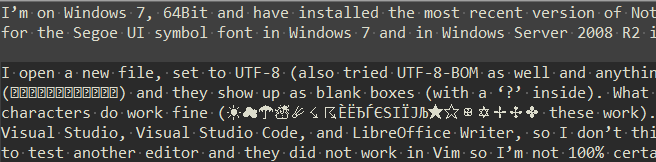
I’m on Windows 7 64bit and emojis are correctly displayed in a Firefox window, but in Notepad++ 7.8.6 get the blank boxes OP mentioned, as follows:
However, after applying the script you provided, emojis are correctly displayed
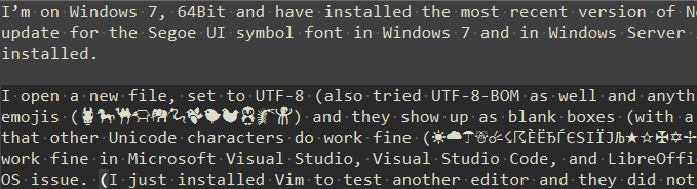
Thank you :)
-
@astrosofista said in Emojis Not Showing On Windows 7:
However, after applying the script you provided, emojis are correctly displayed
Great! Note that N++ version 7.8.7+ - that is to say whatever version will next be released looks to have this
SC_TECHNOLOGY_DIRECTWRITEas an option in the Settings => Preferences => MISC. dialogue.But a script for now is just as good while we wait!
Cheers.




Hello! It looks like you're interested in this conversation, but you don't have an account yet.
Getting fed up of having to scroll through the same posts each visit? When you register for an account, you'll always come back to exactly where you were before, and choose to be notified of new replies (either via email, or push notification). You'll also be able to save bookmarks and upvote posts to show your appreciation to other community members.
With your input, this post could be even better 💗
Register Login