Open text file and jump to the end
-
Hey Guys, can i open a text file like a log File and jump automaticly to the end of the file?
Maybe with a aditional parameter. Or with nen start macro.
I know i can press Strg+End, but other people dont know this. -
That feature is not built into Notepad++ as far as I am aware.
To get an “[on] start macro”, you could use a plugin like PythonScript, and add
editor.documentEnd()tostartup.py, with the PythonScript > Configuration setting Initialisation:ATSTARTUP<edit>: That will only get it in the first active window. If you also want it every time you load a new file, you’d also have to define a callback for
NOTIFICATION.FILEOPENED(there are some examples of callbacks in the PythonScript docs after you install the plugin)</edit> -
@Rahan-Bölzer said in Open text file and jump to the end:
I know i can press Strg+End, but other people dont know this.
I think you mean Shift+End , but it could be that “Strg” is a non-English keyboard thing that I’ve never heard of.
Anyway, Shift+End is a keycombo that works in most Windows programs – wouldn’t it be a good idea to educate other people about how things work?
That seems to me like the best solution. -
@Alan-Kilborn said in Open text file and jump to the end:
I think you mean Shift+End
I think you mean
Ctrl+End. By default,Shift+Endselects to the end of the line. By default,Ctrl+Endmoves the cursor to the end of the document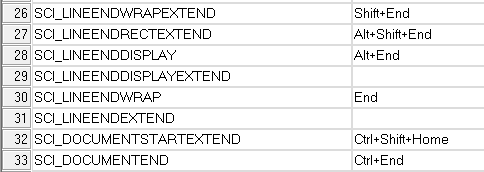
-
@PeterJones said in Open text file and jump to the end:
I think you mean Ctrl+End
Yep, oops.
That shows how little I think about it – I just DO IT!
If you learn it and train yourself in its use early on, it becomes second-nature muscle-memory.
One more argument for educating the masses.(I think I was thrown in what I was typing by OP’s use of “Strg” which made me think of “Shift”).
Regardless, where I said Shift in my previous post, replace with Ctrl !
Sorry. -
@Alan-Kilborn said in Open text file and jump to the end:
it could be that “Strg” is a non-English keyboard
Specifically, according to a quick search, Wiki says it’s German keyboards, being the abbreviation for “Steuerung”.
-
@PeterJones said in Open text file and jump to the end:
Wiki says it’s…
The key part of that:
…(thus e.g. “Ctrl” is translated to its German equivalent “Strg”, for Steuerung).
-
@Rahan-Bölzer said in Open text file and jump to the end:
and jump automaticly to the end of the file
It’s a bit “hacky”, but could you just use the
-ncommand line argument and put in a ridiculously large number (i.e., greater than the number of lines in your file)?For me, opening a 2827 line file with:
notepad++.exe -n1000000000 file.txtputs the cursor on the last line of that file.
Note: Windows 10 64-bit, Notepad++ 7.9 64-bit
Cheers.
-
@Michael-Vincent said in Open text file and jump to the end:
It’s a bit “hacky”, but could you just use the -n command line argument
I 💙 this solution.
I don’t see it as “hacky”.
Well…
I don’t see it that way because we’re all about “hacks” here. :-) -
@Alan-Kilborn said in Open text file and jump to the end:
I don’t see it as “hacky”.
I was hoping
-1(negative one) would be like “last array element” and bring me to the last line, but it didn’t work. I would think that would be “less hacky”.:-)
Cheers.




Hello! It looks like you're interested in this conversation, but you don't have an account yet.
Getting fed up of having to scroll through the same posts each visit? When you register for an account, you'll always come back to exactly where you were before, and choose to be notified of new replies (either via email, or push notification). You'll also be able to save bookmarks and upvote posts to show your appreciation to other community members.
With your input, this post could be even better 💗
Register Login