NppFTP Unable to connect
-
Npp 7.9 64
NppFTP 0.30 64
or 0.29.6I am testing connecting to various FTP servers.
Including to ftp://91.122.30.115/
this server has public access.
I have tried various settings.
Anyway I get
-> TYPE I
Connecting
-> Quit
Unable to connect
Disconnected
-> TYPE I
Connecting
-> Quit
Unable to connect
DisconnectedTo any server.
I even began to doubt - does the program have Internet access?
BUT if you select the connection type FTPS, then the server response:
Connecting
[SFTP] Connection failed: Failed to resolve hostname ftp://astral.com.ru ()
Unable to connect
DisconnectedFILEZILLA is the standard as always!
Status: Determining the IP address for astral.com.ru
Status: Connecting to 185.26.122.47:21 …
Status: Connection established, awaiting invitation …
Answer: 220 ProFTPD 1.3.5e Server (Hostland server) [:: ffff: 185.26.122.47]
Command: AUTH TLS
Reply: 234 AUTH TLS successful
Status: Initializing TLS …
Status: Certificate Verification …
Status: TLS connection established.
Command: USER host701097
Answer: 331 Password required for host701097
Command: PASS ***********************
Reply: 230-User ‘host701097’ allowed by access rules
Answer: 230 User host701097 logged in
Command: SYST
Answer: 215 UNIX Type: L8
Command: FEAT
Answer: 211-Features:
Answer: CCC
Answer: PBSZ
Answer: AUTH TLS
Answer: MFF modify; UNIX.group; UNIX.mode;
Answer: REST STREAM
Answer: MLST modify *; perm *; size *; type *; unique *; UNIX.group *; UNIX.mode *; UNIX.owner *;
Answer: UTF8
Answer: EPRT
Answer: EPSV
Answer: LANG bg-BG; ko-KR; fr-FR; es-ES; ru-RU; ja-JP; zh-TW; it-IT; en-US *; zh-CN
Answer: MDTM
Answer: SSCN
Answer: TVFS
Answer: MFMT
Answer: SIZE
Answer: PROT
Answer: 211 End
Command: OPTS UTF8 ON
Answer: 200 UTF8 set to onI saw a recommendation in one of your answers:
provide debug information
and where to get it? I would like to see it myself. -
Not properly
ftp://91.122.30.115
ftp://ya.ru
right
91.122.30.115
ya.ru -
@Дмитрий-Суричев said in NppFTP Unable to connect:
provide debug information
and where to get it? I would like to see it myself.Go to the ? menu in Notepad++, and it has a Debug Info entry.
When I tried with the ftp://91.122.30.115/ URL (by the way, it would have been nice if your “working filezilla” example had actually been to the same site as your “not-working NppFTP” example) – FileZilla gave
Status:	Connecting to 91.122.30.115:21...
Status:	Connection established, waiting for welcome message...
Status:	Insecure server, it does not support FTP over TLS.
Status:	Server does not support non-ASCII characters.
Status:	Logged in
Status:	Retrieving directory listing of "/"...
Status:	Directory listing of "/" successful
With no username or password, using FTP, NppFTP gave
[NppFTP] Everything initialized
-> TYPE I
Connecting
-> Quit
220 Welcome to Pineforest.info FTP service.
-> USER
331 Please specify the password.
-> PASS *HIDDEN*
503 Login with USER first.
Unable to connect
Disconnected
When I changed the settings to give an anonymous username, and ask for a dummy password
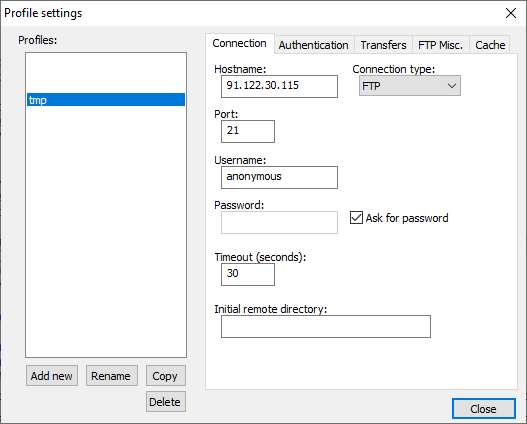
When I ran that connection I typed
anonymous, it gave:-> TYPE I Connecting -> Quit 220 Welcome to Pineforest.info FTP service. -> USER anonymous 331 Please specify the password. -> PASS *HIDDEN* 230 Login successful. -> TYPE A 200 Switching to ASCII mode. -> MODE S 200 Mode set to S. -> STRU F 200 Structure set to F. -> PWD 257 "/" is the current directory Connected -> CWD / 250 Directory successfully changed. -> PASV 227 Entering Passive Mode (91,122,30,115,135,92) -> LIST 150 Here comes the directory listing. 226 Directory send OK.So NppFTP connected just fine to ftp://91.122.30.115/
? > Debug Info:
Notepad++ v7.9   (64-bit)
Build time : Sep 22 2020 - 03:19:04
Path : C:\usr\local\apps\notepad++\notepad++.exe
Admin mode : OFF
Local Conf mode : ON
OS Name : Windows 10 Enterprise (64-bit)
OS Version : 1903
OS Build : 18362.1016
Current ANSI codepage : 1252
Plugins : ComparePlugin.dll LuaScript.dll MarkdownViewerPlusPlus.dll mimeTools.dll NppConsole.dll NppConverter.dll NppEditorConfig.dll NppExec.dll NppExport.dll NppFTP.dll NppUISpy.dll PreviewHTML.dll PythonScript.dll QuickText.dll TagLEET.dll XMLTools.dll
Plugins > NppFTP > About
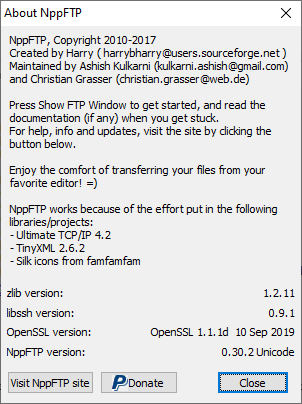
So, it works for me.


Hello! It looks like you're interested in this conversation, but you don't have an account yet.
Getting fed up of having to scroll through the same posts each visit? When you register for an account, you'll always come back to exactly where you were before, and choose to be notified of new replies (either via email, or push notification). You'll also be able to save bookmarks and upvote posts to show your appreciation to other community members.
With your input, this post could be even better 💗
Register Login