Community
    • Login

    What does "Save" button in the Window panel do?

    Scheduled Pinned Locked Moved Help wanted · · · – – – · · ·
    20 Posts 2 Posters 7.4k Views 1 Watching
    Loading More Posts
    • Oldest to Newest
    • Newest to Oldest
    • Most Votes
    Reply
    • Reply as topic
    Log in to reply
    This topic has been deleted. Only users with topic management privileges can see it.
    • EkopalypseE Offline
      Ekopalypse @Dennis64x
      last edited by Ekopalypse

      @Dennis64x - strange, it does for me.
      Can you post your debug info which is available from the last menu, the ? menu?

      Dennis64xD 1 Reply Last reply Reply Quote 0
      • Dennis64xD Offline
        Dennis64x @Ekopalypse
        last edited by

        @Ekopalypse Sure, it is

        Notepad++ v7.8.7   (64-bit)
        Build time : Jun  5 2020 - 02:38:56
        Path : C:\Users\Emre\Desktop\npp.7.8.7.bin.x64\notepad++.exe
        Admin mode : OFF
        Local Conf mode : ON
        OS Name : Windows 10 Pro (64-bit) 
        OS Version : 2004
        OS Build : 19041.508
        Current ANSI codepage : 1254
        Plugins : Explorer.dll mimeTools.dll NppConverter.dll NppExport.dll 
        
        
        EkopalypseE 1 Reply Last reply Reply Quote 0
        • EkopalypseE Offline
          Ekopalypse @Dennis64x
          last edited by Ekopalypse

          @Dennis64x
          Apart from using Windows 10, your setup is similar to mine.
          Let me check the source code to see what it does under the hood.

          1 Reply Last reply Reply Quote 0
          • EkopalypseE Offline
            Ekopalypse
            last edited by

            @Ekopalypse

            According to here it sends an WDN_NOTIF and in big switch it checks and saves the document.

            You do have the file selected, don’t you?

            Dennis64xD 1 Reply Last reply Reply Quote 0
            • Dennis64xD Offline
              Dennis64x @Ekopalypse
              last edited by

              @Ekopalypse Yes, file is selected

              1 Reply Last reply Reply Quote 0
              • EkopalypseE Offline
                Ekopalypse
                last edited by

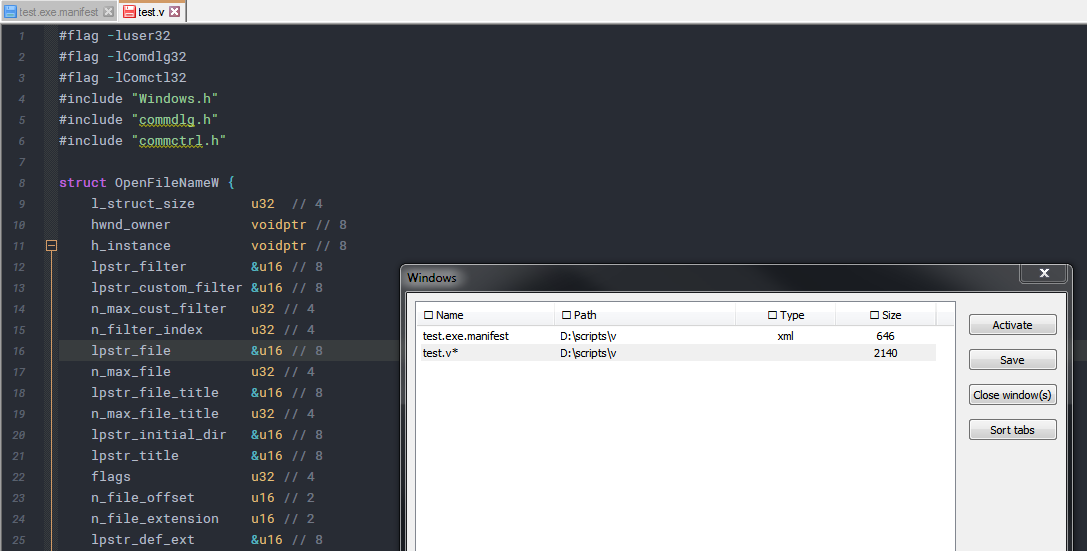
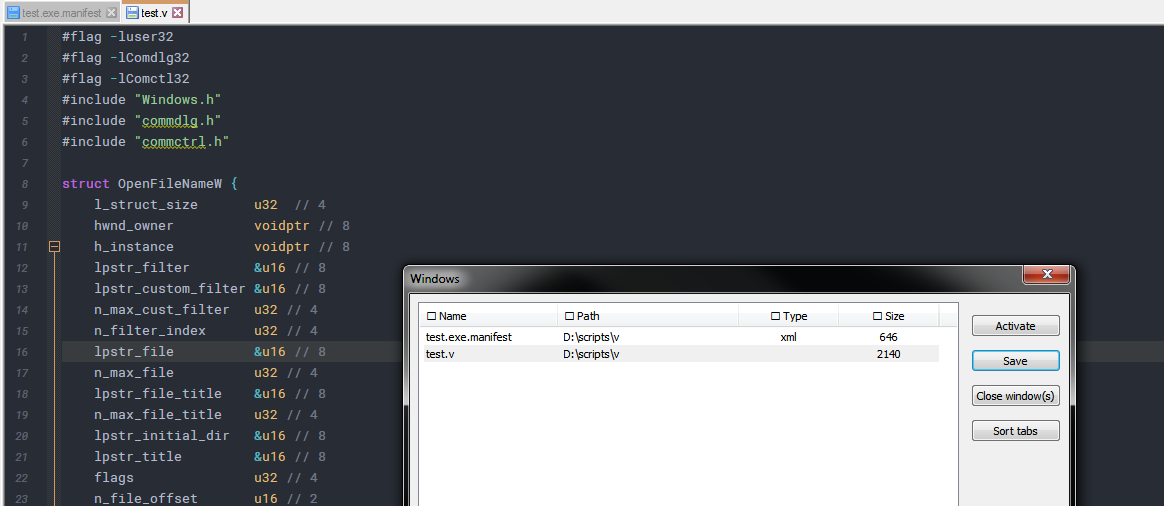
                Before
                a7185d3e-2069-4309-bea8-36981bdd49c5-image.png

                after pressing save

                fc256423-951b-47d4-98ad-64933d4bf4e4-image.png

                Dennis64xD 2 Replies Last reply Reply Quote 1
                • Dennis64xD Offline
                  Dennis64x @Ekopalypse
                  last edited by

                  @Ekopalypse Hmm, I’ll try with different tabs and report back

                  1 Reply Last reply Reply Quote 1
                  • Dennis64xD Offline
                    Dennis64x @Ekopalypse
                    last edited by Dennis64x

                    @Ekopalypse I tried “Activate”, “Close window(s)” and “Sort tabs” buttons. They’re working fine. But in “Save” button there is no response or any file activity.

                    EkopalypseE 1 Reply Last reply Reply Quote 0
                    • EkopalypseE Offline
                      Ekopalypse @Dennis64x
                      last edited by

                      @Dennis64x

                      Can you give it a try with a fresh portable from here?
                      Just unzip it to where ever you want. Close the old instances and run the portable one.

                      Dennis64xD 1 Reply Last reply Reply Quote 2
                      • Dennis64xD Offline
                        Dennis64x @Ekopalypse
                        last edited by

                        @Ekopalypse It worked with fresh portable build. I was using default NPP portable it tough but I think it’s because some of 32bit or 64bit addons.

                        EkopalypseE 1 Reply Last reply Reply Quote 0
                        • EkopalypseE Offline
                          Ekopalypse @Dennis64x
                          last edited by

                          @Dennis64x except for the explorer plugin all others you use are standard.
                          And I assume that a 32bit plugin will not be loaded from a 64bit npp.

                          EkopalypseE Dennis64xD 2 Replies Last reply Reply Quote 0
                          • EkopalypseE Offline
                            Ekopalypse @Ekopalypse
                            last edited by

                            @Ekopalypse

                            you can try to temporarily rename your plugins directory and see if it
                            works with the primary installation.

                            1 Reply Last reply Reply Quote 0
                            • Dennis64xD Offline
                              Dennis64x @Ekopalypse
                              last edited by Dennis64x

                              @Ekopalypse Oh, I did what you said. You’re right, the problem is the plugin. When I changed the name of the plugin folder, the “Save” button works
                              Thanks a lot!

                              1 Reply Last reply Reply Quote 0
                              • EkopalypseE Offline
                                Ekopalypse
                                last edited by

                                @Dennis64x
                                Now the question is which plugin is causing this. It must be explorer plugin but I use this as well. How did you install this plugin? Via plugin admin?

                                Dennis64xD 1 Reply Last reply Reply Quote 0
                                • Dennis64xD Offline
                                  Dennis64x @Ekopalypse
                                  last edited by

                                  @Ekopalypse No, I didn’t use the “Plugin Admin” because the default plugin was not available for 64bit NPP so I searched for an alternative. I found this https://github.com/oviradoi/npp-explorer-plugin, then installed manually.

                                  EkopalypseE 1 Reply Last reply Reply Quote 0
                                  • EkopalypseE Offline
                                    Ekopalypse @Dennis64x
                                    last edited by

                                    @Dennis64x

                                    according to plugin admin this is the same I use

                                    File browser. You can open whatever you want from it in Notepad++, just double click!
                                    Author: Jens Lorenz
                                    Homepage: https://github.com/oviradoi/npp-explorer-plugin
                                    

                                    Really strange … need to go to bed … already 1 am here - have a nice whatever where ever all you are :-D

                                    Dennis64xD 1 Reply Last reply Reply Quote 0
                                    • Dennis64xD Offline
                                      Dennis64x @Ekopalypse
                                      last edited by

                                      @Ekopalypse Thank you for everything. Have a good sleep :)

                                      1 Reply Last reply Reply Quote 1

                                      Hello! It looks like you're interested in this conversation, but you don't have an account yet.

                                      Getting fed up of having to scroll through the same posts each visit? When you register for an account, you'll always come back to exactly where you were before, and choose to be notified of new replies (either via email, or push notification). You'll also be able to save bookmarks and upvote posts to show your appreciation to other community members.

                                      With your input, this post could be even better 💗

                                      Register Login
                                      • First post
                                        Last post
                                      The Community of users of the Notepad++ text editor.
                                      Powered by NodeBB | Contributors