Interesting 'Recent Files' menuing situation
-
I have a “blank” item in my File menu:
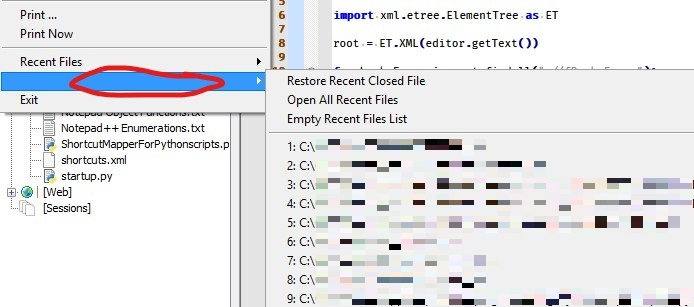
The Recent Files item just above it appears the same when expanded:
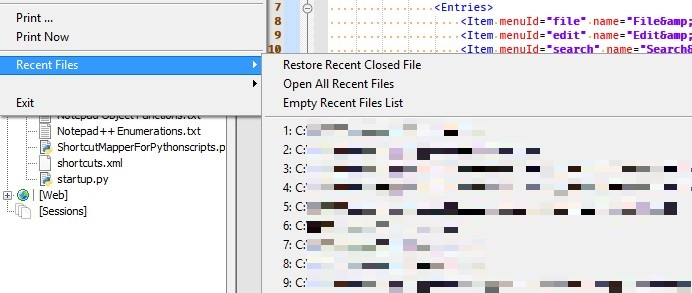
Any ideas how to fix?
(Meaning how to remove the “blank” one) -
-
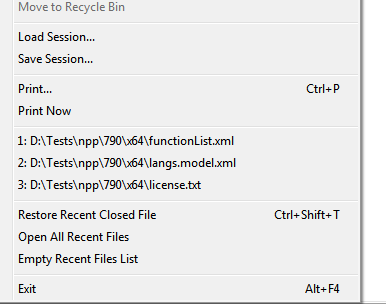
The menu Alan showed for his unnamed > submenu is what I see in my Recent Files > submenu, if Settings > Preferences > Recent Files History > In Submenu is enabled. But I see just the one Recent Files >, without the second unnamed > submenu. If that option is disabled (default condition), I have a menu similar to what @Ekopalypse showed.
Maybe Alan has that enabled, and his playing around with
english_customizable.xmlhas confused somethnig -
@PeterJones said in Interesting 'Recent Files' menuing situation:
Maybe Alan has that enabled, and his playing around …
I’m pretty sure he is - he loves doing this :-)
The menu Alan showed for his unnamed
ha, never noticed this one before.
-
@PeterJones said in Interesting 'Recent Files' menuing situation:
if Settings > Preferences > Recent Files History > In Submenu is enabled
Of course that is enabled for me.
I didn’t think it worth mentioning, because it can be seen.
(But if one is unfamiliar with that even setting even existing…)I haven’t seen how any “hacking” of english_customizable.xml could get an extra menu entry created.
I suppose one could set an entry’s caption to be""in the xml, although I haven’t done that and don’t see the use.
Plus, this is fairly obviously a duplicated menu entry somehow, which I tried to make clear in the screenshots.BTW, and this is only tangentially related, I have noticed problems with files I close not appearing in the recent-files-list. Perhaps if I close them via script they don’t get put in the list (although I thought they do). I will have to keep a closer eye on this going forward.
-
The “if” clause was mostly meant to explain the difference between yours and eko’s – because I don’t assume people (even experienced users) know what every option does (there are plenty that I don’t know, or forget)
My thought on the english_customizable was that maybe a typo (maybe one of the ID numbers got changed) or misbalanced quotes or angle-brackets has caused confusion in the parser, creating the second menu.
Or maybe you have two
<History>sections in config.xml.If you start with a fresh portable, does it render correctly (even after loading and closing files so you have a history, and restarting)? If you backup config.xml, and try to File > Empty Recent File List, then restart, does that fix the problem?
-
My thought on the english_customizable was that maybe a typo (maybe one of the ID numbers got changed) or misbalanced quotes or angle-brackets has caused confusion in the parser, creating the second menu.
Hmm, a localization change doesn’t create menus/items, so I fail to see how this could happen, but I guess anything is possible.
Or maybe you have two <History> sections in config.xml.
Verified as a No, I don’t.
Well, either a restart of N++ or a changing to English caused the duplicate-but-blank menu item to disappear.
BUT…I’ve seen it before, so I know that it will likely reappear.
I’ll keep an eye out for its return and see if I can figure out more about it and what might cause it.Thanks to those that offered input.



Hello! It looks like you're interested in this conversation, but you don't have an account yet.
Getting fed up of having to scroll through the same posts each visit? When you register for an account, you'll always come back to exactly where you were before, and choose to be notified of new replies (either via email, or push notification). You'll also be able to save bookmarks and upvote posts to show your appreciation to other community members.
With your input, this post could be even better 💗
Register Login