New copy colored text command in Notepad++ 7.9.1
-
One of the new features in 7.9.1 is the ability to copy out some text that you’ve colored with one of the 5 styling colors.
So, say you color some text (select text, right-click, Style token, choose color style):
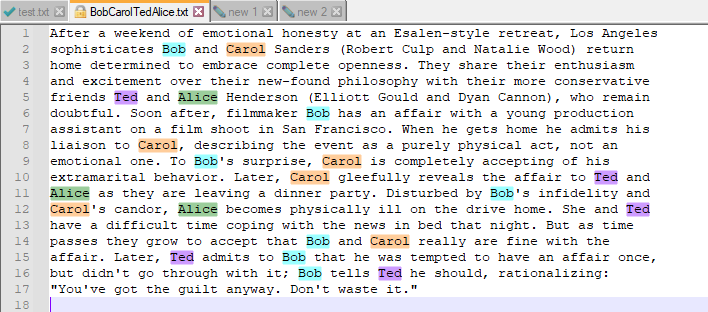
And then you execute from the Search menu, Copy Styled Text, then All styles.
Pasting the result somewhere else gives you:
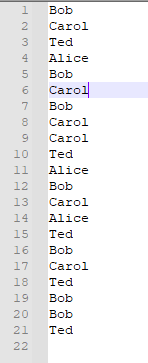
But, wait…why do I want this? I’ve got 7 copies of
Bob, 6Carols, etc. It’s, well, overwhelming with its duplication. This is just a test case, but in a real-world example I wouldn’t need all these copies of the same stuff over and over.I was going to turn this into a “complaint” posting (because we all like those!), but the it occurred to me that I could use another 7.9.1 feature to “fix” this.
I went to the Edit menu, Line Operation, Remove Duplicate Lines and I was left with what I thought I should get in the first place:
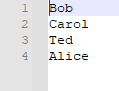
(Sorting first and then using the old Remove Consecutive Duplicate Lines works as well, but in a real situation, maybe sorting is not desired)
So, turned the “complaint” into a “success story”. :-)
-
BTW, in my poking around with other new 7.9.1 features, I just noticed that the above screenshot shows another one:
Arguably better tab icons for the different “conditions” files can be in:
- green check mark: file is saved to disk
- yellow pencil: file has edits and is different from its disk version, or has never been saved
- golden lock: file is readonly
- eyeball (not shown): when a file is “monitored” via View menu’s Monitoring (tail -f) (this is unchanged by 7.9.1)
These new icons can be turned on in Settings (menu) > Preferences > General > Tab Bar > Alternate icons
So my technique shown HERE for hacking the tab icons is now obsolete and that is probably a good thing. :-)
-
@Alan-Kilborn said in New copy colored text command in Notepad++ 7.9.1:
Arguably better tab icons for the different “conditions” files can be in
I just noticed that using these new icons can solve the ages-old problem of not being able to tell when you have an inactive, read-only tab.
With the old “diskette” icons, the dimming effect of the tab being inactive could make the user unable to tell if it was a readonly tab or not.
-
@Alan-Kilborn said in New copy colored text command in Notepad++ 7.9.1:
So my technique shown HERE for hacking the tab icons is now obsolete and that is probably a good thing
It was a great thing and I used it to change my icons. Happy it’s native to N++ now, but I’m keeping that script you provided. It’s an awesome hack to automate resource changes to an executable that I barely knew how to do - even manually.
Cheers.
-
@Alan-Kilborn Thanks a lot. Solved my problem too.



Hello! It looks like you're interested in this conversation, but you don't have an account yet.
Getting fed up of having to scroll through the same posts each visit? When you register for an account, you'll always come back to exactly where you were before, and choose to be notified of new replies (either via email, or push notification). You'll also be able to save bookmarks and upvote posts to show your appreciation to other community members.
With your input, this post could be even better 💗
Register Login