Styling '
-
In my UDL, I’m having trouble getting
'to style.I tried using
&#as a keyword in prefix mode, but nothing happens.And I tried it for a number,
prefix1: &#andsuffix1: ;but it still doesn’t colour.And I don’t even have
&or#defined as operators. -
For numbers, it can work, either as prefix2:
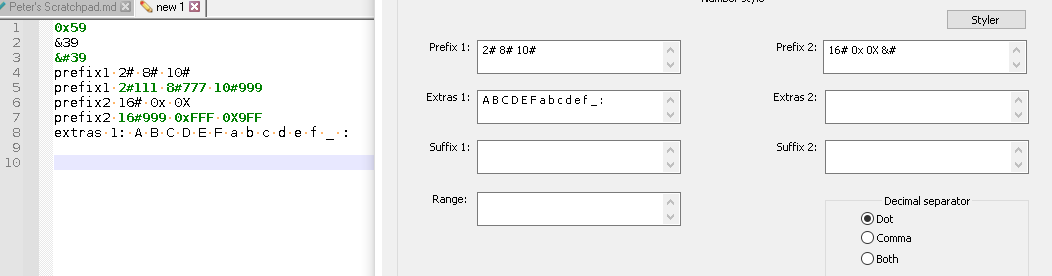
or as prefix1:
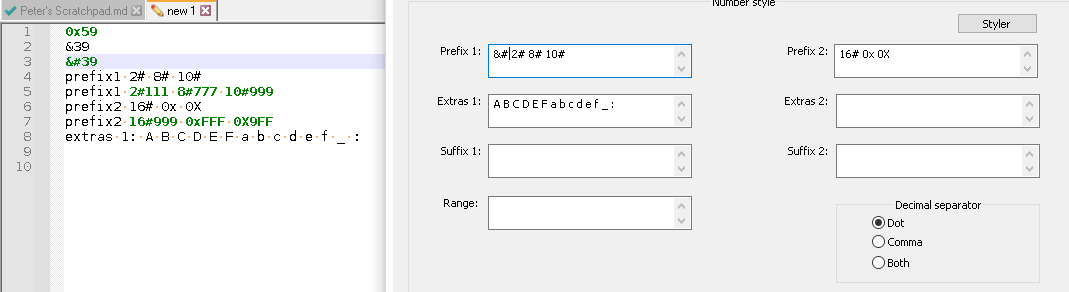
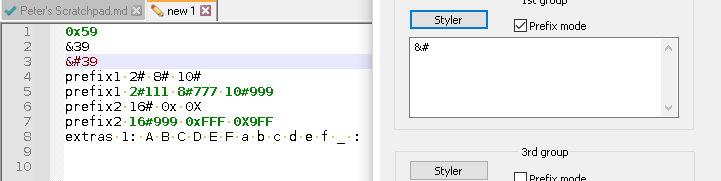
I also took it out of both numeric prefixes, and moved it to keyword1 in prefix mode, and it worked correctly for me:
(Side experiment: to get both
&#and&to work as number-prefixes in the same category, you have to order it as&# &. In keyword, it didn’t matter, probably because&#matches&-prefix anyway. In numbers, it matters, because # wasn’t an “extra” numeric character)Can you show us a minimal example? (Create a brand new UDL – or just use the default “user defined” – assign the active document to User Defined, and show the screenshot of both your text and the relevant UDL-dialog entry, like I did (if UDL is floating, like mine was, you can use Snipping Tool /
Win+Shift+Sto grab both text and UDL at once; if UDL docked, a simpleAlt+PrintScreenwill grab everything you need)here is the example text I was using.
0x59 &39 ' prefix1 2# 8# 10# prefix1 2#111 8#777 10#999 prefix2 16# 0x 0X prefix2 16#999 0xFFF 0X9FF extras 1: A B C D E F a b c d e f _ :I set the keyword1 to burgandy/red, and the numeric to bold green
-
Thanks, Peter.
You know, it works easily as a keyword in a fresh UDL, but not in my squiffy UDL. I can’t figure it out. There’s not even much in the UDL.
-
@BGM-Coder said in Styling ':
not in my squiffy UDL
Works for me. Well, the UDL you linked didn’t define &# as a prefix-keyword. So I added it to keyword4, and it highlighted just fine:
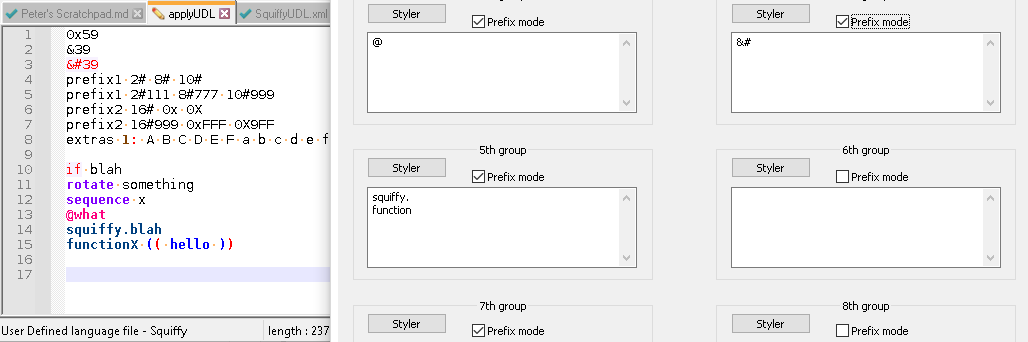
I added some of your other keywords, to prove the other squiffy keywords were also highlighting for me. But the critical thing is that
'is highlighted red, matching the definition of keyword4Or, if you’d prefer it to count as a number:

Either work for me, starting with your UDL xml that I downloaded from the link you shared.
Maybe you need to delete your SquiffyUDL.xml, exit Notepad++, download a fresh copy into your UDL folder, and reload Notepad++ (maybe it got “stuck” somehow). Or maybe there’s an example set of data that doesn’t work, whereas the data I show does work – maybe there’s some contextual problem with your exact sequence of data that makes it not work, even though it works with my example data.
-
You know what? I’m usually tech support for people, and they come and tell me that something isn’t working. I ask them to show me, and then they can’t get it to not work.
Now I spent an hour trying to get that to work in my UDL, but it would not colour no matter what I did.
But just now, on a whim, after reading that it worked for you, I went and stuck
&#in the exact same place I had tried it before (I like it in Styler 3 just below the@) and it just worked.I have no explanation why except that I deserve every bit of my frustration for whatever I have done in my life so far.
Now it’s working for some reason! haaaaaaaaaahhhhhaaaaa
-
Oh - thanks, Peter, for your time and for looking at it for me!


Hello! It looks like you're interested in this conversation, but you don't have an account yet.
Getting fed up of having to scroll through the same posts each visit? When you register for an account, you'll always come back to exactly where you were before, and choose to be notified of new replies (either via email, or push notification). You'll also be able to save bookmarks and upvote posts to show your appreciation to other community members.
With your input, this post could be even better 💗
Register Login