How do I use ctrl+backspace shortcut to delete word's worth in Notepad++ because it won't let me
-
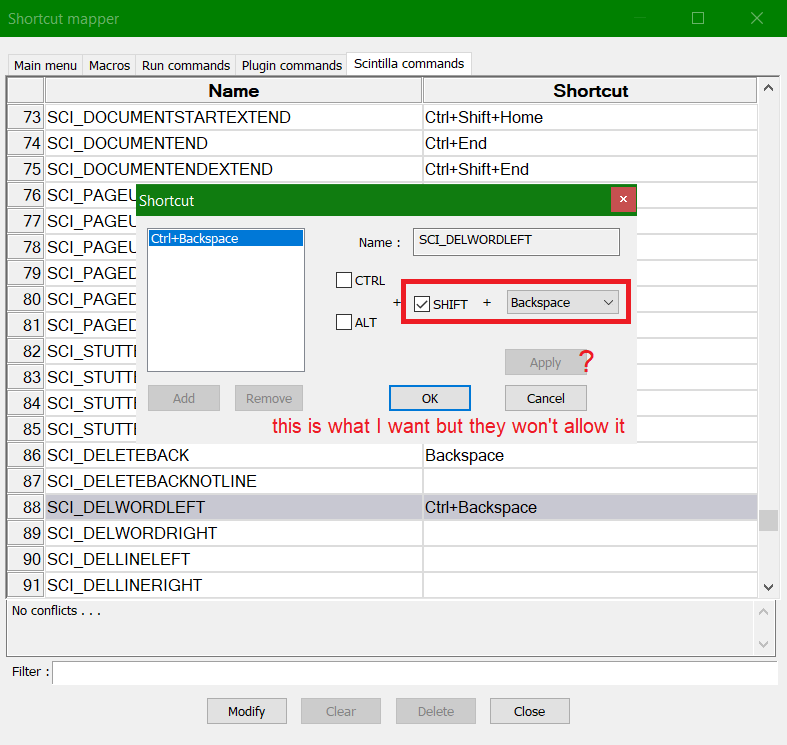
I wanted to use shift+backspace to use to erase a word’s worth like on how a normal computer I would type, but notepad++ wouldn’t allow me to unless I’d add ctrl or alt to it
It’s because of consistency’s sake that I wanted it to add on to this, and some of the keys could work it’s just that a few exceptions they won’t let me allow to use the shortcut I wanted like this shift+backspace here.
I would love to help me on this if you want to suggest me on anything or to find a plugin to make something like this possible to work
-
i have no idea , but i see shift + backspace is already in use . did you try to clear those dependencies first ?
-
no conflicts, I’ve deleted them all and the default for shift backspace is supposedly just the backspace button, it’s just another shortcut added in Notepad++
-
This post is deleted! -
Interesting. I can confirm that other keystrokes will allow me to Add and/or Apply, but it won’t let me do
Shift+Backspace.I even went to
SCI_DELETEBACK, which by default (verified with fresh portable edition unzip) hasShift+Backspaceas the alternate keystroke:
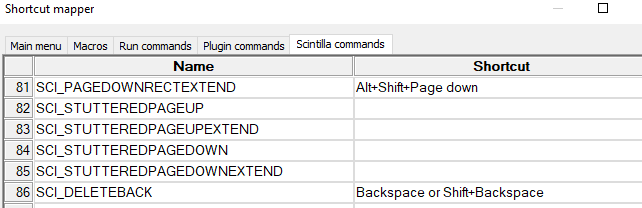
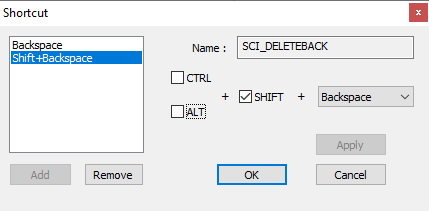
If I Remove the
Shift+Backspaceentry, it now doesn’t allow me to Add and/or Apply
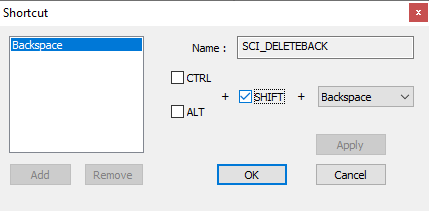
whereas if I try a different keystroke (like
Alt+Shift+Backspace), those entries are enabled:
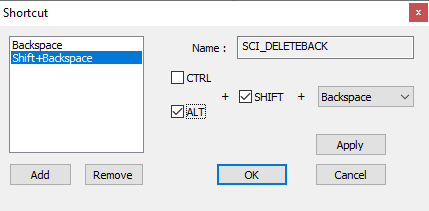
If I cancel out of there (I don’t want to lose
Shift+Backspacefor now) and go to a different Scintilla command (SCI_DELETEBACKNOTLINE) – if I try to pickShift+Backspace
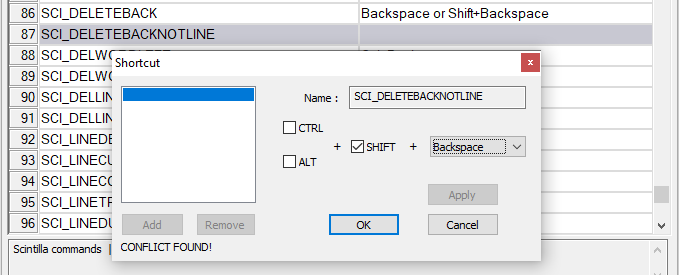
… it tells me there’s a conflict and won’t let me Add/Apply. If I try just backspace, it also tells me there’s a conflict and won’t let me Add/Apply.
But if I try a different key (like
TAB), it tells me there is a conflict, but it will let me Add/Apply:
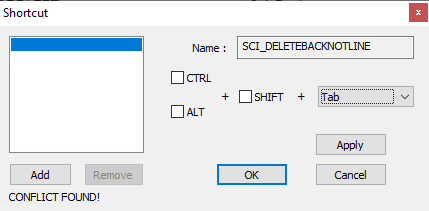
So, the shortcut mapper treats
BackspaceandShift+Backspacedifferent from other keys.It may be the the OS doesn’t allow (or doesn’t always honor) mapping those two to anything other than backspace functionality. I cannot think of an editor application whereShift+Backspacehas a different meaning fromBackspace, but I also cannot ever remember trying that key combo before.I just tried the experiment where I unmapped
Shift+Backspaceand tried typing it: it inserts theBScharacter (with its black-box set-representation). So it can do something different than just backspace over the previous character. But maybe there’s something about the underlying Scintilla component that won’t letShift+Backspacedo anything but do a normal backspace or type theBScharacterHowever, by following the procedure to edit a config file, I was able to edit
shortcuts.xml, and change the shortcut on the default Run > Open file in another instance action to make use of that keystroke:<Command name="Open file in another instance" Ctrl="no" Alt="no" Shift="yes" Key="8">$(NPP_FULL_FILE_PATH) $(CURRENT_WORD) -nosession -multiInst</Command>When I reload Notepad++, that action is now associated with
Shift+Backspace: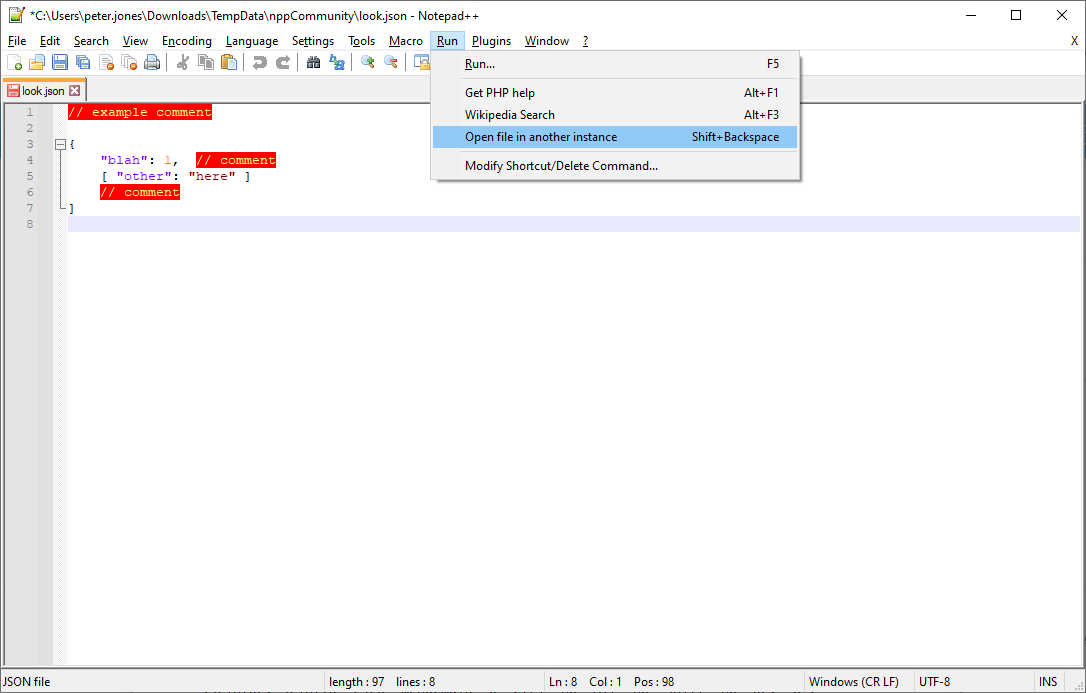
Similarly, if I set a command like
SCI_DELETEBACKNOTLINEto a dummy shortcut *, likeShift+Alt+Backspace, exit, then edit shortcuts.xml so the scintilla keys look like:<ScintillaKeys> <ScintKey ScintID="2326" menuCmdID="0" Ctrl="no" Alt="no" Shift="no" Key="8" /> <!-- remove the shift+backspace from SCI_DELETEBACK --> <ScintKey ScintID="2344" menuCmdID="0" Ctrl="no" Alt="no" Shift="yes" Key="8" /> <!-- set SCI_DELETEBACKNOTLINE to shift+backspace manually --> </ScintillaKeys>when I reload Notepad++, that change has taken effect, and
Shift+Backspaceis now mapped fromSCI_DELTEBACKNOTLINE:

So, while the Shortcut Mapper GUI won’t let you assign the
Shift+Backspace(or justBackspace) key, if you editshortcuts.xml, you can re-mapHope this helps.
-
Tangent:
I was curious what
SCI_DELETEBACKNOTLINEdid differently than the normal backspace behavior, so since I had it mapped in that fresh portable, I tried it. If you have text on the line you are editing, that command will erase normally. But if you are at the first character of the line, where a normal backspace would delete the previous line’s EOL characters and take you to the end of the previous line, theSCI_DELETEBACKNOTLINEwill not erase the EOL characters or take you to the end of the previous line – it will just stop at the beginning of the line you’re at.Interesting. I don’t know that I’ve ever had a desire for the editor to stop me from accidentally backspacing to the previous line… but I guess it’s good to know such a feature exists. :-)
-
 A Alan Kilborn referenced this topic on


Hello! It looks like you're interested in this conversation, but you don't have an account yet.
Getting fed up of having to scroll through the same posts each visit? When you register for an account, you'll always come back to exactly where you were before, and choose to be notified of new replies (either via email, or push notification). You'll also be able to save bookmarks and upvote posts to show your appreciation to other community members.
With your input, this post could be even better 💗
Register Login