Making fonts larger so old men can read
-
Ok, little odd topic here, but I have to ask. I can’t find how to make the fonts larger so I can view them more easily. I looked at all the preferences and couldn’t see anything about font size. I don’t want to change the native format of the text I’m viewing, just want to view it easier! Thanks!.
-
@Michael-DeLigny said:
I looked at all the preferences and couldn’t see anything about font size.
Let look at Settings -> Style Configurator
I don’t want to change the native format of the text I’m viewing, just want to view it easier!
Neither of file types supported by Notepad++ have font-related properties. All font names, sizes, styles used by Notepad++ are for viewing only, and they are never stored in the files.
-
Style Configurator is described at https://npp-user-manual.org/docs/preferences/#style-configurator
-
To be a bit more specific, these might be the settings you’ll want to experiment with:
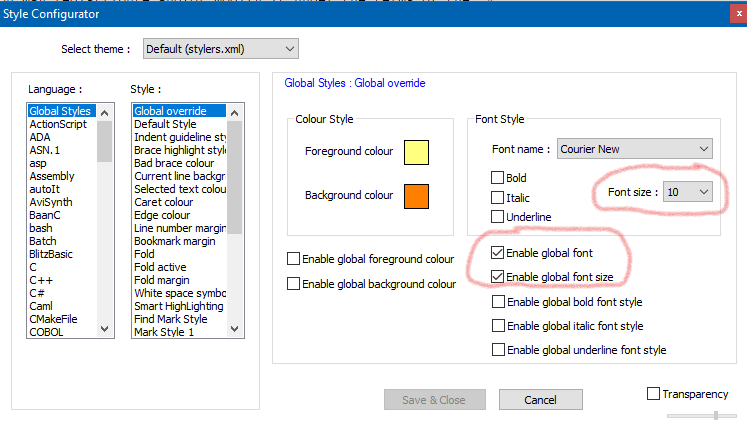
Also: You can temporarily change the size of text by pointing your mouse at the window, holding the Ctrl key, and scrolling the mouse wheel in either direction.
I don’t want to change the native format of the text I’m viewing
This shows you have a basic misunderstanding about what text editing is and what a text editor does. @zanud clarifies nicely with:
(None) of file types supported by Notepad++ have font-related properties. All font names, sizes, styles used by Notepad++ are for viewing only, and they are never stored in the files.



Hello! It looks like you're interested in this conversation, but you don't have an account yet.
Getting fed up of having to scroll through the same posts each visit? When you register for an account, you'll always come back to exactly where you were before, and choose to be notified of new replies (either via email, or push notification). You'll also be able to save bookmarks and upvote posts to show your appreciation to other community members.
With your input, this post could be even better 💗
Register Login