Odia text not rendered properly in NPP
-
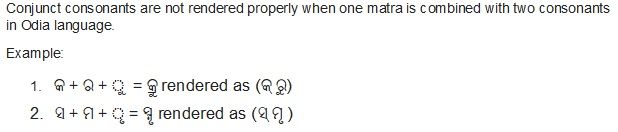
Conjunct consonants are not rendered properly when one matra is combined with two consonants in Odia language.
Example: କ + ର + ୁ = କ୍ରୁ rendered as (କ୍ ରୁ)
Another: ସ + ମ + ୃ = ସ୍ମୃ rendered as (ସ୍ ମୃ )
Please helpThe image of the problem is below:
-
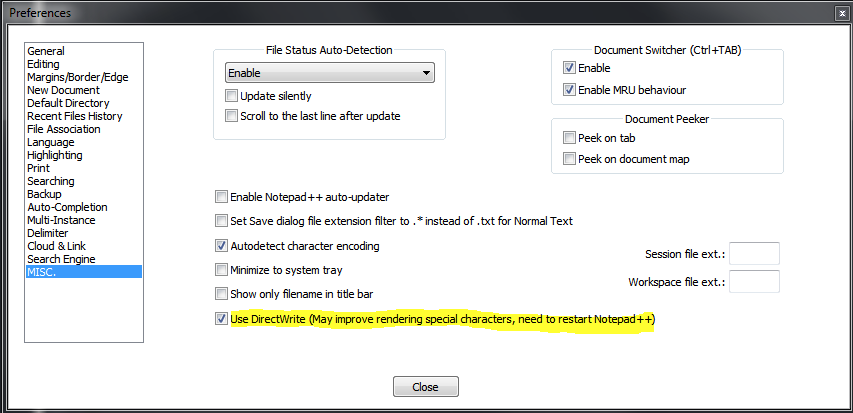
Have you tried setting driectwrite?
-
Hello, @ajit-nayak, @ekopalypse and All,
Sorry, @ajit-nayak, as an European man I’m not acquainted, of course, with Indian languages !
However, I’m pretty sure that your problem is related to the current fonts, installed in your OS and not related to Notepad++
Presently, on my OS ( an old
XP SP3laptop ) I’ve got the following typefaces, relative to Indian languages and scripts :•-------------•---------------•----------------------------• | Typeface | Font Name | Target Language / Script | •-------------•---------------•----------------------------• | gautami | gautami.ttf | Telugu language | | MV Boli | mvboli.ttf | Thaana writing system | | Raavi.ttf | raavi.ttf | Gurmukhi abugida | | Shruti | shruti.ttf | Gujarati language | | Tunga | tunga.ttf | Kannada script | | Vrinda | vrinda.ttf | Bengali language | •-------------•---------------•----------------------------•Refer to this link for an oversight of all the typefaces on Windows systems :
https://en.wikipedia.org/wiki/List_of_typefaces_included_with_Microsoft_Windows
From this list, I did not have any font for the
Odialanguage ( formerly spelled asOriya)Refer to the link below, which explicits all
OdiaUnicode characters :http://www.unicode.org/charts/PDF/U0B00.pdf
Luckily, after some researches on Google, I came across this site http://odiafonts.com/
So, follow these steps :
-
Close any Notepad++ instance, first
-
Download the archive
ananta.zip: http://odiafonts.com/d/13058/ananta.zip -
Extract the
OR51_Ananta.ttffont file -
Double-click on the
OR51_Ananta.ttffile ( before installing this font, definitively, on your system ! ) -
Re-start Notepad++ :
-
Select the
Settings > Style Configurator... > Global Styles > Global overridestyle -
Then, in the Font Style section, choose the
Odia Anantafont -
Tick the
Enable global fontoption -
Click on the
Save & Closebutton
With this font , containing
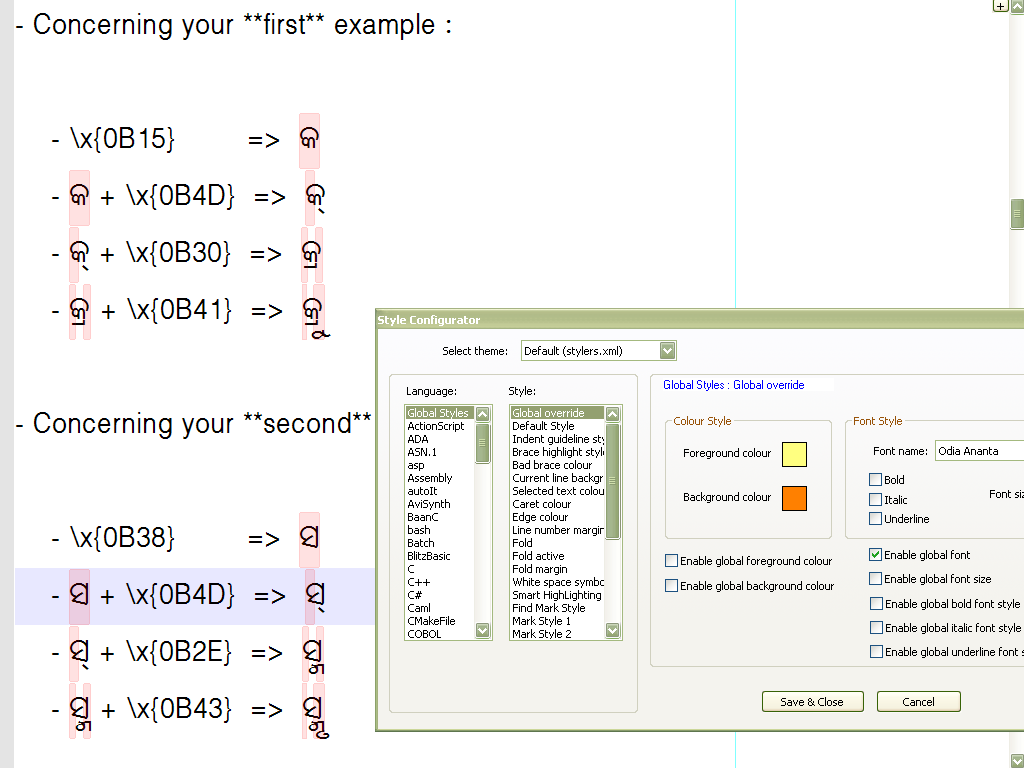
755characters and1245glyphs, all the UnicodeOdiacharacters are correctly displayed, except for the character\x{0B55}( ORIYA SIGN OVERLINE ) !?And I was able to get your composed characters, shown in your post. For instance :
-
Concerning your first example :
- \x{0B15} => କ
- କ + \x{0B4D} => କ୍
- କ୍ + \x{0B30} => କ୍ର
- କ୍ର + \x{0B41} => କ୍ରୁ
-
Concerning your second example :
- \x{0B38} => ସ
- ସ + \x{0B4D} => ସ୍
- ସ୍ + \x{0B2E} => ସ୍ମ
- ସ୍ମ + \x{0B43} => ସ୍ମୃ
To end with, here is an example of a regex S/R which change the latin letters
AandZ, whatever their case, into your two characters :-
SEARCH
(?i)(A)|(Z) -
REPLACE
(?1\x{0B15}\x{0B4D}\x{0B30}\x{0B41})(?2\x{0B38}\x{0B4D}\x{0B2E}\x{0B43})
So from the simple line
A - ZYou would get :
କ୍ରୁ - ସ୍ମୃI hope I’m not too “off-topic” !
Best Regards,
guy038
P.S. :
Of course, the real glyph of composed
Odiacharacters, resulting of the four consecutive characters, can ONLY be seen is you open this text, using theOR51_Ananta.ttffont file :-))Ah ! Here is a picture of my file :
-
-
Hello, @ekopalypse and @guy038
Thank you very much for the quick response.
The Solution provided by @guy038 completely solves the problem and now I can write anything in my language.
So nice of you @guy038 to provide the solution with other research outputs that will further help us for using it effectively.
with regards
Ajit



Hello! It looks like you're interested in this conversation, but you don't have an account yet.
Getting fed up of having to scroll through the same posts each visit? When you register for an account, you'll always come back to exactly where you were before, and choose to be notified of new replies (either via email, or push notification). You'll also be able to save bookmarks and upvote posts to show your appreciation to other community members.
With your input, this post could be even better 💗
Register Login