How does Notepad++ Manage to display all Characters and Emojis
-
This question is about how Notepad++ is developed. I am doing a test containing these characters for PDF generation:
ÄÖÜ
个相同基因的更多拷⻉来提⾼适应性
Πρωτότυπο κβαντικό ραντάρ από ερευνητές στην Αυστρία
☹️😀😃😄😁😆😅😂🤣☺️😊😇🙂🙃😉😌😌😍😘😗
👩⚕️What I can not understand is how Notepad++ (v7.9.1) displays all these characters perfectly on Windows 10, even when I change the Font Style to Courier New, which lacks these characters if I am not mistaken. I have tried the superman character 🦸♂️ and that one changed into two characters divided by a ZWJ (zero width joiner), so I am sure there is some font or table included in Notepad++ to do this, which lacks the newest emojis. Can you tell me what font it uses or how it is done? I need this to include the font in the PDFs I am generating or replicate the process.
-
@Martin-Furek said in How does Notepad++ Manage to display all Characters and Emojis:
As far as I know, Notepad++ does not use an internal lookup table for unknown glyphs.
When I look at those characters (including superman) in Courier New, I see:
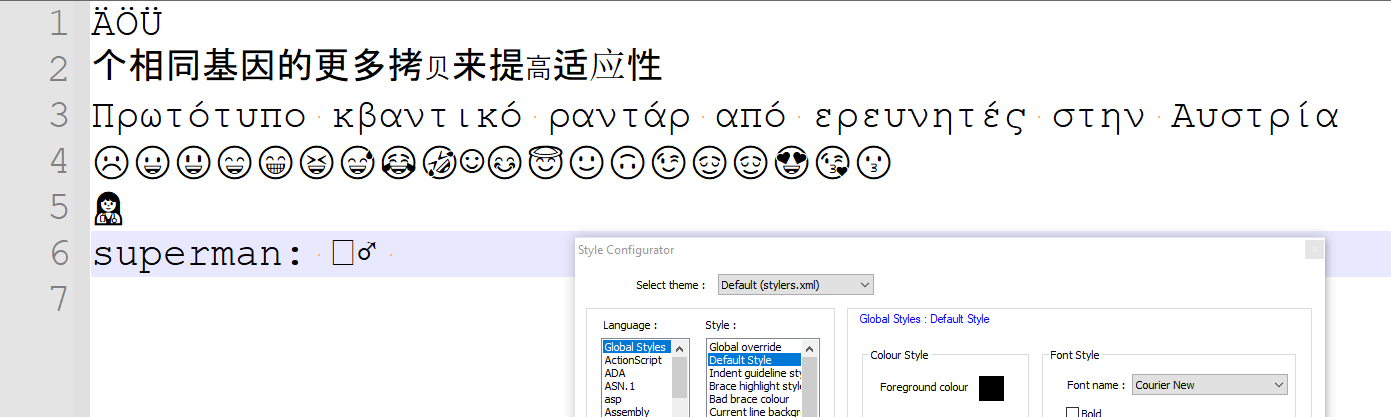
But if I use my normal Deja Vu Sans Mono font, I get:
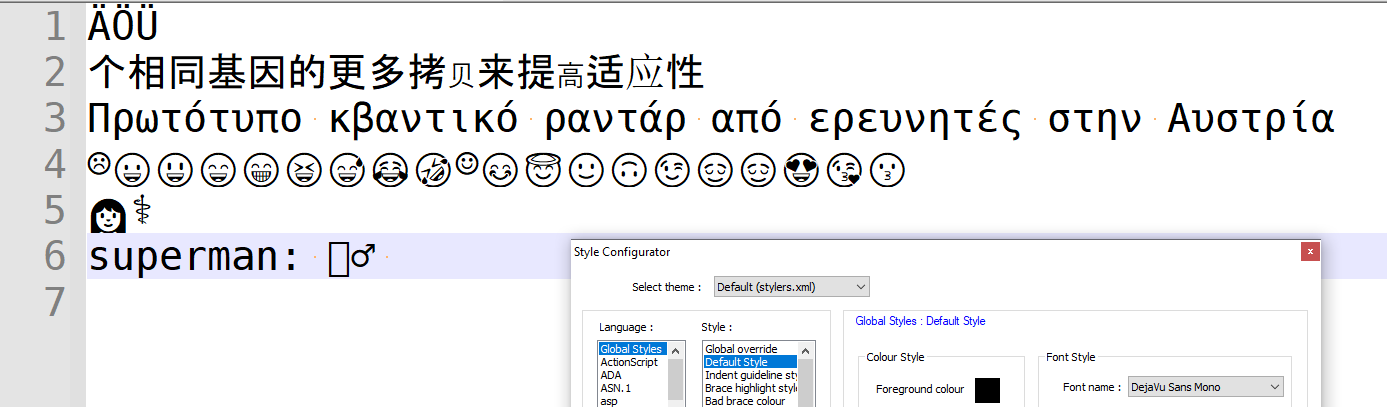
Note that the female medical worker splits back to the component woman + medical-symbol, since Deja Vu Sans Mono does not have that glyph.If Notepad++ were using a lookup table to find missing characters, then it would have used the same lookup on woman+medical under Deja Vu Sans Mono as it does with Courier New, but it obviously doesn’t.
Given the number of times in this forum that people have complained about Notepad++ displaying their character as an
□, and we suggest that they use a font that knows that character, and then the character displays correctly for them, I am usually pretty confident in asserting that Notepad++ does not use alternate fonts for characters that don’t have a glyph in the chosen font.On the other hand, some of the emoji you showed use codepoints above U+FFFF, and others use the ZWJ to do the emoji-combo-trick, and I don’t know how the Windows OS and the font system handle such circumstances under the hood. It may be some OS and/or font magic, rather than Notepad++ itself, “helping” you.
And as to your question: how to determine what’s happening behind the scenes and replicate that in generated PDFs: sorry, I don’t think the behind-the-scenes stuff is in Notepad++, so I don’t know how you’d replicate it in your generated PDF.
-
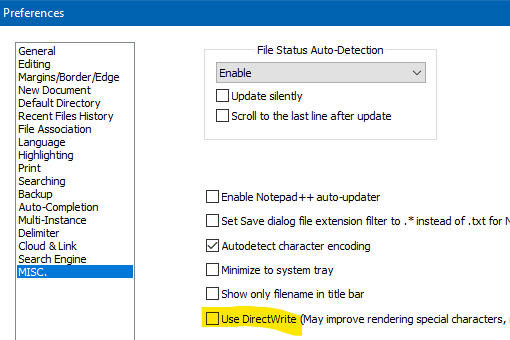
Should probably note here that what is displayed may also be affected by this setting in the Preferences :
-
Hello, @Martin-furek, @peterjones, @alan-kilborn and All,
You may be interested by this post :
https://community.notepad-plus-plus.org/topic/19990/regexp-fails-to-match-utf-8-characters/14
and by this site :
Particularly, the points :
https://emojipedia.org/man-superhero/
https://emojipedia.org/emoji-11.0/
On the other hand, from this site https://www.fontyukle.net/ara.php?ara=Segoe+UI you could download a fairly new versions of all fonts of the
Segoe UIfamily, listed below, with their main characteristics :•----------------------------------------•------------------•--------------------------------------•---------•------------•----------•------------• | Segoe UI font variations | Microsoft Name | Font Names in "Fontyukle" archives | Version | Characters | Glyphs | Kern pairs | •----------------------------------------•------------------•--------------------------------------•---------•------------•----------•------------• | Segoe UI Black (TrueType) | seguibl.ttf | Segoe UI Black.TTF | 2.02 | 2,191 | 2,443 | 2,638 | | Segoe UI Black Italic (TrueType) | seguibli.ttf | Segoe UI Black Italic.TTF | 2.02 | 2,191 | 2,544 | 8,467 | | | | | | | | | | Segoe UI (TrueType) | segoeui.ttf | Segoe UI.TTF | 5.62 | 3,952 | 5,344 | 8,292 | | Segoe UI Bold (TrueType) | segoeuib.ttf | Segoe UI Gras.ttf | 5.60 | 3,900 | 5,219 | 8,319 | | Segoe UI Bold Italic (TrueType) | segoeuiz.ttf | Segoe UI Gras Italique.ttf | 5.30 | 2,826 | 3,377 | 8,613 | | Segoe UI Italic (TrueType) | segoeuii.ttf | Segoe UI Italique.ttf | 5.30 | 2,826 | 3,377 | 5,739 | | | | | | | | | | Segoe UI Emoji (TrueType) | seguiemj.ttf | Segoe UI Emoji.TTF | 1.29 | 1,962 | 12,189 | 1,394 | | | | | | | | | | Segoe UI Historic (TrueType) | seguihis.ttf | Segoe UI Historic.TTF | 1.03 | 3,658 | 4,737 | 1,352 | | | | | | | | | | Segoe UI Light (TrueType) | segoeuil.ttf | Segoe UI Light.ttf | 5.60 | 3,902 | 5,231 | 5,503 | | Segoe UI Light Italic (TrueType) | seguili.ttf | Segoe UI Light Italic.ttf | 5.30 | 2,826 | 3,389 | 8,388 | | | | | | | | | | Segoe UI Semibold (TrueType) | seguisb.ttf | Segoe UI Semibold.TTF | 5.62 | 3,948 | 5,271 | 8,291 | | Segoe UI Semibold Italic (TrueType) | seguisbi.ttf | Segoe UI Semibold Italic.TTF | 5.32 | 2,874 | 3,437 | 5,209 | | | | | | | | | | Segoe UI Semilight (TrueType) | segoeuisl.ttf | Segoe UI Semilight.TTF | 5.62 | 3,950 | 5,219 | 8,293 | | Segoe UI Semilight Italic (TrueType) | seguisli.ttf | Segoe UI Semilight Italic.ttf | 5,30 | 2,826 | 3,389 | 8,338 | | | | | | | | | | Segoe UI Symbol (TrueType) | seguisym.ttf | Segoe UI Symbol.ttf | 6.23 | 7,362 | 9,209 | 1,361 | •----------------------------------------•------------------•--------------------------------------•---------•------------•----------•------------•Best Regards,
guy038
-
T Terry R referenced this topic on
-
A Andrej730 referenced this topic on




Hello! It looks like you're interested in this conversation, but you don't have an account yet.
Getting fed up of having to scroll through the same posts each visit? When you register for an account, you'll always come back to exactly where you were before, and choose to be notified of new replies (either via email, or push notification). You'll also be able to save bookmarks and upvote posts to show your appreciation to other community members.
With your input, this post could be even better 💗
Register Login