Lua: How to have notepad + highlight the IF and END of a codeblock?
-
I searched google for an example, but I couldn’t find it. Is there a way to make notepad + highlight the if and end of a codeblock if I were to doble click one or the other?
-
Notepad++ has brace-match highlighting (for parenthesis, brackets, or braces), but I don’t know of a way to make it do matching on non-brace open/close syntax like if/end.
As a workaround, if your cursor is inside an if/end block, the folding level on the left is highlighted red.
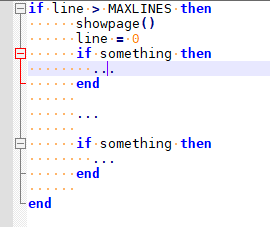
So you could collapse the current fold, move the cursor to the line after the fold, then unfold, which should leave your cursor just after theend. Not ideal, but it’s something.Someone else might know of a way to abuse the Highlight Matching Tags feature or something similar. Or there are scripting plugins which can add functionality (we often recommend PythonScript, but since you are writing in Lua, you might be more comfortable with LuaScript) – they embed a programming-language interpreter in the Notepad++ environment, and the script can manipulate the contents and highlighting of the editor windows in Notepad++. There is good documentation with either of the plugins I mentioned, and someone who is already comfortable with Lua would probably be able to figure out how to search for the matching tag. If you want to go that route, feel free to share what you’ve tried and ask for help if you need it.
But no, as far as I know, the exact feature you are looking for is not natively in Notepad++.
-
I might beable to “trick” notepad ++ into believing the “then” is a { and the “end” is a }, then add them into the sentax preferences.
-
Hello, @themaster1124, @peterjones, and All,
May be, using the
View > Show symbol > Show Indent Guidecould be useful, too ?Best Regards,
guy038



Hello! It looks like you're interested in this conversation, but you don't have an account yet.
Getting fed up of having to scroll through the same posts each visit? When you register for an account, you'll always come back to exactly where you were before, and choose to be notified of new replies (either via email, or push notification). You'll also be able to save bookmarks and upvote posts to show your appreciation to other community members.
With your input, this post could be even better 💗
Register Login