Regex: Parsing, How to make a regex replacement in multiple files, from Folder-1 to Folder-2
-
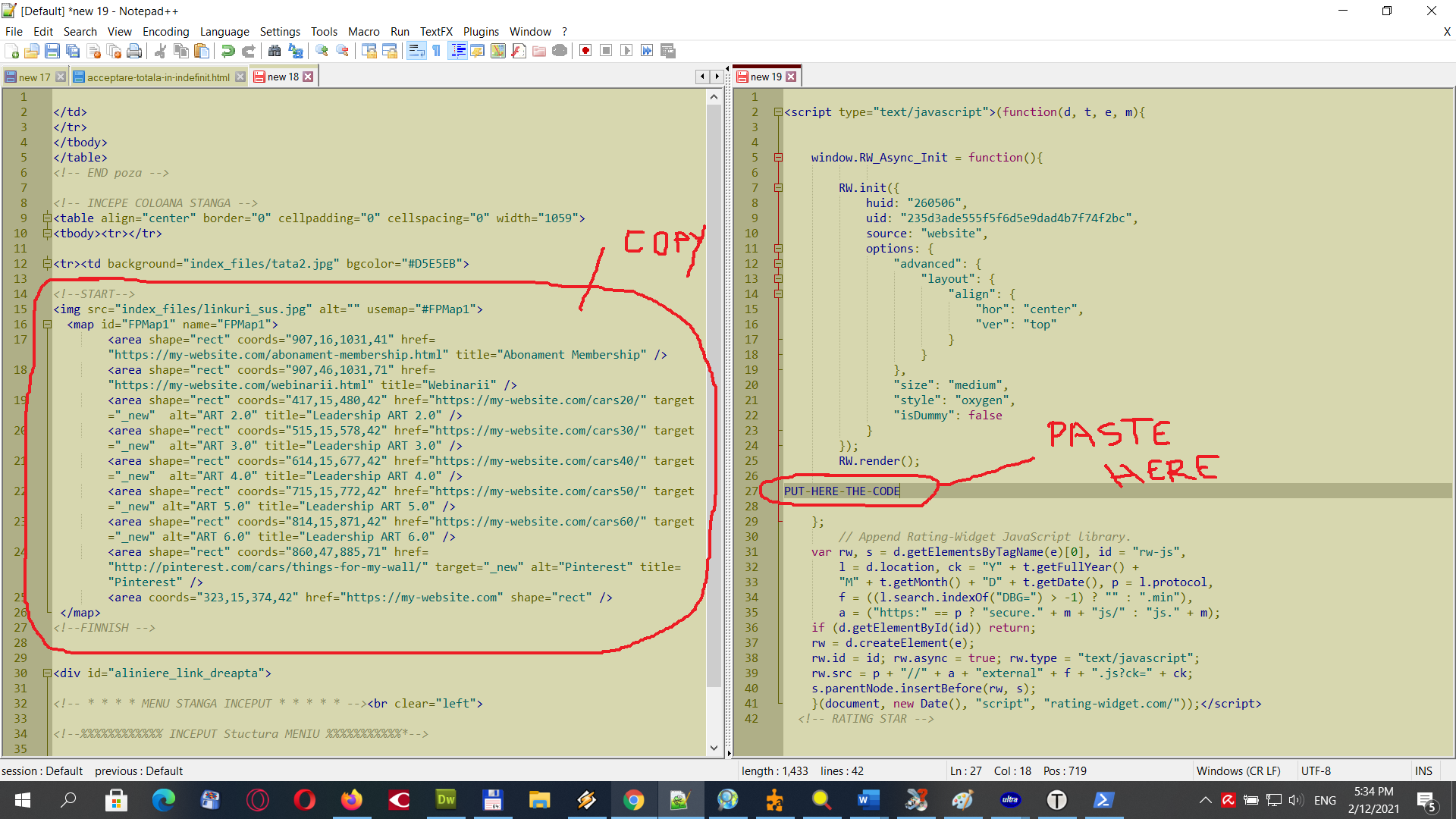
hello, the image will explain what I want to do. I have a lot of html files in Folder-1 and the same number of files in Folder-2. The name of the files is the same on both folders, only the content of them is different. As you can see in this image what I want to do is to copy the lines from <!–START–> to <!–FINNISH --> and paste them to other files from second folder, in html files, in the point PUT-HERE-THE-CODE
You have to know that the content of <!–START–> to <!–FINNISH --> is different on all pages, so only this 2 words are repeated in all files, the links are different. And in the Folder-2, the only part that repeats in all files is PUT-HERE-THE-CODE
SOLUTION. I made a regex for this task: This will select the lines between
<!--START-->to<!--FINNISH -->FIND:
(?s)(<\!--START-->).*(<\!--FINNISH -->)But how can I move this content in other files, from Folder-1 to Folder-2 to other file over the word
PUT-HERE-THE-CODE? -
This post is deleted! -
to make an idea, should be something like:
FIND:
(?s)(START).*(FINNISH) \ Folder-1
Replace on:$1 PUT-HERE-THE-CODE $2 \ Folder-2Is it possible with notepad++ ?
-
Hello @robin-cruise and All,
I did not investigate, yet but I thought of some points :
-
Are there several
PUT-HERE-THE-CODElines in the files, located in Folder-2 ? In other words, do you have to paste the<!–START–> •••••• <!–FINNISH -->block in several locations of a same file ? -
Are there several
<!–START–> •••••• <!–FINNISH -->blocks in files, located in Folder-1 ? I suppose not because your regex would not match these sections properly and you would need several marks asPUT-HERE-THE-CODE_1,PUT-HERE-THE-CODE_2and so on…
Best Regards,
guy038
-
-
yes, all files from Folder-1 have the same block
<!–START–> •••••• <!–FINNISH -->but with different content. And all files from Folder-2 have the same word/linePUT-HERE-THE-CODE -
This post is deleted! -
I don’t know if it can be done just with regex and notepad++. Maybe in the future. I know that in Sublime-Text this task can be done with a plugin made in Python.
But, instead, you can use very easy PowerShell for this task.
This solution is very simple. Just copy this code in PowerShell from Windows10
$sourceFiles = Get-ChildItem 'c:\Folder1' $destinationFolder = 'c:\Folder2' foreach ($file in $sourceFiles) { $sourceContent = Get-Content $file.FullName -Raw $contentToInsert = [regex]::match($sourceContent,"(?ms)<!--START-->(.+)<!--FINNISH -->").value $destinationContent = Get-Content $destinationFolder\$($file.Name) -Raw $destinationContent = $destinationContent -replace 'PUT-HERE-THE-CODE',$contentToInsert Set-Content -Path $destinationFolder\$($file.Name) -Value $destinationContent -Encoding UTF8 } #end foreach file -
A viable technique, although not a technique inside Notepad++.
I think your technique is going to also copy over the “START” and “FINNISH” lines into the destination file, which, to the OP, may not be desirable.



Hello! It looks like you're interested in this conversation, but you don't have an account yet.
Getting fed up of having to scroll through the same posts each visit? When you register for an account, you'll always come back to exactly where you were before, and choose to be notified of new replies (either via email, or push notification). You'll also be able to save bookmarks and upvote posts to show your appreciation to other community members.
With your input, this post could be even better 💗
Register Login