[IDEA] Highlight all text after X number of characters/words
-
I hope it’s ok to post ideas for plugins - if not feel free to delete!
You know those fields on websites, where you can enter 2000 characters of text and not more?
My idea for a plugin would provide a simple UI, where you specify 1) the number, 2) whether you’re counting words or characters, and 3) if characters include non-space or not. All text beyond that limit will be in red.
This would be useful in editing texts down to the proper limit.
I’m not a dev, but maybe there’s someone who finds this interesting…!
-
Doesn’t the View menu’s Summary command provide most of this information? Sample:
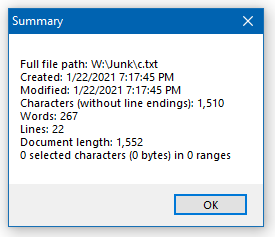
Additionally, if you put some data you want to validate to a certain length into a new N++ tab and then run the following Find All in Current Document regular expression search on it, it should aid the task, matching only text that is less than or equal to your specified limit:
find:
(?-s)\A.{1,200}The above example would be useful for a 200-character limit.
Lengths up to and including 200 would be matched. -
You can already get (some of) this information in the status bar:
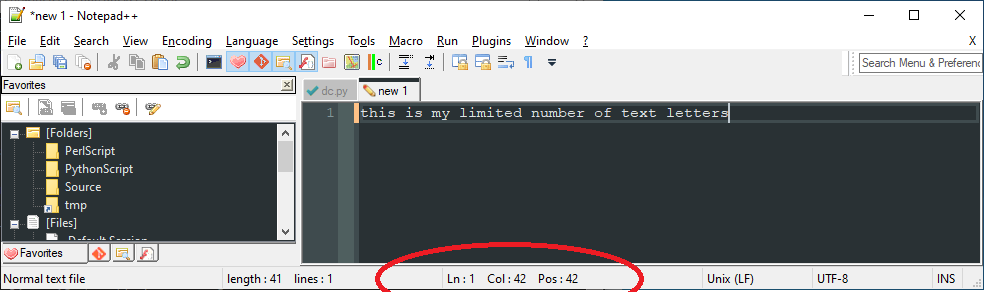
The “Pos” tells you the position in the file, i.e., number of characters you’ve typed. So it isn’t really a count down, rather a count up and it doesn’t care about word or non-word characters, it just counts every character (including newlines and other such stuff).
Cheers.
-
@Michael-Vincent said in [IDEA] Highlight all text after X number of characters/words:
The “Pos” tells you the position in the file, i.e., number of characters you’ve typed. So it isn’t really a count down, rather a count up and it doesn’t care about word or non-word characters, it just counts every character (including newlines and other such stuff).
Yes, except it isn’t very good for this purpose if you have multi-byte UTF-8 characters in your data, as it is more of a byte-based thing, than a character-based thing.
Hmm, thinking about it, I’m not sure how multi-byte characters would interact with the Summary data I showed before. Would take further experimentation…
-
I guess my idea was to have a visual representation, where you actually see how many words/chars you’re over as you’re typing, and dwindle your way down til you have no more “red”.
-
Hi @alan-kilborn and All,
Alan, you said :
Hmm, thinking about it, I’m not sure how multi-byte characters would interact with the Summary data I showed before. Would take further experimentation…
To that purpose, you could look at these two looong posts, written in October 2020 :
Take your time to fully assimilate all the notions ! And, of course, you can test my different counting regexes, for possible error(s) !
Just note, Alan, that I haven’t created any issue yet, regarding the
summaryfeature !Best Regards,
guy038
-
two looong posts
I haven’t created any issue yet!
Yes, I remember them now. Thanks for the refresher, though.
If you’re going to make issue(s) out of your findings, then there is “no time like the present”! -
@oroboros said in [IDEA] Highlight all text after X number of characters/words:
My idea for a plugin would provide a simple UI, where you specify 1) the number, 2) whether you’re counting words or characters, and 3) if characters include non-space or not. All text beyond that limit will be in red.
I guess my idea was to have a visual representation, where you actually see how many words/chars you’re over as you’re typing, and dwindle your way down til you have no more “red”.
So one thing we do here is try to offer alternatives to help you in what you’re trying to do. Often the alternatives are good in and of themselves, but quite often they aren’t exactly matching the original desire.
It’s great to have an “idea for a plugin”, but nobody (but perhaps yourself, if you’re capable) is going to jump on that and create a plugin. It just doesn’t happen that way.
And if you think your idea is super, keep in mind that it may be useful to just yourself, or a limited number of other users. Plugin developers or Notepad++ developers aren’t going to implement your idea, because of its limited applicability.
Suggest you consider the alternatives presented, or possibly hope for more replies with additional options.
-
Thanks for this!
-
I can imagine a Python script, must have PythonScript plugin installed, of course, if the UI can be replaced by Npp editor itself. Basically a script that monitors what you type and if the conditions are met, change the colour.





Hello! It looks like you're interested in this conversation, but you don't have an account yet.
Getting fed up of having to scroll through the same posts each visit? When you register for an account, you'll always come back to exactly where you were before, and choose to be notified of new replies (either via email, or push notification). You'll also be able to save bookmarks and upvote posts to show your appreciation to other community members.
With your input, this post could be even better 💗
Register Login