MISC Clickable Links is GONE! How can I turn off links now?
-
MISC Clickable Links is GONE! How can I turn off links now?
-
-
@C-Eller said in MISC Clickable Links is GONE! How can I turn off links now?:
MISC Clickable Links is GONE! How can I turn off links now?
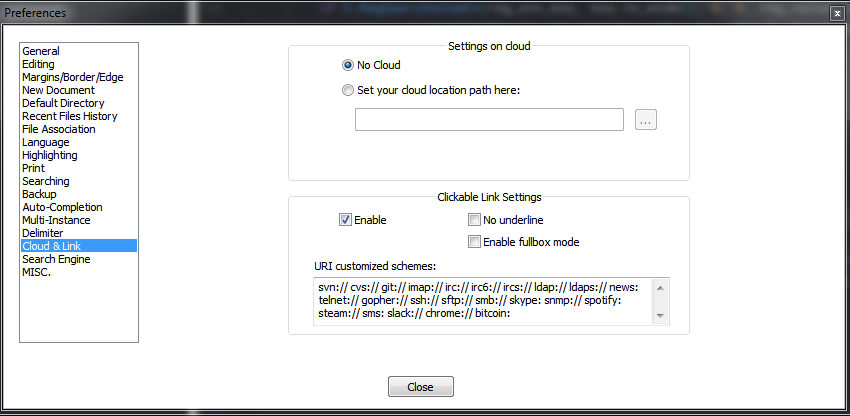
Whenever a setting “disappears” from Notepad++'s preferences, try looking around the user-interface.
Sometimes some cleanup and reorganization is done.
In this case it really was NOT all that hard to find where it moved to. -
@Alan-Kilborn said in MISC Clickable Links is GONE! How can I turn off links now?:
Whenever a setting “disappears” from Notepad++'s preferences, try looking around the user-interface.
++
Also, I and the rest of the npp-user-manual.org maintainers do our best to keep the manual up-to-date with the most recent Notepad++ version. The preferences doc gives a thorough description of each “page” of the Settings > Preferences dialog, and even tries to indicate when a given menu entry has been moved. If you search for “click” or “clickable”, you will quickly see where that option currently resides.




Hello! It looks like you're interested in this conversation, but you don't have an account yet.
Getting fed up of having to scroll through the same posts each visit? When you register for an account, you'll always come back to exactly where you were before, and choose to be notified of new replies (either via email, or push notification). You'll also be able to save bookmarks and upvote posts to show your appreciation to other community members.
With your input, this post could be even better 💗
Register Login