Mark the column by macro
-
I would like use a macro to select column from position X of the second line to position Y of the last line.
Please is there some simper solution than X times repeat message 2306 ….and next commands?
Where can I find some description or manual for macros syntax in Notepad++?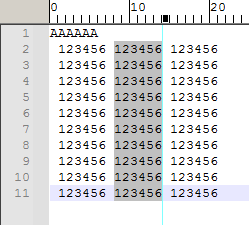
-
Please is there some simper solution than X times repeat message 2306
Sorry, not that I know of. The macro language is a simplistic language that just sends messages to the scintilla editor components for the active editor window, or sending GUI commands (activate menus, etc) to the Notepad++ GUI. It’s essentially recording keystrokes.
Where can I find some description or manual for macros syntax in Notepad++?
The official docs at https://npp-user-manual.org/docs/macros/ have a link to the config-file description for the macros section of shortcuts.xml, and that has a link to the detailed description from Scintilla for all the Scintilla messages.
If you want to do something more complicated – especially if you want X and Y to be variables – then you will need one of the scripting plugins, which embeds the full features of your favorite programming language (Python, Lua, JavaScript, Perl, …) into the Notepad++ environment, so the programming language has direct access to the scintilla editors and the Notepad++ GUI. That makes loops or variables possible. Each of those refenced plugins has good documentation


Hello! It looks like you're interested in this conversation, but you don't have an account yet.
Getting fed up of having to scroll through the same posts each visit? When you register for an account, you'll always come back to exactly where you were before, and choose to be notified of new replies (either via email, or push notification). You'll also be able to save bookmarks and upvote posts to show your appreciation to other community members.
With your input, this post could be even better 💗
Register Login