Replace many lines with conditions
-
Hello, @trần-hoàng-long and All,
OK, So, here is the road map :
-
Open your file in N++
-
Open the Replace dialog (
Ctrl + F) -
SEARCH
(?s-i)^target=18028\R\Ktemporary_opinion=\{.+?"love_opinion".+?(?=^temporary_opinion) -
REPLACE
Leave EMPTY -
Tick the
Wrap aroundoption -
Select the
Regular expressionsearch mode -
Click on the
Replace Allonly ( Do not use theReplacebutton )
Et voilà !
Notes :
-
First the modifiers
(?s-i)means that the dot regex symbol,., will match any character and that the search is sensitive to case -
Then the part
^target=18028\Rlooks for the literal stringtarget=18028, with this exact case, at beginning of line (^) followed with its EOL characters (\R) -
Now the
\Kassertion resets the working position and cancels any previous match -
So, the part
temporary_opinion=\{look for the literal stringtemporary_opinion={, with this exact case -
Followed with the smallest non-null range of any char (
.+?) … -
Till the literal string
"love_opinion"… -
Followed with an other smallest non-null range of any char (
.+?) … -
which ends when it’s followed with an other literal string
temporary_opinionwhich begins a line, due to the look-ahead structure(?=^temporary_opinion) -
As the Replacement zone is empty, all this multi-lines range of text is then deleted
Best Regards,
guy038
-
-
@guy038 Many many thanks to you.
I used your method but not get the result, and dont know why, so I attached my file here for you to check.
https://drive.google.com/file/d/1WC4VHudMm2Do3_QV1xmQV1h2gAuWo26v/view?usp=sharingThere are many paragraphs start with “owner=…” and “target=18028”, I want to delete all “temporary_opinion” which are not “love_opinion” or “friendliness_opinion” in those paragraphs.
Thanks any help in advance.
-
P/S: I’m using Notepad ++ v7.8.8, maybe need to turn on/off some functions to make the search work, but I dont know which functions. So if needed and anyone know, pls tell me (or tell me any good workingNotepad++ version), tks so much.
I attach screen picture here
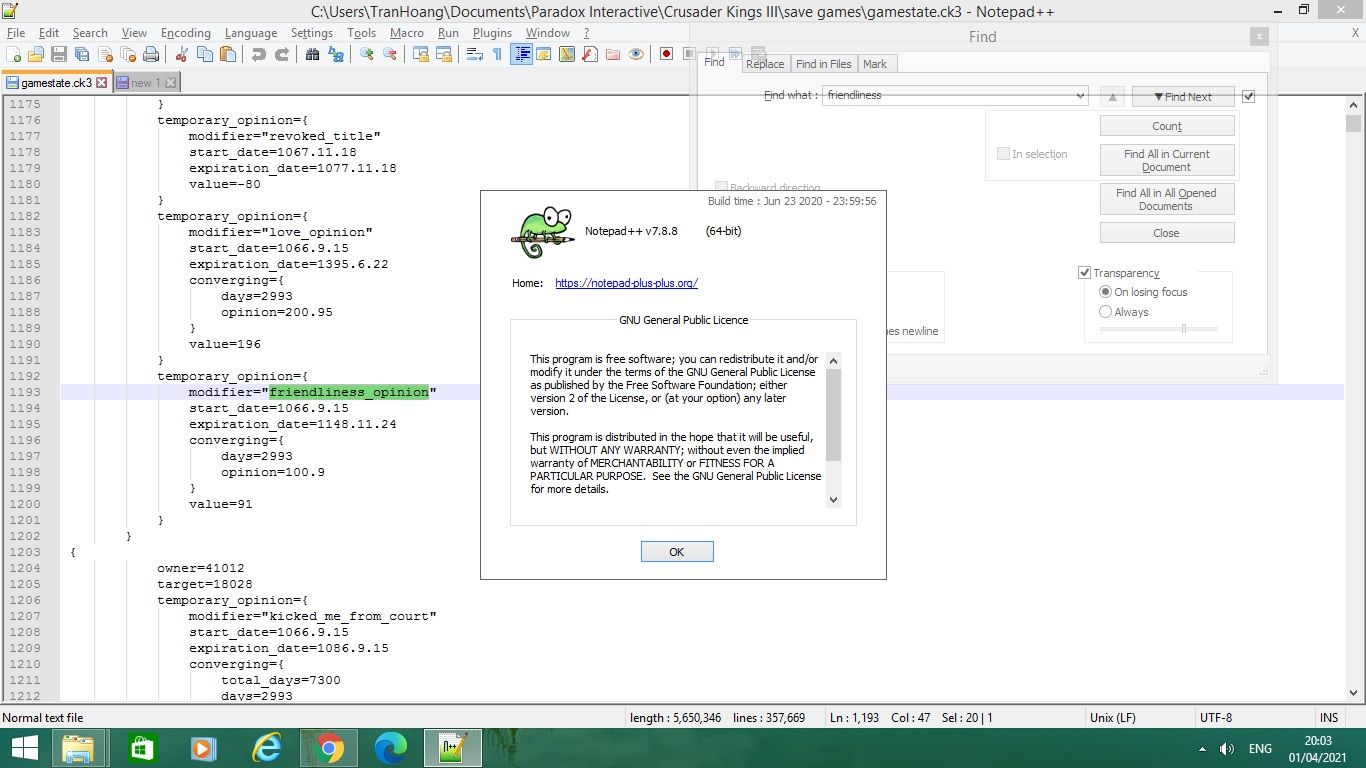
-
Hi, @trần-hoàng-long and All,
OK, I’ve got your file, that I simply changed as a
.txtfile. Nice !Now, it’s still unclear ! In your first post, you said :
… so I want to use Replace function to delete all “
love opinion”And in your second post, you said :
I want to delete all “temporary_opinion” which are not “
love_opinion” or “**friendliness_opinion**” in those paragraphs.Once I know what is exactly needed, with the true file, it should be easy to found out a solution;-))
BR
guy038
-
@guy038 Tks for your reply.
I want to do exactly as 2nd post.
In 1st post, I wanted to say in short but maybe it leads to wrong meaning. Sorry about it.
You can open my file directly with Notepad++, no need to change to .txt :D
-
Hi, @trần-hoàng-long,
One more question :
-
Your file contains
20strings “love_opinion”, in target blocks different from18028 -
Your file contains
868strings “friendliness_opinion”, in target blocks different from18028
Do you want to remove or keep these lines ?
BR
guy038
-
-
Hi @guy038,
There are some paragraphs which have them all, for example like below:
{
owner=…
target=18028
temporary_opinion={
modifier=…
…
}
temporary_opinion={
modifier=…
…
}
temporary_opinion={
modifier=“love_opinion”
…
}
temporary_opinion={
modifier=“friendliness_opinion”
…
}
}
In those paragraphs, I want to delete all “temporary_opinion” graphs which are not “love_opinion” or “friendliness_opinion".If “love opinion” or “friendliness_opinion” stand alone, or not have “target=18028”, so just ignore them.
The result should be
{
owner=…
target=18028
temporary_opinion={
modifier=“love_opinion”
…
}
temporary_opinion={
modifier=“friendliness_opinion”
…
}
}Thanks so much for your help.
-
-
Hello, @trần-hoàng-long,
Ah…Phhhffff ! I finally found out a method ! It wasn’t that easy because your data are a bit complex !
-
Firstly , a global section, begins line with a space followed with an opening brace
{till right before an other similar scheme. Asbraces are used in many other locations, we’ll have to delimit these sections more precisely ! -
Secondly, inside a global section, the
temporary_opinionsub-region may have three different syntaxes :
temporary_opinion •••••• { ••••••••••••••••••••••••••••••••••••• }LF   (  2,779 occurrences )
temporary_opinion •••••• { ••••••••• { •••••••••••• } •••••••••• }LF   ( 17,224 occurrences )
temporary_opinion •••••• { ••••• { ••••• } ••••• { ••••• } ••••• }LF   (     78 occurrences )
So we’ll have to detect these three syntaxes, at the same time
-
Thirdly, we must delete some
temporary_opinionsub-region ONLY in global sections which verify these three criteria :-
It must contain the string
target=18028 -
It must contain the
temporary_opinionsub-region with modifier ="love_opinion" -
It must contain the
temporary_opinionsub-region with modifier ="friendliness_opinion"
-
Note that the first criterion comes first, in a section, but the two others occur in any order !
So we’ll need to distinguish these specific sections, where the suppression process will occur, in a second time !
- Fourthly, in these specific sections, we have to delete any
temporary_opinionsub-region when the modifier is different from"love_opinion"and different from"friendliness_opinion".
But, as these other sub-regions may come before and/or after the sub-regions with
"love_opinion"and"friendliness_opinion", we’ll have to add a mark at the end of general section, to be sure that all thetemporary_opinionsub-regions, undertarget=18028, and different from"love_opinion"and"friendliness_opinion", will be matched and deleted
Okay, let’s go :
-
This first S/R changes the beginning of any global section, using a symbol not used yet, in your file ( I chose the
¤symbol ) -
Open the Replace dialog (
Ctrl + H)-
SEARCH
^\x20\{ -
REPLACE
¤ -
Tick the
Wrap aroundoption -
Select the
Regular expressionsearch mode -
Click on the
Replace Allbutton
-
=>
27,709replacementsFrom now on, if we force the regex engine to look for characters different from
¤, we’ll be sure that any match will be a subset of a global section, only. Moreover, it clearly shows the beginning of a next global section
The second S/R, below, using the free-spacing mode,
(?x), will add a@symbol, in a new line, right before the next global section :(?x) # FREE-SPACING mode ^ \h+ target= 18028 \R (?: [^¤\r\n]*\R )* # Find the line 'target=18028' and possible range of COMPLETE lines, till ... # Find a **`temporary_opinion`** sub-region with string "love_opinion" or "friendliness_opinion" \h+ temporary_opinion = { \R \h+ modifier= "(?:(love)|friendliness) _opinion" (?: [^¤{}]+ { [^¤{}]+ } ){0,2} [^¤{}]+ } \R (?: [^¤\r\n]*\R )* # Find possible range of COMPLETE lines, till ... # Find a **`temporary_opinion`** sub-region with string "friendliness_opinion" or "love_opinion" \h+ temporary_opinion = { \R \h+ modifier= "(?(1)friendliness|love) _opinion" (?: [^¤{}]+ { [^¤{}]+ } ){0,2} [^¤{}]+ } \R [^¤]* # Find the GREATEST range of chars, DIFFERENT from '¤' ( so ENDING right before a '¤' )
-
Select all the text above, between
(?x)and( so ENDING right before a '¤' ) -
Open the Replace dialog (
Ctrl + H)-
The
Search what:zone should contain the selection -
REPLACE
$0@\n -
Tick the
Wrap aroundoption -
Select the
Regular expressionsearch mode -
Click on the
Replace Allbutton
-
=>
1,692replacements
The third S/R, below, in the free-spacing mode too, will delete, in the specific zones ending with a
@symbol, anytemporary_opinionsub-region with modifier different from, either,"love_opinion"and"friendliness_opinion":(?x) # The next line finds ANY temporary_opinion sub-region, DIFFERENT from "love_opinion" and "friendliness_opinion", # WHATEVER the 3 POSSIBLE syntaxes ^ \h+ temporary_opinion = { \R \h+ modifier= (?!"love_opinion") (?!"friendliness_opinion") (?: [^¤{}]+ { [^¤{}]+ } ){0,2} [^¤{}]+ } \R (?= [^¤]* @ ) # This line ensures that the SUPPRESSIONS only occur in the specific regions matching the 3 CRITERIA !
-
Select all the text above, between
(?x)andmatching the 3 CRITERIA ! -
Open the Replace dialog (
Ctrl + H)-
The
Search what:zone should contain the selection -
REPLACE
Leave EMPTY -
Tick the
Wrap aroundoption -
Select the
Regular expressionsearch mode -
Click on the
Replace Allbutton
-
=>
1,483replacements
Finally, this fourth regex S/R will delete all the temporary
¤and@symbols :-
Open the Replace dialog (
Ctrl + H)-
SEARCH
^(¤)|^@\R -
REPLACE
?1\x20{ -
Tick the
Wrap aroundoption -
Select the
Regular expressionsearch mode -
Click on the
Replace Allbutton
-
=>
29,401replacementsBest Regards,
guy038
P.S. :
It remains
1global section, with target different from18028:{ owner=30639 target=15484 temporary_opinion={ modifier="friendliness_opinion" start_date=1074.3.4 expiration_date=1082.5.23 converging={ days=268 opinion=10.8 } value=10 } temporary_opinion={ modifier="love_opinion" start_date=1074.3.14 expiration_date=1098.11.9 converging={ days=258 opinion=15.4 } value=15 } scripted_relations={ potential_lover={ 0 } } }I’ve found it, empirically, with the regex :
(?x-s) target= (?!18028) .+\R (.+\R){1,4} .+? "friendliness_opinion"\R (.+\R){1,9} .+? "love_opinion"\R -
-
Thank you @guy038 so much, I used your method and got exact result I want. Great work !
I’m still trying to understand your method to know more about NPP.
Thanks again. Have a nice day !

Hello! It looks like you're interested in this conversation, but you don't have an account yet.
Getting fed up of having to scroll through the same posts each visit? When you register for an account, you'll always come back to exactly where you were before, and choose to be notified of new replies (either via email, or push notification). You'll also be able to save bookmarks and upvote posts to show your appreciation to other community members.
With your input, this post could be even better 💗
Register Login