Community
    • Login

    To use Firefox on the current edited html file

    Scheduled Pinned Locked Moved Help wanted · · · – – – · · ·
    14 Posts 3 Posters 1.2k Views 2 Watching
    Loading More Posts
    • Oldest to Newest
    • Newest to Oldest
    • Most Votes
    Reply
    • Reply as topic
    Log in to reply
    This topic has been deleted. Only users with topic management privileges can see it.
    • Cyrille PiateckiC Offline
      Cyrille Piatecki @Ekopalypse
      last edited by

      @Ekopalypse I have noticed that (sorry I use Notepad++ in french) Affichage -> Affiche le ficher dans -> Firefox, I can have what I want but the file must be first saved and ther is no shortcuts

      1 Reply Last reply Reply Quote 0
      • EkopalypseE Offline
        Ekopalypse
        last edited by Ekopalypse

        @Cyrille-Piatecki

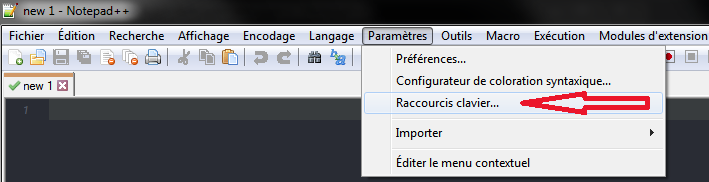
        You can assign shortcuts via the Shortcut Mapper

        05fc1356-1046-4c66-bdba-b96dbc76d470-image.png

        Cyrille PiateckiC 2 Replies Last reply Reply Quote 1
        • Cyrille PiateckiC Offline
          Cyrille Piatecki @Ekopalypse
          last edited by

          @Ekopalypse Ok but I do not know what to write in Name and Catégorie

          EkopalypseE 1 Reply Last reply Reply Quote 0
          • EkopalypseE Offline
            Ekopalypse @Cyrille Piatecki
            last edited by Ekopalypse

            @Cyrille-Piatecki

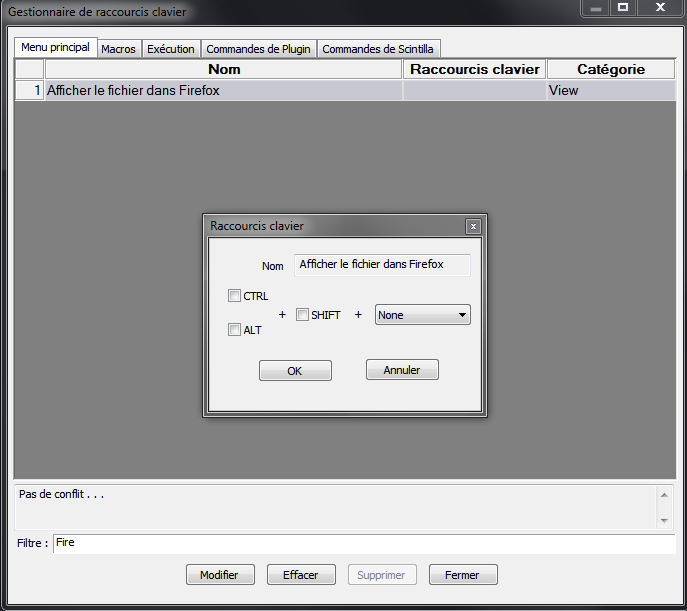
            you don’t, type Fire in the Filtre box, double click
            on the filtered item and assign the shortcut you want to use.
            5a5d52f6-d385-4686-8b1c-c65c70fa0a33-image.png

            1 Reply Last reply Reply Quote 0
            • Cyrille PiateckiC Offline
              Cyrille Piatecki @Ekopalypse
              last edited by

              @Ekopalypse SOrry for my former reply. I have seen in the panel Exécution . I have tried to typeset Firefox in Nom but it open Firefox alone not on the current file.

              Cyrille PiateckiC EkopalypseE 2 Replies Last reply Reply Quote 0
              • Cyrille PiateckiC Offline
                Cyrille Piatecki @Cyrille Piatecki
                last edited by

                @Cyrille-Piatecki Thanks it works

                1 Reply Last reply Reply Quote 1
                • EkopalypseE Offline
                  Ekopalypse @Cyrille Piatecki
                  last edited by

                  @Cyrille-Piatecki

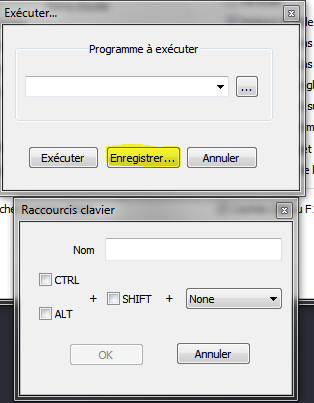
                  If you want to execute something via the Run (Exécution) menu, use the variable $(FULL_CURRENT_PATH) to pass it as an argument. It will be replaced by the actual file name.

                  Like firefox $(FULL_CURRENT_PATH)

                  Cyrille PiateckiC 1 Reply Last reply Reply Quote 2
                  • Cyrille PiateckiC Offline
                    Cyrille Piatecki @Ekopalypse
                    last edited by

                    @Ekopalypse Ok for your last suggestion and to have it permanently ?

                    EkopalypseE 1 Reply Last reply Reply Quote 0
                    • EkopalypseE Offline
                      Ekopalypse @Cyrille Piatecki
                      last edited by

                      @Cyrille-Piatecki

                      by saving it

                      0e635716-e529-443d-9060-84d6630e03d5-image.png

                      Cyrille PiateckiC 1 Reply Last reply Reply Quote 2
                      • Cyrille PiateckiC Offline
                        Cyrille Piatecki @Ekopalypse
                        last edited by

                        @Ekopalypse I have done what you suggest firefox $(FULL_CURRENT_PATH) as a Programme à exécuter. But it says that it cannot find the file.

                        1 Reply Last reply Reply Quote 0
                        • EkopalypseE Offline
                          Ekopalypse
                          last edited by

                          @Cyrille-Piatecki

                          This sounds like you have not installed firefox.
                          Are you using a portable version?
                          If so, you need to use the whole path something like
                          D:\whatever_path\firefox.exe $(FULL_CURRENT_PATH)

                          And you can only use it on saved files, of course.
                          New 1 etc… do not work.

                          PeterJonesP 1 Reply Last reply Reply Quote 1
                          • PeterJonesP Offline
                            PeterJones @Ekopalypse
                            last edited by

                            @Ekopalypse said in To use Firefox on the current edited html file:

                            D:\whatever_path\firefox.exe $(FULL_CURRENT_PATH)

                            Word of warning: if either D:\whatever path\firefox.exe or the value of $(FULL_CURRENT_PATH) have spaces in them, that will probably not work. As with all Windows paths that have (or might have) spaces, use quotes around them. So "D:\whatever path\firefox.exe" "$(FULL_CURRENT_PATH)" .

                            Any time you are referring to a path inside Notepad++ config files, Run dialog, etc, I highly recommend putting quotes around the paths.


                            1 Reply Last reply Reply Quote 1

                            Hello! It looks like you're interested in this conversation, but you don't have an account yet.

                            Getting fed up of having to scroll through the same posts each visit? When you register for an account, you'll always come back to exactly where you were before, and choose to be notified of new replies (either via email, or push notification). You'll also be able to save bookmarks and upvote posts to show your appreciation to other community members.

                            With your input, this post could be even better 💗

                            Register Login
                            • First post
                              Last post
                            The Community of users of the Notepad++ text editor.
                            Powered by NodeBB | Contributors