Notepad++ keeps messing up the colors of my user defined language
-
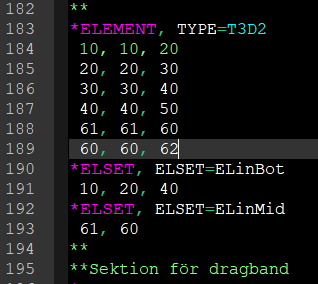
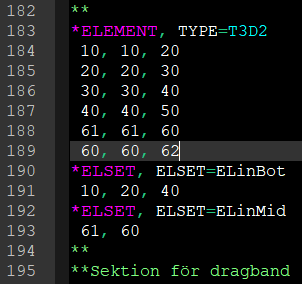
So I have a user defined language for a program called Abaqus, and many times notepad++ messes up the colors of it when I edit the document. In the first picture, line 195 is a comment line, and it starts with two stars ** and has a green color. In the same picture, line 184 has that same green color even though it is not a comment line. Now if I press “Language” in the menu, then choose “Abaqus” (which is the name of my language), I get the correct colors, as seen in the second picture.
I have uploaded the .xml file for the language here, if anyone wants to take a look:
Abaqus.xml (filebin.net) -
Something similar to this has been discussed recently on
https://community.notepad-plus-plus.org/topic/20755/syntax-highlighting-works-for-a-time-then-irreproducibly-bleeds-only-restarting-npp-fixes-it/10
Perhaps you may find some help there.


Hello! It looks like you're interested in this conversation, but you don't have an account yet.
Getting fed up of having to scroll through the same posts each visit? When you register for an account, you'll always come back to exactly where you were before, and choose to be notified of new replies (either via email, or push notification). You'll also be able to save bookmarks and upvote posts to show your appreciation to other community members.
With your input, this post could be even better 💗
Register Login