Function List MariaDB Scrip
-
Hi everyone, I’m lloking for some hel abut this topic, I developed a VBA application using MariaDB database, now I’m updating the database structure because i change some vba code, I’m using notepad++ to write de sql scrip, and Iwould like to have the list functions of my scrip, but the sql function list of notepad++ only showme a part of my function and Sp.
Someome could help me, what I have to do?, I don’t know nothing about regular expression . Thans for your help.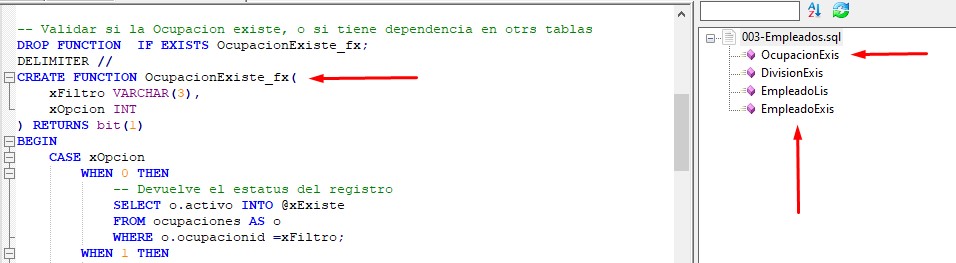
-
I see the same thing.
It looks like the
([\s]*([ia]s))alternative is hitting, and matching on i or a followed by s, which hits at the “is” in each of those function names. I don’t know why an SQL function-name parser would want that.I changed those to be
\w+instead of[ia]s, and at least for my example, it worked.But since I don’t SQL very well, I don’t know if that would break anything.
To implement this:
- Exit Notepad++
- Edit
%AppData%\Notepad++\functionList\sql.xml, and make it look like:
<NotepadPlus> <functionList> <!-- ========================================================= [ PL/SQL ] --> <parser id="plsql_function" displayName="PL/SQL" commentExpr="((/\*.*?\*)/|(//.*?$))"> <function mainExpr="((PROCEDURE)|(FUNCTION))[\s]+[A-Za-z][\w_]*([\s]*\([^\)]*\)[\s]*)?(([\s]*;)|([\s]*(\w+))|([\s]+(RETURN)([\s]+[\w%\.]+)+(([\s]*;)|([\s]+(\w+)))))" displayMode="$className->$functionName" > <functionName> <nameExpr expr="[\s]+[A-Za-z][\w_]*([\s]*\([^\)]*\))?(([\s]*;)|([\s]*(\w+))|([\s]+(RETURN)([\s]+[\w%\.]+)+(([\s]*;)|([\s]+(\w+)))))"/> <nameExpr expr="[A-Za-z][\w_]*([\s]*\([^\)]*\))?(([\s]*;)|([\s]*(\w+))|([\s]+(RETURN)([\s]+[\w%\.]+)+(([\s]*;)|([\s]+(\w+)))))"/> <nameExpr expr="[A-Za-z][\w_]*([\s]*\([^\)]*\))?(([\s]+(RETURN)([\s]+[\w%\.]+)+))*"/> </functionName> </function> </parser> </functionList> </NotepadPlus>- Save and exit
- Load your SQL file in Notepad++
(Personally, I think the expressions they use could use some cleanup; a lot of parens that aren’t doing anything, and made it hard for me to figure out even as much as I did. )
You also might want to look at @MAPJe71’s repo which includes functionList XML files for bunches of languages – if there’s an SQL in that repo, it might work better than yours. https://github.com/MAPJe71/Languages (I am seeing a parameter-completion file, but not any functionList file, unfortunately).
-
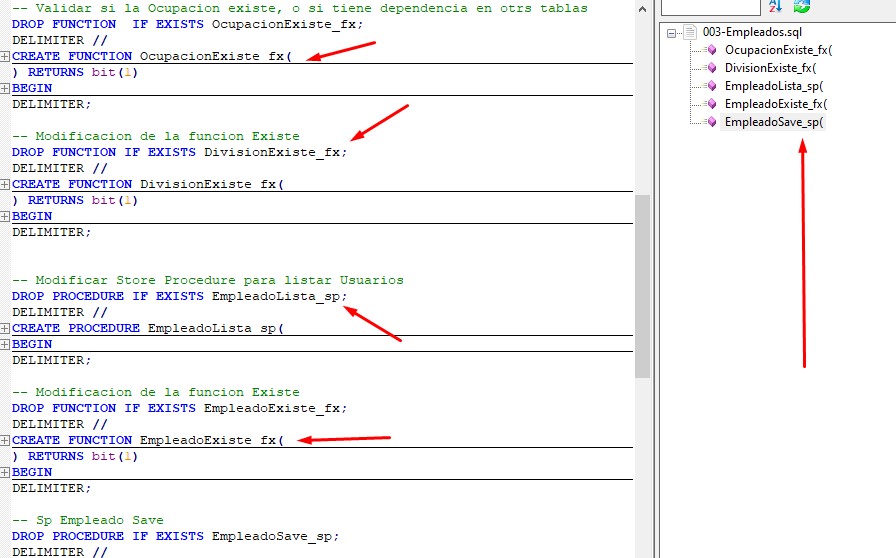
@PeterJones I was changing those code, but I did on C:\programs files, I changed the code using www.regex.com, and the code works, I leave the code and the pict as how I wanted. Thanks so much, and Excuseme by my english skill…,
 ```
```
<functionList>
<!-- ===== [ PL/SQL ] -->
<parser id=“plsql_function” displayName=“PL/SQL” commentExpr=“((/*.?*)/|(//.?$))”>
<function
mainExpr=“((CREATE PROCEDURE)|(CREATE FUNCTION))[\s]+[A-Za-z][\w_][\wfx]([\s]([^)]|([\s]+(RETURNS)))”
displayMode=“$className->$functionName”
>
<functionName>
<nameExpr expr=“[\s]+[A-Za-z][\w_][\wfx]([\s]([^)]|([\s]+(RETURNS)))”/>
</functionName>
</function>
</parser>
</functionList> -
I know you found one that worked for you. But I found another couple places:
- https://community.notepad-plus-plus.org/post/22441 => shows a different take from four years ago
- https://github.com/notepad-plus-plus/notepad-plus-plus/pull/3741 => this is the pull request that made the distributed
functionList\sql.xmlas it is today, I think (the PR source has the[ia]spieces)… but @MAPJe71 had chimed in with an alternative syntax which looks like it has a lot more features (plus comments!)… and when I tried that on my mockup of your example data, it worked for me. And I trust one of @MAPJe71’s solutions to have at least considered edge cases
-
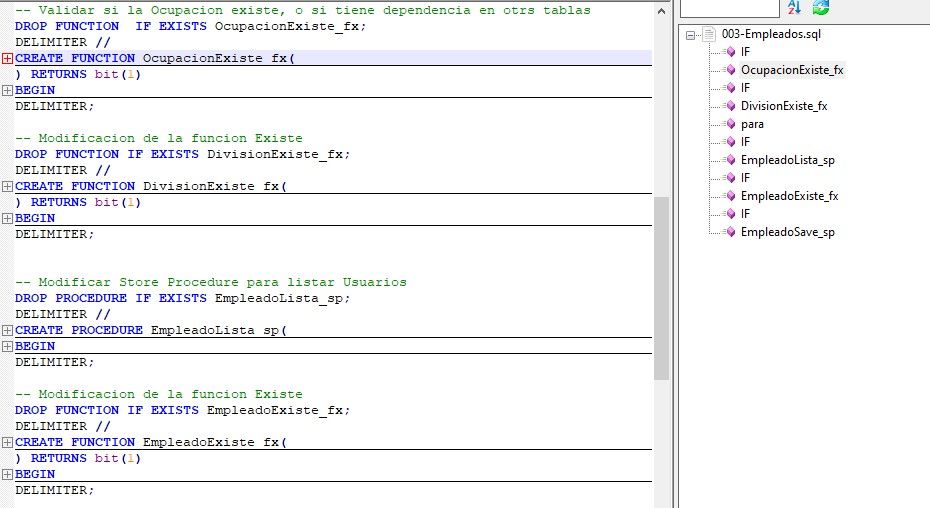
@PeterJones Did you use @MAPJe71 code?, I going to test rigth now, it’s the result, its show the IF sentenses and some code where be in comment.
I going to use the code that I changed, because I need only Functions and Store procedure, and I ever use the _fx() for Functions and _sp for Store Procedure.
sincerely. I’m very greatifull for your help. -
I forget to add how the image looks

Hello! It looks like you're interested in this conversation, but you don't have an account yet.
Getting fed up of having to scroll through the same posts each visit? When you register for an account, you'll always come back to exactly where you were before, and choose to be notified of new replies (either via email, or push notification). You'll also be able to save bookmarks and upvote posts to show your appreciation to other community members.
With your input, this post could be even better 💗
Register Login