add line breaks without breaking word
-
i was wondering if there was a way i could add a line break every x amount of characters without breaking words? something kind of like this:
before
hello! this is just a fake line of text for this example. have a good day!after
hello! this is just a fake line of text for this example. have a good day!kind of like this website.
i wanted to record a macro of it so i wouldn’t have to constantly go to the website mentioned.
thank you!
-
It’s not a macro, because macro won’t change a setting… but if you go to Preferences > Margins/Border/Edge, and change the Vertical Edge Settings to
23(for your example), then hitCtrl+I(aka Edit > Line Operations > Split), it will split the line at the margin. So you can pick the appropriate Vertical Edge column and then use the Split command to do what you want.There are ways to get regular expression search/replace to do something similar, but this is much simpler, IMO.
-
@PeterJones This works great thanks!
-
This post is deleted! -
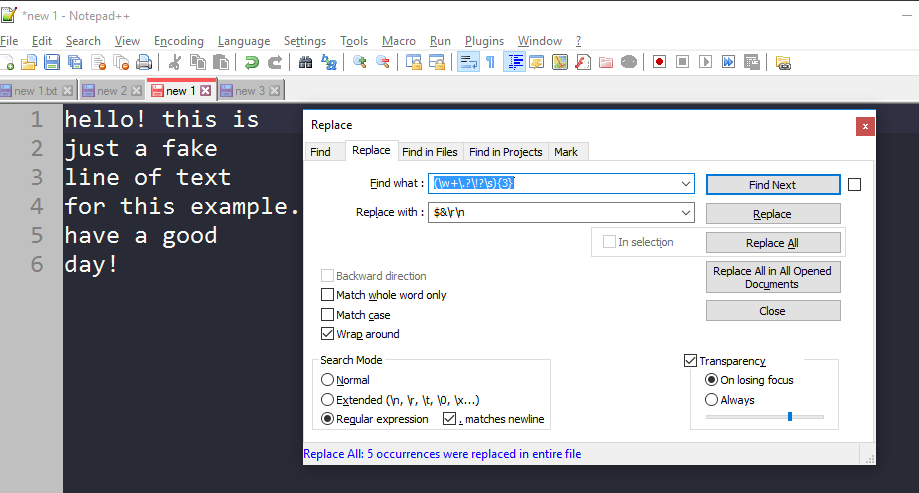
PeterJones mention a good way and here is another way using regex:
search for :(\w+\.?!?\s){2}
replace with : $&\r\n
search mode : regular expression
change 2 to the X amount of characters you want


Hello! It looks like you're interested in this conversation, but you don't have an account yet.
Getting fed up of having to scroll through the same posts each visit? When you register for an account, you'll always come back to exactly where you were before, and choose to be notified of new replies (either via email, or push notification). You'll also be able to save bookmarks and upvote posts to show your appreciation to other community members.
With your input, this post could be even better 💗
Register Login