UDL 2.1: When an Operator is also a Delimeter
-
Hi all,
I’m writing a UDL that supports HTML tags and also uses “<” as an operator. You can see where this is going…
My goal is to highlight HTML tags, so I’ve included “<” and “>” as Delimiters. However, when I use “<” in an operation, it’s interpreted as a delimiter opening so everything following it is highlighted as if it were HTML, until it sees a closing “>”.
Here’s a screenshot of the UDL and how it renders:
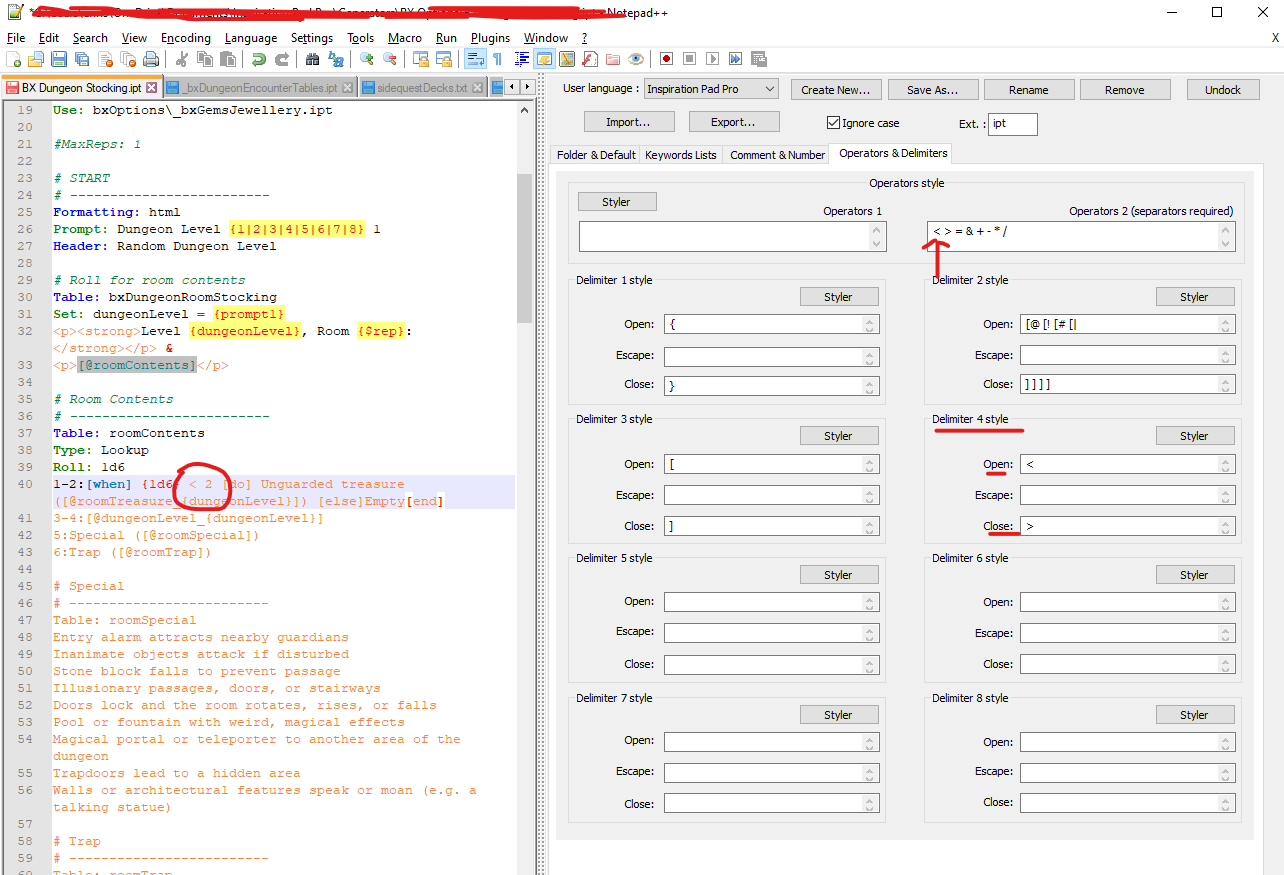
I’ve searched through the forum and couldn’t find a direct resolution, so I’m thinking the solve is a bit more complex than what I can accomplish via the UDL GUI. To that end, could someone please point me in the right direction?
Cheers,
-Erin -
@Erin-D-Smale said in UDL 2.1: When an Operator is also a Delimeter:
I’m thinking the solve is a bit more complex than what I can accomplish via the UDL GUI.
I cannot think of an immediate way around it using the UDL itself.
However, you can add extra highlighting to anything in Notepad++ (whether using a builtin lexer or to a User Defined Language (UDL)) using regexes via the script
EnhanceAnyLexer.pythat @Ekopalypse shares in his github repo.So if you leave
<>as the delimiter4 style in the UDL, you could use the PythonScript solution to search onr'\h[<>]\h'(ie, search for less than or greater than as long as it has a horizontal space character (space or tab) to both the left and right of the operator) and apply a different color to those spaced-out instances of the angle-brackets (and you could make the PythonScript use the same color as your Operators’ Styler). -
@PeterJones - Thanks very much for the tip. I’ll give this a shot over the weekend and post results in case others have the same problem.
Cheers,
-Erin

Hello! It looks like you're interested in this conversation, but you don't have an account yet.
Getting fed up of having to scroll through the same posts each visit? When you register for an account, you'll always come back to exactly where you were before, and choose to be notified of new replies (either via email, or push notification). You'll also be able to save bookmarks and upvote posts to show your appreciation to other community members.
With your input, this post could be even better 💗
Register Login