Window view problem
-
Hello.
At some point, such a sight appeared to me.
I can’t get back to normal.
Every time I run notepad ++, I have this view.
Reinstalling notepad ++ did not help (after uninstalling, I deleted all directories from C: \ User \ … \ AppData \ …)
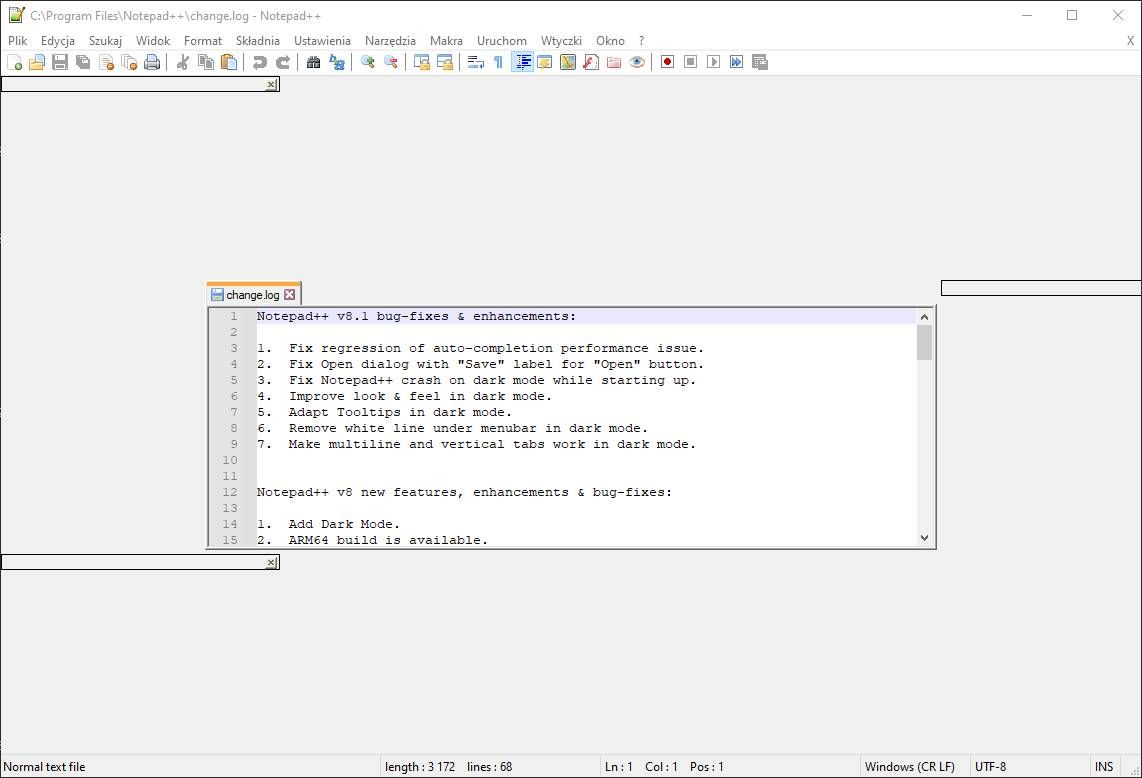
-
Oddly enough, this happens to some, but the reason what causes this has not been found yet. See here for more info.
-
additional information
Notepad++ v8.1   (64-bit)
Build time : Jun 17 2021 - 01:56:07
Path : C:\Program Files\Notepad++\notepad++.exe
Command Line :
Admin mode : OFF
Local Conf mode : OFF
Cloud Config : OFF
OS Name : Windows 10 Pro (64-bit)
OS Version : 2009
OS Build : 19043.1055
Current ANSI codepage : 1250
Plugins : mimeTools.dll NppConverter.dll NppExport.dll
I had the problem about 2 months ago. After 2 days of fighting with reinstalling N ++, we finally managed to fix it (I don’t know how)
Today the problem happened again (Post # 1)
After reinstalling N ++, the problem was still there
After reboot computer, N ++ works fine -
Does the problem happen to start after using a screen-sharing meetings app? For me, I notice this issue occurs every time I use an app called RingCentral to share my screen in a meeting, and clears itself after a reboot.
-
P PeterJones referenced this topic on
-
@madzilla You are completely right, it also seems to happen on my end whenever I am using Ringcentral BlueJeans app, no matter if I screenshare or not. Rebooting does the trick.



Hello! It looks like you're interested in this conversation, but you don't have an account yet.
Getting fed up of having to scroll through the same posts each visit? When you register for an account, you'll always come back to exactly where you were before, and choose to be notified of new replies (either via email, or push notification). You'll also be able to save bookmarks and upvote posts to show your appreciation to other community members.
With your input, this post could be even better 💗
Register Login