Adding to the Context Menu a Plug in .dll?
-
I am new to this but have read that you can add tot he context menu that appears when you right click within notepad Plus.
I have been able to add the About option as a test but now I want to add a “Format Json” option it is not working.
Is this because it is a .dll file rather than a MIME Tools file? If so is this possible or not?
Any help would be appreciated.
This is what I have ,
To add plugin commands, you have to use PluginEntryName and PluginCommandItemName to localize the plugin commands
–>
<Item FolderName=“Plugin commands” PluginEntryName=“MIME Tools” PluginCommandItemName=“Base64 Encode” />
<Item FolderName=“Plugin commands” PluginEntryName=“MIME Tools” PluginCommandItemName=“Base64 Decode” />
<Item FolderName=“Plugin commands” PluginEntryName=“MIME Tools” PluginCommandItemName=“About” />
<Item FolderName=“Plugin commands” PluginEntryName=“NPPJSONViewer.dll” PluginCommandItemName=“Format JSON” /> -
@Mick-Peters
<Item PluginEntryName="JSON Viewer" PluginCommandItemName="Format JSON"/>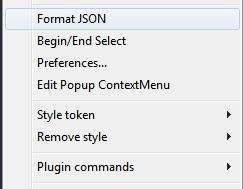


Hello! It looks like you're interested in this conversation, but you don't have an account yet.
Getting fed up of having to scroll through the same posts each visit? When you register for an account, you'll always come back to exactly where you were before, and choose to be notified of new replies (either via email, or push notification). You'll also be able to save bookmarks and upvote posts to show your appreciation to other community members.
With your input, this post could be even better 💗
Register Login