Compare Plugin - creates 8 invisible buttons in toolbar
-
Hi - using 8.1.2 with Compare 2.0.1 - and I seem to have 8 buttons that are hidden between the Macro “save/run” and the “spell check” - they’re there if I hover over but otherwise invisible.
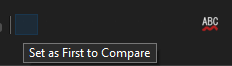
Same in both dark & light mode (under the green arrow in the attached pic)

Any ideas if this is a problem with my setup or a general issue?
-
@ManOfLard said in Compare Plugin - creates 8 invisible buttons in toolbar:
a general issue
Dark Mode icons need to be added by each individual plugin developer (including me and I haven’t got around to it). The alternative is to keep Dark Mode on, but use the “Settings => Preferences => General => Toolbar => Standard icons: small” option instead of a “Fluent” icon choice which Dark Mode defaults to.
Cheers.
-
Perfect. Although the same is true of “not Dark” mode. I surmise that the developer hasn’t added any Fluent icons.


Hello! It looks like you're interested in this conversation, but you don't have an account yet.
Getting fed up of having to scroll through the same posts each visit? When you register for an account, you'll always come back to exactly where you were before, and choose to be notified of new replies (either via email, or push notification). You'll also be able to save bookmarks and upvote posts to show your appreciation to other community members.
With your input, this post could be even better 💗
Register Login