Built in Language to UDL?
-
Hi,
sry if i’m in the wrong place, i’m just an old (PL/SQL etc) coder and its actually my first ever post on this new web thingy. :)>I wish there was a way to select say, the C language, and then export it to a UDL.xml file that I could then easily edit to add the missing keywords. I’m trying to do some GLSL coding , I read the UDL docs and then imported an existing GLSL UDL (which didn’t fold anything but contained some GLSL keywords). Then I made a load of my useless UDL’s, than can fold comments or functions but not both! It was driving me mad but luckily simply selecting “C” does what my UDLs cannot do . l saw a previous post by David Lin on 5 Feb 2021, 18:53 but his requirements seemed way more advanced than mine.
I’m naturally pessimistic but I guess its worth asking, so
Many Thanks for taking the time to read this…
Chris -
No, you cannot convert a built-in language to a UDL.
If you want to automatically use c-style syntax highlighting and folding for your GLSL files, you can.
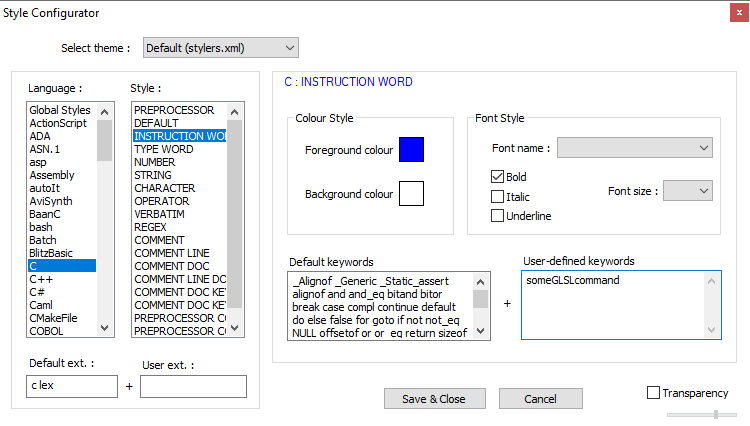
- In the Settings > Style Configurator , select the
Clanguage. - In
User ext.:box, type the name of the extension without the dot (glslor whatever) - In the
INSTRUCTION WORDand/orTYPE WORDstyles, use theUser-defined keywordsto add user-defined keywords (ie, your GLSL-specific words)
- In the Settings > Style Configurator , select the
-
Wow,
many thanks @PeterJones that was so quick and your solution is perfect. I’ve done what you suggested and its working perfectly now.FYI The only minor problem remaining is that “#define #include #ifdef #ifndef #elif #endif #pragma” aren’t highlighted as Instruction words and similarly "SV_DispatchThreadID iChannelTime[0] iChannelTime[1] iChannelTime[2] iChannelTime[3] iChannelResolution[0] iChannelResolution[1] iChannelResolution[2] iChannelResolution[3] " aren’t highlighted as Type words.
But I don’t care as this is me 99.9% happy (at least until until I want to try and learn C).
Thanks again for keeping this great free product alive,
Chris -
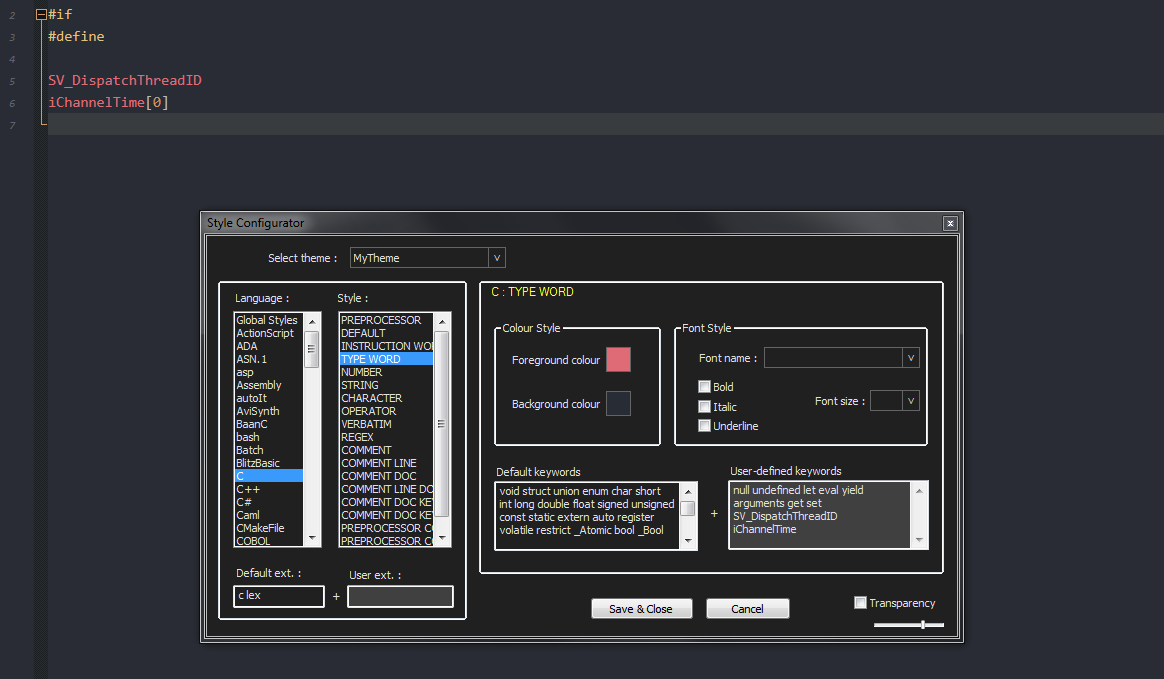
#define … are handled by the preprocessor list and SV_DispatchThreadID … do get colored once I add it to the type word list



Hello! It looks like you're interested in this conversation, but you don't have an account yet.
Getting fed up of having to scroll through the same posts each visit? When you register for an account, you'll always come back to exactly where you were before, and choose to be notified of new replies (either via email, or push notification). You'll also be able to save bookmarks and upvote posts to show your appreciation to other community members.
With your input, this post could be even better 💗
Register Login