New bug with "Execute this script when Notepad++ starts"?
-
That is a great answer! Thank you. And it does match my observations, with the updated Test 2 below. I just can’t figure out how I haven’t noticed it before.
I’ll try your suggestion and report back if my PythonScript might be useful for someone.
Here’s the real Test 2, with an additional Test 3:
Test 2:
1 - Open an existing file after NPP is already open. It doesn’t work in that tab.Test 3:
1 - Double-click on an existing, so that it opens in NPP. It does work in that tab. -
Excuse my ignorance, but I’m uncertain about the functionality provided by SCI_SETTABINDENTS. From its docs:
Inside indentation white space, the tab and backspace keys can be made to indent and unindent rather than insert a tab character or delete a character with the SCI_SETTABINDENTS and SCI_SETBACKSPACEUNINDENTS functions.If your caret is in the “indention whitespace” – presume this means between the start of line and the first non-whitespace character – the tab key will “indent”…but what does that (indention) even mean if it isn’t inserting something, be it a tab character or a certain amount of spaces…?
-
I’m not sure if you’re asking me or one of the other two that commented on this question?
If it’s me, this post is actually a follow-on from my post last year called “Make tab key just insert 4 spaces, not insert 4 spaces AND move to the first char on the line”. It explains the behavior I was after, and a solution that seemed to work.
Now I realize that I didn’t really test all combinations, so my post yesterday was not a “New bug”, but rather me seeing the “container specific” scenarios for the first time.
It’s not all wasted, though, as the PythonScript addition sounds like something I need anyway to get my original question working all the time.
-
@VTGroupGitHub said in New bug with "Execute this script when Notepad++ starts"?:
I’m not sure if you’re asking me or one of the other two that commented on this question?
I was asking you since you seem to be best equipped to answer, but really, anyone could have responded with info.
this post is actually a follow-on from my post last year called “Make tab key just insert 4 spaces, not insert 4 spaces AND move to the first char on the line”. It explains the behavior I was after, and a solution that seemed to work.
That thread is HERE.
-
Here’s a PythonScript that should do what you’re looking for:
# -*- coding: utf-8 -*- from Npp import * class T21693(object): def __init__(self): notepad.callback(self.bufferactivated_notify, [NOTIFICATION.BUFFERACTIVATED]) def bufferactivated_notify(self, args): editor.setTabIndents(False) if __name__ == '__main__': T21693() -
@VTGroupGitHub said in New bug with "Execute this script when Notepad++ starts"?:
It explains the behavior I was after, and a solution that seemed to work.
Ok, so I read the other thread and I “get it” now. :-)
Without the background info, I found it confusing.
Nice to have all of the info now.So I experimented with this command on the Indent submenu of the Edit main menu (by assigning it a dummy keycombo, Ctrl+e):
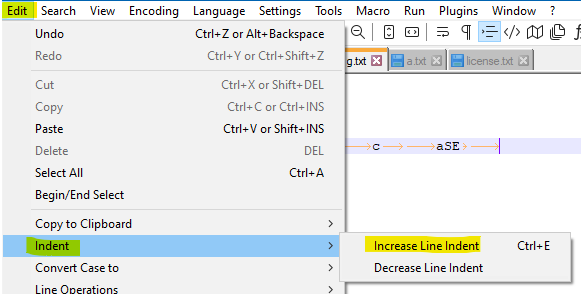
This also seems to do what you want?
OK, not 100% on that because I’m not you. :-)
But you might want to experiment with it.If it worked out, you could forget using a script, and just reassign the Tab and Shift+Tab commands, over to those shown in the screenshot.
-
The Increase Line Indent feature works kind of different. The caret is not moved at all when indentation is increased. It stays at the current/previous position. So the script solution to modify SCI_SETTABINDENTS is needed.
Taking the example from the other thread:
- Have text in one line: column 0 starting with 8 spaces, at column 9 following some text.
- Caret is at column 0.
- Increase Line Indent.
- Indentation is increased (test starts at 13), but caret stays at column 0.
And other way round
- Have text in one line: column 0 starting with 8 spaces, at column 9 following some text.
- Caret is at column 11.
- Increase Line Indent.
- Indentation is increased (test starts at 13), but caret “stays” at column 15.
-
Thank you again to everyone for the input. It’s now working the way I want in all cases. In case anyone else is looking for the behavior, the solution requires:
- The original script that’s configured to execute when NPP starts in “NppExec Advanced Options”:
NPP_CONSOLE 0 SCI_SENDMSG SCI_SETTABINDENTS 0- Alan’s PythonScript above that I added to startup.py. (Thanks Alan!)
from Npp import * class FixTabOnStartup(object): def __init__(self): notepad.callback(self.bufferactivated_notify, [NOTIFICATION.BUFFERACTIVATED]) def bufferactivated_notify(self, args): editor.setTabIndents(False) if __name__ == '__main__': FixTabOnStartup()- Changing “Initialisation” to “ATSTARTUP” in the “Python Script Configuration” dialog.
After typing all of this, though, it’s possible the first bullet is no longer needed with the new PythonScript ? I’ll have to validate later.
-
@VTGroupGitHub said in New bug with "Execute this script when Notepad++ starts"?:
the first bullet is no longer needed with the new PythonScript
I agree.
-
BTW, the script may not work for the file active when N++ starts up. A workaround would be to add this line at the end of the
__init__function:self.bufferactivated_notify(None)



Hello! It looks like you're interested in this conversation, but you don't have an account yet.
Getting fed up of having to scroll through the same posts each visit? When you register for an account, you'll always come back to exactly where you were before, and choose to be notified of new replies (either via email, or push notification). You'll also be able to save bookmarks and upvote posts to show your appreciation to other community members.
With your input, this post could be even better 💗
Register Login