Cannot add style token to selected text anymore
-
Since my last upgrade I cannot “highlight” selected text anymore.
If I double click on a word and then apply a style token, it works; but if I select a text by clicking & dragging the mouse, applying a style token doesn’t seem to have any effect.
Any idea how to solve this (other than downgrading to previous versions) ? -
There was an added setting in v8.0 and newer which slightly changed the default behavior of the style token highlighting:
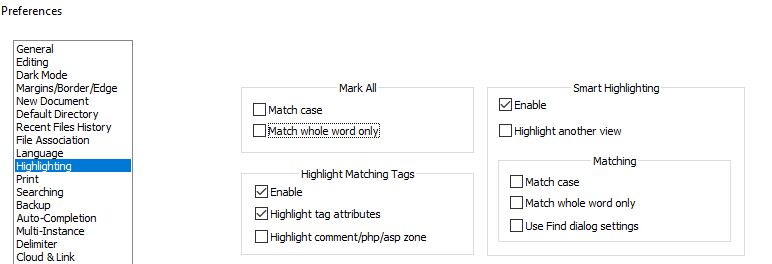
If you uncheck the Mark All =>
☐ Match whole word only(as shown in the screenshot), then the style-token highlighting will work even if you select only part of a word, or if your selection goes across a word boundary (like punctuation or spaces)previous answers on similar questions:
- https://community.notepad-plus-plus.org/post/68148
- https://community.notepad-plus-plus.org/post/67883
official documentation:
-
Thank you! That solved the problem.
Thanks also for the links, very useful! -
This post is deleted!


Hello! It looks like you're interested in this conversation, but you don't have an account yet.
Getting fed up of having to scroll through the same posts each visit? When you register for an account, you'll always come back to exactly where you were before, and choose to be notified of new replies (either via email, or push notification). You'll also be able to save bookmarks and upvote posts to show your appreciation to other community members.
With your input, this post could be even better 💗
Register Login