Window close button (X) does not register mouse pointer consistently when window is maximized on second monitor
-
Hello,
I’ve been troubled by what looks like a bug for years and hope you can help me.
I am on Windows 10, currently using Notepad++ 8.1.4. I have two monitors. The editor is maximized at all times (entire screen).
On the primary monitor, which is located logically to the right, the close button of the window bar (“X”) works as expected. Every pixel of it is registered by the editor and leads to closing the window.
On the secondary monitor, which is located logically to the left, this is not the case. When moving the mouse along the outer edge of the X button, it sporadically does not register. This effect changes anytime the mouse is moved, not when it is static. When clicking the button when not registered by the editor, the button indeed does not close the editor. Instead, it transparently goes through to the unrelated window of another program behind it, and (naturally) closing that window. As you can certainly imagine, this had some bad consequences for me.
This effect applies to the minimize/maximize buttons of the window bar, too. I’ve screen recorded the problem to illustrate below. Please note that I am pushing the mouse up during all movement, and the mouse pointer never leaves the topmost edge of the screen.
There is no difference in behavior between maximizing the window manually (using the maximize button of the window bar) or dragging the window to the top of the monitor and letting it snap. I’ve compared this with a range of other programs (e.g. Explorer and cmd.exe). None of them showed this behavior.
In any case, this has been going on for several years. I’m not sure how to report this as a bug, if my system is fubar, or what can be done to mitigate. I’d be grateful for any help or assistance.
-
@nerai said in Window close button (X) does not register mouse pointer consistently when window is maximized on second monitor:
I’m not sure how to report this as a bug
You don’t have to.
It has been reported many times already. -
Thank you @Alan-Kilborn
I googled earlier, but only now have found this issue in the tracker (for reference: https://github.com/notepad-plus-plus/notepad-plus-plus/issues/8660 )
Using this, I was able to fix the issue by setting “DPI awareness” to “Application”. This also fixed blurry font issues that I so far had ignored.
-
@nerai said in Window close button (X) does not register mouse pointer consistently when window is maximized on second monitor:
I was able to fix the issue by setting “DPI awareness” to “Application”
What does this mean?
Maybe if you elaborate about it, it could help other users. -
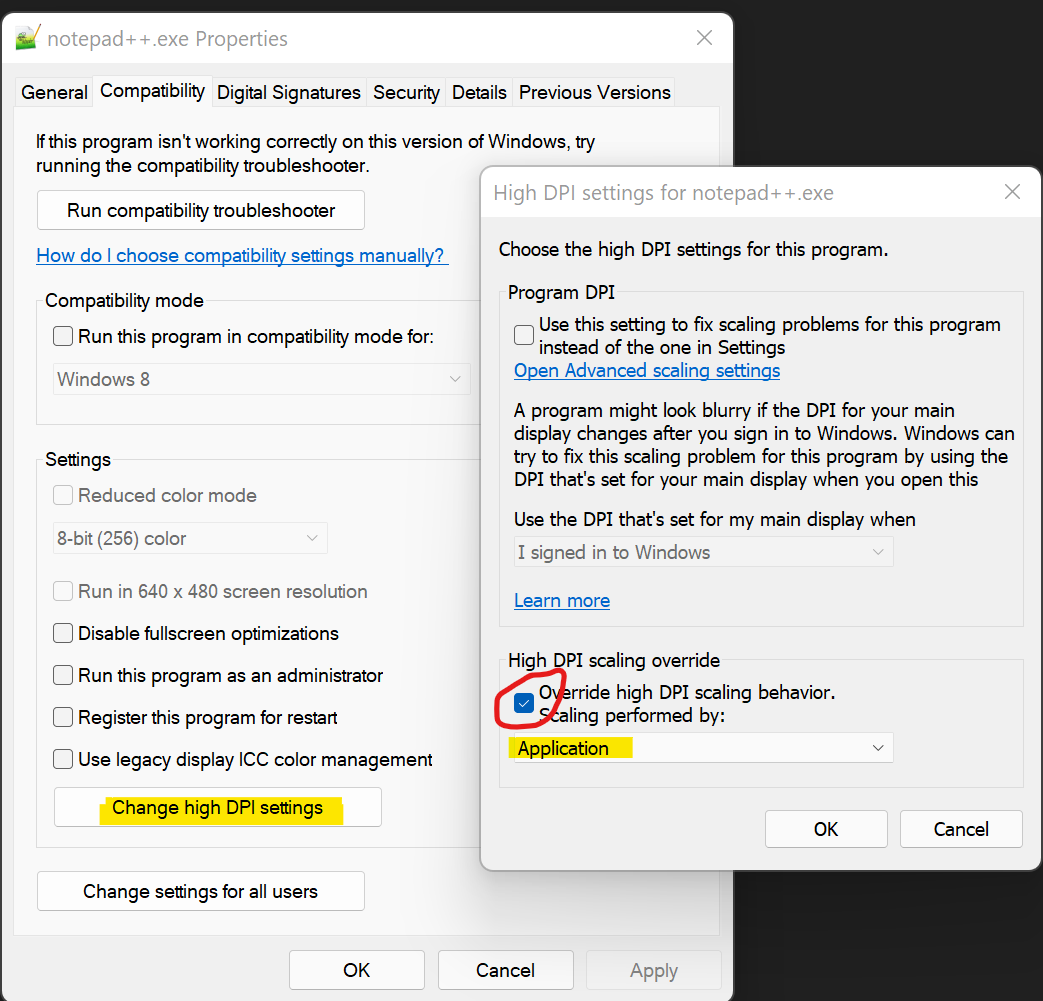
Basically you need to modify the startup behavior of Notepad++ via Windows Compatibility tab.
You can get here many ways, I’m just using task manager since I had notepad++ open.- Start notepad++
- CTRL+ALT+DEL - open task manager.
- find notepad++ and right click on it and select --> Properties.
- Click the Compatibility tab
- Click Change High DPI Settings
- Check “override high DPI scaling behavior” and set it to Application



Hello! It looks like you're interested in this conversation, but you don't have an account yet.
Getting fed up of having to scroll through the same posts each visit? When you register for an account, you'll always come back to exactly where you were before, and choose to be notified of new replies (either via email, or push notification). You'll also be able to save bookmarks and upvote posts to show your appreciation to other community members.
With your input, this post could be even better 💗
Register Login