Adding parentheses around xml tags.
-
Greetings.
I have a need to add wrapping parentheses around"xref"tagging in my xml based technical manuals.
It’s a little complicated because some of the xrefs already have the parens, and some don’t need them.
However, I think the xref tags that need the parens are all preceded by a blank space.
Here are some examples.
This is a case where the parens are not needed:<ref-setup-item><xref wpid="M50026"/></ref-setup-item>Here is a case where the parens already exist:
<para>Inspect cable identification band (<xref
figid="T5A088-M8T01-036fig1"/>, Item 2).</para>
Here is an example of where they need to be added:
<item>Replace or repair connector <xref wpid="M50026"/></item>As you can see in these examples, the only one with a leading blank space is the case where I need to add parentheses.
Here is what the desired coding structure should look like:
<item>Replace or repair connector (<xref wpid="M50026"/>)</item>So, the search would be for xrefs with a leading space. The open paren would go after the space and the closing paren would go after the xref tag closure
/>.Looking for a regex to handle this across many files.
Thanks. -
Thank you for the before and after data, and giving examples of lines that shouldn’t change and lines that should. That makes it easier.
Given the data
not needed:
<ref-setup-item><xref wpid="M50026"/></ref-setup-item>

not needed:
<para>Inspect cable identification band (<xref
figid="T5A088-M8T01-036fig1"/>, Item 2).</para>

needed:
<item>Replace or repair connector <xref wpid="M50026"/></item>

peter guesses it's needed:
<item>Replace or repair connector <xref
wpid="M50026"/></item>
FIND =
(?s)\x20(<xref.*?/>)
REPLACE =\x20\($1\)
MODE = regular expressiongives:
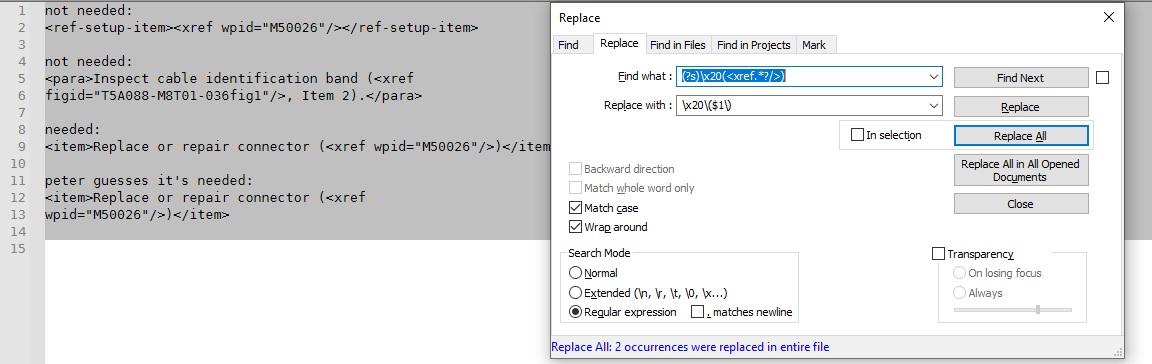
not needed:
<ref-setup-item><xref wpid="M50026"/></ref-setup-item>

not needed:
<para>Inspect cable identification band (<xref
figid="T5A088-M8T01-036fig1"/>, Item 2).</para>

needed:
<item>Replace or repair connector (<xref wpid="M50026"/>)</item>

peter guesses it's needed:
<item>Replace or repair connector (<xref
wpid="M50026"/>)</item>
I added a fourth condition with a newline in the needs-parentheses-xref, because based on your multiline doesnt-need, I thought you might also have multiline does-need. If not, change the
(?s)to(?-s), and it will no longer match multiline xref.Also, in both the FIND and REPLACE I used
\x20– that’s regex-speak for character-at-hex-value 20, which is the space character at ASCII 32. I used that rather than a literal space in the search and replace to make it easier to see in the forum; in the regex, you can use either a literal space or the\x20in either of those locations.The parentheses in the FIND are used for creating a group, so they do not mean literal parentheses in the search. The parentheses in the REPLACE would also have special meaning, except I “escaped” them by using
\(and\) -
@PeterJones
Peter, that was a good guess! Yes, I’d say it’s possible the tagging could cross lines.
I’ll give this a go and see how it works out.
Appreciate it! -
@Richard-Howard
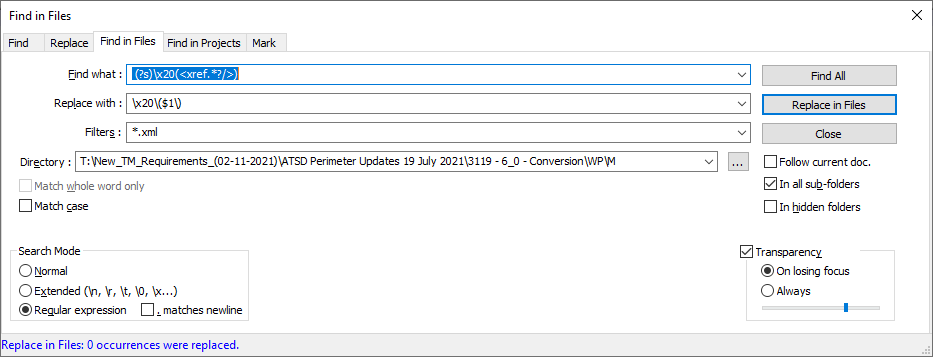
Humm. It didn’t find any matches.
Here is a code example it did not find:<para>Install LSB cover assembly <xref wpid="M40032"/>.</para>I’m using Find in Files
-
@Richard-Howard said in Adding parentheses around xml tags.:
<para>Install LSB cover assembly <xref wpid=“M40032”/>.</para>
It matches that text for me in a single file
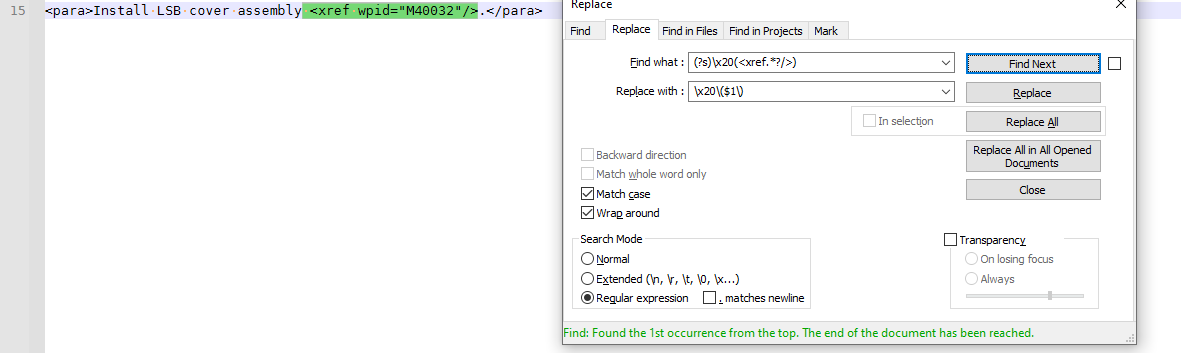
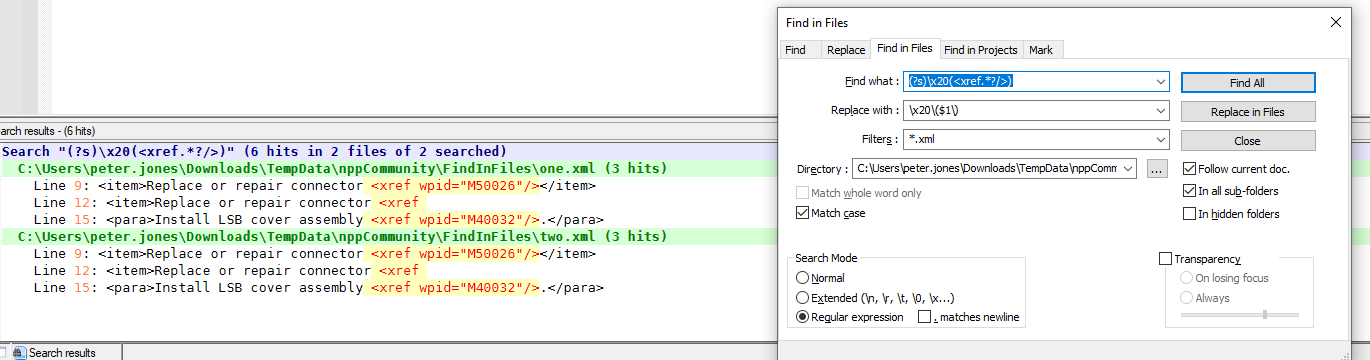
I made two files, each containing:
not needed:
<ref-setup-item><xref wpid="M50026"/></ref-setup-item>

not needed:
<para>Inspect cable identification band (<xref
figid="T5A088-M8T01-036fig1"/>, Item 2).</para>

needed:
<item>Replace or repair connector <xref wpid="M50026"/></item>

peter guesses it's needed:
<item>Replace or repair connector <xref
wpid="M50026"/></item>

<para>Install LSB cover assembly <xref wpid="M40032"/>.</para>
Then I ran Find in Files > Find All, and it worked as expected, finding 3 instances in each that matched:
-
@PeterJones
So odd. I can’t see what I’m doing different/wrong?
I tried a single file containing search criteria:para>Install LSB cover assembly <xref wpid="M40032"/>.</para>Still not finding it?
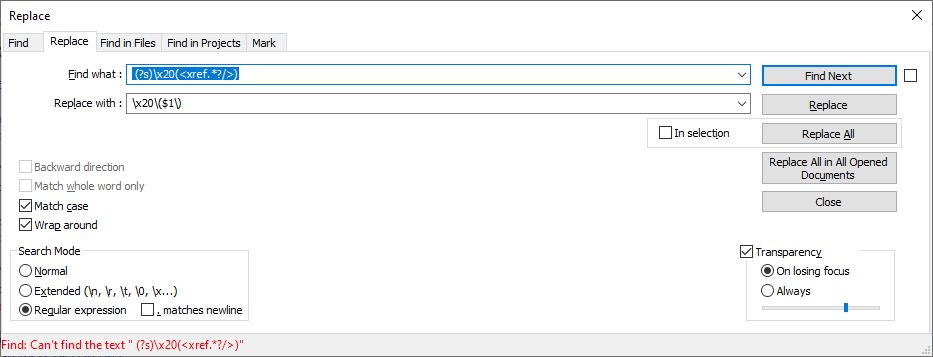
Ideas? -
@Richard-Howard
I think I got it Peter.
I must have had a space in the front of the Find criteria.
It’s finding it now.
Thank you!! -
@Richard-Howard
Just as a follow-up, this appears to have solved my need, saving me hours of edit time.
Thank you!!


Hello! It looks like you're interested in this conversation, but you don't have an account yet.
Getting fed up of having to scroll through the same posts each visit? When you register for an account, you'll always come back to exactly where you were before, and choose to be notified of new replies (either via email, or push notification). You'll also be able to save bookmarks and upvote posts to show your appreciation to other community members.
With your input, this post could be even better 💗
Register Login