2 txt files are different in notepad , but similar in notepad++
-
Hi
I got 2 txt files that some process in our system is building.
they consist of a list of directories.when I inspect them in notepad 1 file (A) has the directory as a string with no spaces, while the other one (B) has a “space” after each character (which is the proper way we want)
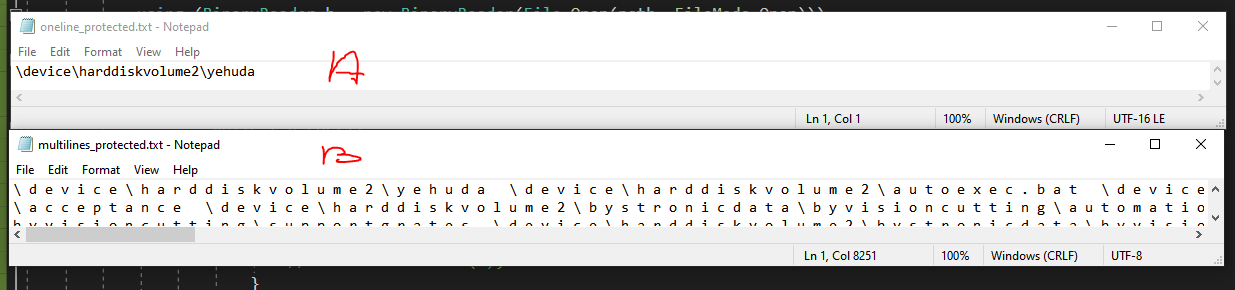
however, when opening both files in notepadd++ - none of them is showing the spaces

in show symbols, the “show all characters” is turned on
when i inspect both of the files as hexa they are the same (well at least the prefix which is the same directory)any ideas why notepad++ not showing the spaces?
-
Notice you put “space” in quotes. I am betting that is because it’s not really a space, it’s really the 0 byte of the two-byte UTF-16 LE encoding that Windows uses for Unicode files. Please even note that your “oneline” file in Windows Notepad shows that it’s “UTF-16 LE” (lower right corner) – That file will have the 0-bytes between the characters in the raw form (you don’t show the hexa output; you really should have).
Notepad++ then properly sees that the files are encoded as UTF-16 LE, and interprets each two-byte sequence as a single character, because that’s what it is. It is doing the right thing by not showing 0bytes (which you called “spaces” but are actually NUL bytes when interpreted as a single-byte character). If you were to look at the lower-right of Notepad++, you would see that it shows UTF-16 LE BOM or similar, as it should:

The only bug in the above examples is that MS Notepad is interpreting the “multiline_protected.txt” as UTF-8 instead of the correct UTF-16 LE, and wrongly showing you the 0-bytes as separate characters instead of as part of the character like in “oneline_protected.txt”.
--
edit: removed all the incorrect mentions of UCS2-LE (I misrembered which was which when first writing the post). -
I think some studying and understanding of Unicode encoding concepts is in order before you go too much farther along in your current task.
-
@PeterJones thx for the detailed answer!
one thing that still confuses me - why doest MS notepad doesn’t interpret the “online” txt as UTF-8 ? why it only see this file as utf-16 , but not other files ? -
why doest MS notepad…
That would technically be a question for a MS forum. But I will give you my insight, anyway
why doest MS notepad doesn’t interpret the “online” txt as UTF-8 ?
You’ve actually got the question backwords: the oneline text file is the one that MS properly interpreted as UTF-16, because that’s what it is. The multiline text file is the one that should be read as UTF-16, but for some reason MS reads it as UTF-8 instead, so shows all the null characters as blanks between characters.
why it only see this file as utf-16 , but not other files ?
I am not an expert on Microsoft’s decision making algorithm.
My guess is that on the file where MS reads the UTF-16 file as UTF-8 that there is at least one character that isn’t properly encoded as 2-byte UTF-16 (so maybe it has an odd number of bytes in the file, which is technically impossible in a UTF-16 encoded text file, or some garbage character(s) that aren’t recognized are in there).
-
@PeterJones said in 2 txt files are different in notepad , but similar in notepad++:
(s) that aren’t recognized are in the
thanks a lot, dude. this really was helpful and insightful !



Hello! It looks like you're interested in this conversation, but you don't have an account yet.
Getting fed up of having to scroll through the same posts each visit? When you register for an account, you'll always come back to exactly where you were before, and choose to be notified of new replies (either via email, or push notification). You'll also be able to save bookmarks and upvote posts to show your appreciation to other community members.
With your input, this post could be even better 💗
Register Login