Direction In Find
-
So I want to use the direction function, as in up and down in the find section. I would like to either know what version of notepad++ still has it, or how I can do it on the latest.
-
Presume you are running into lack of ability to search backwards when the Search mode is set to Regular expression ?
If so, see the fine user manual HERE and look for (or search for) this text:
Backward regex searching is foribidden by default -
@alan-kilborn No I am on extended.
-
Ah, okay, it’s a bit like pulling teeth, but I’m rereading your original question in a non-regex mode context…
Maybe you are referring to “very old” Notepad++ software, where there were Up and Down radio buttons?:
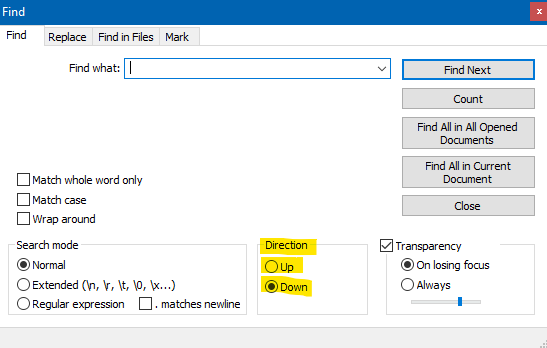
If so, then I’ll point out that newer software consolidates this functionality into one control:
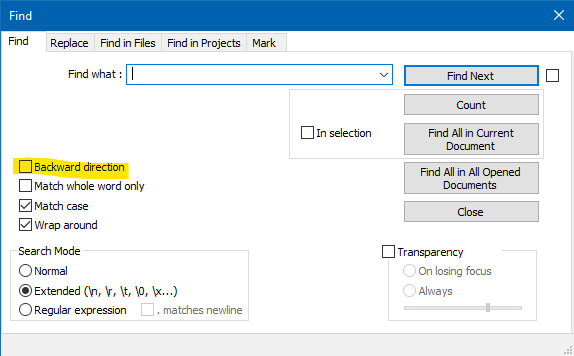
However, most people don’t use that, I’d say, because you can easily turn on “two button” find mode with the checkbox to the right of Find Next:

and achieve this:
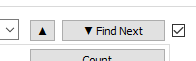
where you have backward and forward directional searching with a single button press.
Also note that the Enter and Shift+Enter keys when the Find window has input focus will also serve to find the next and previous matches.
Hopefully this covers everything you need about this feature?
-
@Alan-Kilborn Thank you very much this helped a lot.


Hello! It looks like you're interested in this conversation, but you don't have an account yet.
Getting fed up of having to scroll through the same posts each visit? When you register for an account, you'll always come back to exactly where you were before, and choose to be notified of new replies (either via email, or push notification). You'll also be able to save bookmarks and upvote posts to show your appreciation to other community members.
With your input, this post could be even better 💗
Register Login