How to delete this on notepad?
-
g.e.n.t.l.e.k.s.dd@gmail.com:444
t.wo…1122334.455.6.6@gmail.com:333
thrifty.wife@yahoo.com:222
cut.3fac.3@yahoo.com:111I want to delete every line containing more then 3 dats on email, how to do it?
So this 2 are good
thrifty.wife@yahoo.com:222
cut.3fac.3@yahoo.com:111 -
Seems like this would match the lines you don’t want. If you can match them you can delete them by replacing with nothing.
(?-s)^.*?(\..*?){3}@.*\RUse regular expression search mode.
-
Actually, you said:
delete every line containing more then 3 dats
But I gave a solution (above) for “3 or more” dots.
Here’s the semi-obvious slight adjustment to do “more than 3”:
(?-s)^.*?(\..*?){4}@.*\R -
Alan’s second answer should give the results you requested.
But remember, “be careful what you ask for”: Specifically in this case, be wary of trying to differentiate between spam email and valid email addresses based on number of dots.
first.mi.last.modifier@gmail.comis valid; there are a lot of “peter jones”-es on gmail, and many of us use middle initials and/or some other modifier after the last name, breaking your “delete if more than three dots” rulefirst.mi.last@alumni.collegename.eduis valid: many colleges give alumni addresses on a subdomain
Anyone who is trying to solve spam by using regex will fail – both by not keeping out enough and by rejecting valid addresses. So if that’s what you’re doing, you might want to go a different direction.,
-—
edit: my examples weren’t right, because re-reading the original post, it looks like you only want to match usernames (before the @ sign) that have more than 3 dots… which is different than I interpreted it (more than three dots anywhere in the email address, before or after the @). I am still leaving the post without deleting it because of conversational context, and because the general warning of my post – don’t expect regex to be able to filter out ‘fake’ email addresses – is still valid. -
@peterjones
I tried this what u gave me, one mail was deleted but for an example this still surviveb.eth.2012.bs.@gmail.com:111
Here we got 4 dats in email and he’s not deleted.
-
First, @Alan-Kilborn was the one who gave you the expression, not I. He deserves credit.
And I say credit, not blame, because his expression works on the address you just shared.
g.e.n.t.l.e.k.s.dd@gmail.com:444
t.wo…1122334.455.6.6@gmail.com:333
thrifty.wife@yahoo.com:222
cut.3fac.3@yahoo.com:111
b.et.2012.bs.@gmail.com:111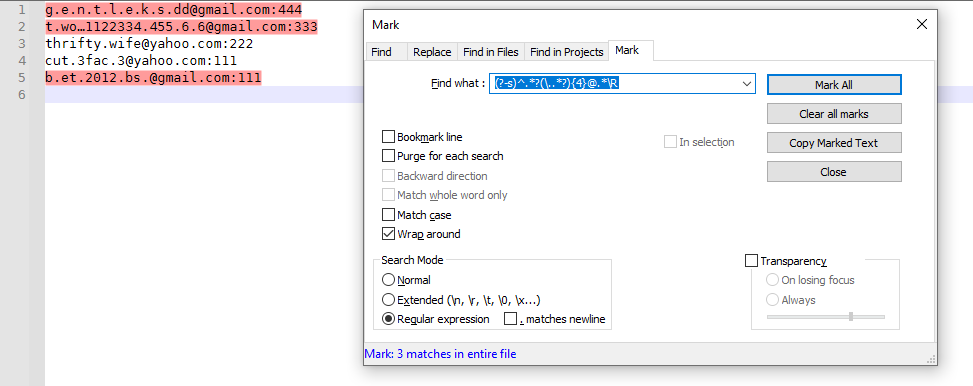
If your expression is not matching that last address, then you have not correctly used Alan’s expression.
-
@alan-kilborn
Thank u Alan for help and your time :)



Hello! It looks like you're interested in this conversation, but you don't have an account yet.
Getting fed up of having to scroll through the same posts each visit? When you register for an account, you'll always come back to exactly where you were before, and choose to be notified of new replies (either via email, or push notification). You'll also be able to save bookmarks and upvote posts to show your appreciation to other community members.
With your input, this post could be even better 💗
Register Login